
Key Takeaways
- An internal link connects one page of your website to another, helping both visitors and Google understand your site structure. It guides users smoothly and makes it easier for search engines to crawl and rank your pages.
- Effective internal link building distributes authority across your site. By pointing more links toward cornerstone or pillar pages, you show Google which content is most valuable and boost its chances of ranking higher.
- Smart use of internal links, through contextual links, anchor text, taxonomies, and links to new or popular posts, creates topic clusters, strengthens navigation, and ensures no important page gets overlooked.
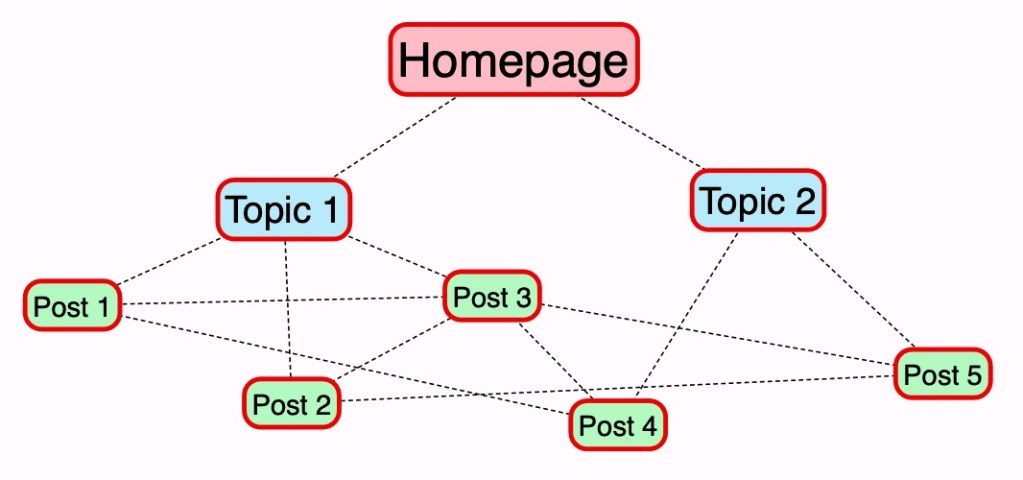
Internal links. Source: http://www.williskhan.com
Internal linking is one of the most overlooked SEO tactics, but also one of the most powerful. Let ROI Digitally help you create a scalable SEO strategy that connects your content, improves crawlability, and drives conversions. Schedule a consultation with our professionals today!
What Is An Internal Link?
An internal link is a hyperlink that connects one page of your website to another page within the same domain. It’s one of the simplest but most powerful tools in SEO, because it helps both people and search engines move through your site with ease.
For users, internal links improve experience by helping them discover valuable content without friction. For Google, internal link SEO signals which pages matter most and how different topics on your site are connected. For example, if several blog posts link to your main service page, Google interprets that page as authoritative.
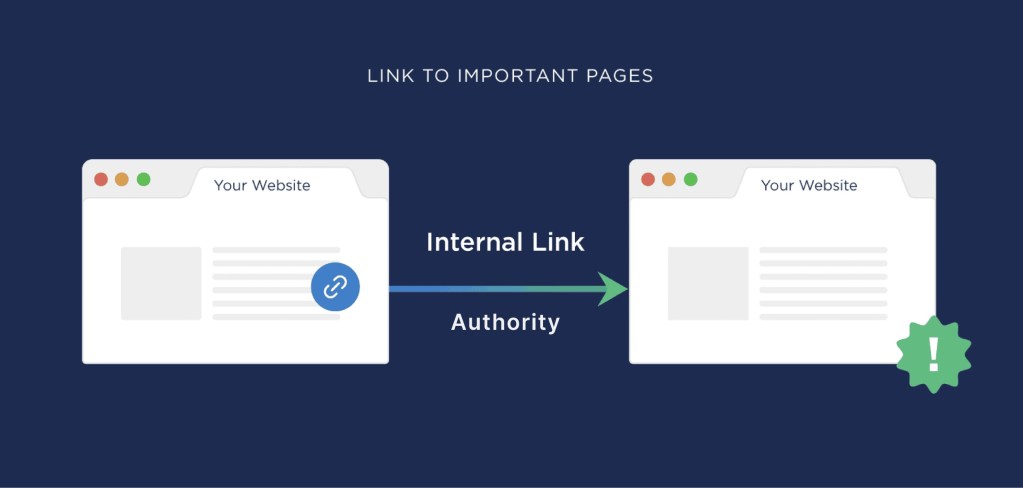
How internal links work. Source: Backlinko
So, when you ask what is an internal link, think of it as a roadmap: it directs users to what they’re looking for, while also showing Google how to crawl, index, and rank your website effectively.
Types of Internal Link SEO
Not all internal links work the same way. Each has its own role in improving both user experience and internal link SEO. Here are the most common types:
- Navigational Links – Found in menus, headers, and sidebars, these guide visitors to your most important pages, like services, blogs, or contact.
- Contextual Links – Placed inside the body of your content, they connect related topics, helping users dig deeper and signaling content relevance to search engines.
- Image Links – Clickable images that act as hyperlinks, often used in banners or product thumbnails to draw attention and drive clicks.
- Footer Links – Positioned at the bottom of a site, they give quick access to essential pages such as policies, FAQs, or contact info.
- Sidebar Links – Handy for blogs or eCommerce sites, these highlight related posts, categories, or products in a way that keeps users engaged.
- Breadcrumb Links – Show the path of a page within your site’s hierarchy (e.g., Home > Blog > SEO > Internal Links), making navigation clearer for both users and Google.
- In-Content CTA Links – Strategically placed links within text to drive action, such as “Read more,” “Sign up,” or “Buy now.”
Each type of internal link works together to build a strong site structure, improve navigation, and boost SEO by showing Google which pages matter most.
Learn more: SEO Audit: What It Is and How To Do It
Internal Link vs External Link
Both internal links and external links are essential for SEO, but they serve different purposes. Understanding the difference helps you create a smarter linking strategy.
- Internal Links – These are links that connect one page of your website to another page on the same domain. They guide visitors through your content, improve navigation, and distribute link authority across your site. For internal link SEO, they’re vital because they tell search engines which pages matter most, helping your site rank better.
- External Links – These point from your website to another domain. They’re often used to cite sources, reference data, or give readers extra context. Linking out to trusted sites builds credibility, while earning external backlinks to your site boosts domain authority and search visibility.
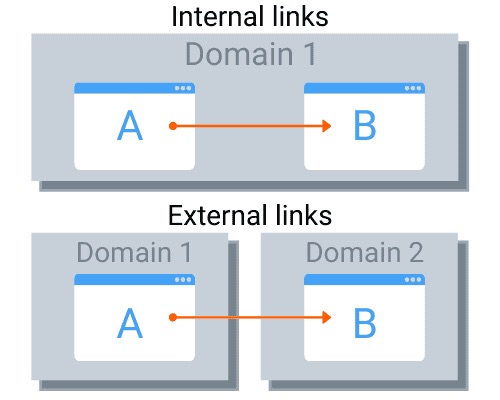
Internal links vs External links. Source: Webtretho
The Role of Internal Links In SEO
When we talk about internal link SEO, we’re really talking about one of the most powerful, yet often overlooked, ways to improve rankings and user experience.
An internal link is simply a hyperlink that connects one page of your site to another. While this may seem basic, the way you structure and use these links directly impacts how Google and users engage with your website.
1. Helping Google Discover and Understand Your Pages
Google’s crawler, Googlebot, moves through your website by following internal links. This is how it discovers new pages and understands how your content is connected.
Without strong internal linking, some pages can become “orphaned,” meaning Google can’t easily find or index them. That hurts visibility.
By creating clear pathways with internal links, you’re telling Google: “This page matters, here’s where it belongs, and here’s how it relates to the rest of my site.”
2. Passing Link Authority Across Pages
Not all pages on your site carry the same SEO weight. Your homepage often attracts the most external backlinks, giving it the highest “link value.”
Through internal links, you can distribute that authority to other important pages,like cornerstone articles, service pages, or new blog posts. The more internal links pointing to a page, the more important it looks in Google’s eyes, increasing its chances of ranking higher.
Learn more: 5 Latest Methods That Help Improving Domain Authority
3. Improving User Navigation and Engagement
Good SEO is also about user experience. Internal links guide visitors to relevant content, keeping them engaged and reducing bounce rates.
For example, linking a blog post about “keyword research” to one about “semantic search” gives readers more value and signals to Google that your content is interconnected. The longer users stay and explore, the stronger your engagement signals become.
4. Preventing Content from Being Overlooked
Even with sitemaps, large or new websites often struggle with pages that rarely get crawled. Internal links act like shortcuts for Googlebot, ensuring your fresh or deep-level content isn’t ignored.
Linking new posts from high-value pages like your homepage or key category pages makes them easier and faster for Google to index.
5. Building Content Relationships
Internal links also help search engines (and users) understand the topic clusters within your site. By linking related content together, like articles on “site structure,” “content SEO,” and “internal linking,” you’re building topical authority. This not only improves SEO but also positions your brand as a trusted source on those subjects.
Your site is only as strong as the links that hold it together. At ROI Digitally, we build internal link structures that guide both users and Google straight to your most valuable pages. See how our SEO strategies work.
Internal Link SEO Best Practices
Create an Internal Link Strategy
If you want to get the most out of internal link SEO, you need more than just adding links here and there; you need a strategy. An internal link is how both users and Google understand the structure, importance, and relationships of your pages. Without a plan, your site can become messy, hard to crawl, and difficult to rank.
Internal links tell Google three things:
- Relevance — what a page is about.
- Relationship — how one page connects to others.
- Value — which pages are the most important.

Internal links play an important role in boosting SEO performance for a website. Source: Clearscope
When done right, internal linking builds a strong foundation that supports rankings, user navigation, and conversions.
Learn more: 5 Latest Methods That Help Improving Domain Authority
Step 1: Visualize Your Site Like a Pyramid
The easiest way to structure your site is to imagine it as a pyramid:
- At the top is your homepage.
- Just below are your key categories or sections.
- Beneath those sit your subcategories, posts, and product pages.
This pyramid structure ensures link authority flows naturally from the top down, while still making it easy for visitors to explore. Your main menu should reflect this hierarchy, making navigation intuitive.
Step 2: Identify Your Cornerstone Content
Every site has a few pages that matter most, whether they are cornerstone articles, service pages, or high-converting landing pages. Your internal link strategy should send more link authority to these critical pages. The more links they receive from across your site, the more weight they carry in Google’s eyes.
Step 3: Map Out Relationships Between Pages
Think about how your content connects. A blog on “keyword research” should naturally link to a post on “semantic search.” These contextual internal links strengthen topic clusters and help Google understand your expertise in a subject area.
Step 4: Keep Evaluating and Improving
Your internal link SEO strategy isn’t “set and forget.” As your site grows, review your internal links regularly. Add links from new content to existing cornerstone pages and update old posts with fresh contextual links. This continuous optimization keeps your site healthy, crawlable, and relevant.
Define Your Key Content
When it comes to internal link SEO, one of the most important steps is defining your key content. These are the pages that truly matter to your business, the ones you want both Google and your audience to see as the most valuable.
In internal link building, we often call this cornerstone content. It’s your strongest, most complete content that showcases your expertise, like an ultimate guide or a detailed service page.

Example of how key content is being distributed into different content angles. Source: Noble Studios
The reason this matters is simple: Google doesn’t automatically know which of your pages you want to highlight. By adding more internal links to your key content, you’re signaling to search engines, “This is my best work.”
At the same time, you’re helping users navigate naturally to the most important areas of your site. The more often you point internal links toward these cornerstone pages, the more authority and visibility they gain in rankings.
There are plenty of places to add these links strategically, inside blog posts whenever a related topic comes up, in your navigation menus, or even in your sidebar and footer. You can also link from category pages so that your key content stands out as the go-to resource.
Learn more: How to Optimize Content for AI Overviews: An Expert Guide
Identify Pillar Pages
Pillar pages play a key role in building a strong site structure. It is a comprehensive resource that covers a broad topic at a high level, while linking to more specific cluster pages that dive deeper into subtopics. This setup creates what’s known as a topic cluster, where the pillar serves as the central hub and cluster pages support it with detailed information.
For example, a retail website might use a pillar page for “washing machines” that links to pages about front-load, top-load, and compact models. Those cluster pages can then link further down to individual product pages.

Example of a pillar content for a focused topic “home remodelling”. Source: EZ Rankings
The benefit of this model is twofold: first, it helps Google understand the hierarchy and relationships between your content; second, it gives your most important pillar pages more authority through consistent internal linking.
Since pillar pages often target broad, high-volume keywords, they also act as entry points for a wide audience, while cluster pages handle more specific search intent.
The key is to ensure your pillar pages are broad enough to support multiple cluster pages but not so narrow that they lack depth.
Learn more: Everything You Need To Know About Pillar Content
Add Contextual Links
Contextual links are the threads that tie your content together. Placed naturally within your text, they guide readers deeper into your site while signaling to Google which pages matter most.
To simply explain, adding contextual links shows Google how your articles are connected and helps you highlight cornerstone content, the most complete resource on a topic.
To do this, link from all related posts to your cornerstone article and link back from the cornerstone to those supporting posts.

Contextual link example Source: Neil Patel
For example, if your cornerstone is “The Ultimate Guide to Keyword Research,” smaller posts like “7 Keyword Research Mistakes” should link to it, while the guide also links back to them. This structure guides readers, strengthens topic clusters, and signals to Google which page deserves the highest ranking.
Know How To Use Anchor Text
Anchor text is the clickable text you use when creating an internal link, and it’s one of the most important elements in internal link building. Because you have full control over it on your own site, it’s your chance to guide both readers and search engines toward understanding what the linked page is about.
The best anchor text is short, specific, and descriptive. Aim for no more than five words, and avoid vague phrases like “click here” or “learn more,” which provide no context. Instead, use words that naturally reflect the content of the page you’re linking to.

Anchor text must best describe the article that is being attached. Source: Webserv
For example, linking with “guide to keyword research” is far more valuable than a generic “read here.”
In internal link building, you can safely use exact-match anchor text (keywords that directly match your target topic), as long as it’s relevant and not overused. This helps pass topical signals and clarifies how different pages on your site connect.
This SEO factor should also be mapped carefully: your cornerstone or pillar pages should use anchor text tied to high-value keywords, while cluster or supporting pages can use variations and related terms.
Learn more: 5+ Best Small Business SEO Service
Add Links When It’s Relevant
A strong internal link strategy is about placing links where they provide real value. Every link you add should guide visitors naturally and help Google understand how your content is connected. Here are three smart ways to do it:
- Link to taxonomies (categories and tags): Categories and tags group content under broader themes. By linking posts to their categories (like “SEO Basics” or “Technical SEO”), you show Google the hierarchy of your site. For users, it creates an easy path to explore related articles, which reduces bounce rates and keeps them engaged.
- Link to new posts: Fresh content often struggles to get visibility at first. By linking to new posts from older, established content, you give search engines more entry points to discover and index them. This also prevents “orphaned content” that sits unseen. Over time, it helps distribute link authority to your newest, most relevant work.
- Link to popular posts: Adding links to your top-performing articles, in a sidebar, footer, or content sections, ensures they keep gaining traffic and authority. Since these posts already attract attention, pointing more internal links to them strengthens their visibility in search and signals to Google that they’re worth ranking even higher.
When done thoughtfully, internal link building will help to create a stronger site architecture, boost SEO performance, and give your readers a smoother journey through your content.
Frequently Asked Questions
- What is an internal link in debate?
In debate, an internal link is the connection that shows how one argument leads to another. It bridges the cause to the final impact. For example: “Policy X improves the economy” (cause) → “a stronger economy prevents conflict” (internal link) → “reduces risk of war” (impact).
- What does an internal link look like?
An internal link is a hyperlink that takes you to another page on the same website. It usually shows up as clickable, underlined text in a different color, or even as a linked image. Example: Read more in our blog post.
- How many internal links per 1000 words?
A practical rule of thumb is 2–5 internal links per 1000 words. The exact number isn’t as important as making sure each link is useful and relevant for the reader.
- What is an internal URL?
An internal URL is simply the address of a page that belongs to your own site. For example, www.example.com/about-us is an internal URL if it’s part of your domain.

Jeng Nguyen has nearly 10 years of experience ranging from project management, operations, business development, customer service, content creation, video production, photography, website development, social media marketing, email marketing, advertising, SEO and sales.
Well-known as an ace Digital Marketing expert throughout various industries in Vietnam, Australia and the USA - Jeng is known for the success rate that he achieves whilst finding solutions tailored best for each unique business.
Jeng's mission is to revolutionize customer experience, starting with the journey of Attraction - Interest - Desire – Action. Together with a multi-expertise team at ROI Digitally, Jeng aims to provide businesses unprecedented breakthroughs in Return-on Investment from their customers.