Key Takeaways
- Website bounce rate measures the percentage of people who leave after viewing only one page. A high bounce rate can signal problems with content, speed, or user experience.
- Slow-loading pages, weak content, poor mobile design, or misleading metadata are common reasons visitors leave quickly. Understanding these factors helps improve website bounce rate.
- To lower bounce rate, focus on improving page speed, optimizing for mobile, adding useful internal links, writing quality content, avoiding intrusive pop-ups, and aligning with search intent.

Bounce rate. Source: Advertising Vietnam
Improving bounce rate is only the beginning of building a strong SEO foundation. At ROI Digitally, our complete SEO services, from keyword research to technical audits, help your website rank higher and engage longer. Explore our SEO Services to see how we can grow your visibility.
What Is Bounce Rate?
When we talk about what is bounce rate, we’re referring to the percentage of visitors who land on a webpage and leave without interacting further. In simple terms, a “bounce” happens when someone visits your site but doesn’t click, scroll, comment, or move to another page.
Think of each visitor as a drop of water. If your website is engaging, it absorbs those drops, allowing visitors to explore more pages, stay longer, and take action. If it’s not engaging, the drops slide right off, and visitors bounce away.

Bounce rate analytics. Source: HubSpot Blog
Website bounce rate tells you how many of these unengaged sessions occur. For example:
- If someone opens a blog post and leaves after two seconds, that’s a bounce.
- If a visitor clicks through to another page, it won’t count as a bounce.
This metric is important because it reveals how effective your site is at keeping users engaged. While a high bounce rate isn’t always negative (especially for quick-answer pages like blog posts), it often signals opportunities to improve content, design, or user experience.
On average, website bounce rates usually fall between 41% and 51%. However, what counts as a “normal” bounce rate can vary a lot depending on your industry and where your traffic comes from.
Bounce Rate Calculation
Calculating website bounce rate is simple. It’s the percentage of visitors who land on your site and leave without interacting further. To work it out, take the number of one-page visits (people who only viewed the landing page and did nothing else) and divide it by the total number of visits to your site. Then multiply by 100 to get the percentage.

Bounce rate calculation. Source: AB Tasty
For example, if 40 out of 100 visitors leave after only viewing one page, your website’s bounce rate is 40%.
People can bounce by clicking back, closing the tab, typing in a new URL, or simply going idle until their session times out.
Bounce Rate vs. Exit Rate
Bounce rate and exit rate often get mixed up, but they actually measure two different aspects of user behavior on your site. Misunderstanding them can lead to wrong conclusions in your analytics, so it’s important to know how they differ.
Your website’s bounce rate tells you the percentage of visitors who land on a page and then leave without doing anything else. This could mean they didn’t scroll, click a link, or view another page.
Exit rate, however, measures the percentage of people who leave your website from a specific page, no matter how many pages they’ve already seen in that session. It answers the question: “Out of all the people who viewed this page, how many chose to exit the site from here?”

The difference between bounce rate vs exit rate. Source: AdLift
Here’s an example to make it clear:
- If a visitor lands on Page A and leaves right away, that’s a bounce (and also an exit from Page A).
- If another visitor lands on Page A, clicks to Page B, and then leaves the site from Page B, that’s not a bounce, but it does count toward Page B’s exit rate.
The key difference is that bounce rate is about lack of interaction (sessions that start and end on the same page), while exit rate is about the final step in a visitor’s journey (the last page they visited before leaving).
Why does this matter? Because the two metrics tell you different things:
- A high bounce rate usually signals that your landing page isn’t engaging enough to draw people deeper into your site.
- A high exit rate on a certain page suggests that something on that page is causing users to leave, even after they’ve already browsed other parts of your site.
Where Can You Find Bounce Rate in GA4?
In Universal Analytics, bounce rate used to appear by default in most reports. But in GA4, things work a little differently. The website bounce rate metric isn’t automatically displayed, you need to add it manually to your reports.
Here’s how you can do it step by step:
- Sign in to your GA4 property and head over to Reports > Engagement > Pages and Screens.
- In the top-right corner of the report, click the pencil icon to customize it. (You’ll need the right permissions to do this.)
- In the sidebar that opens, go to Metrics > Add metric.
- From the list, select Bounce rate and drag it up so it shows as one of your first columns.
- Click Apply, then Save the report.
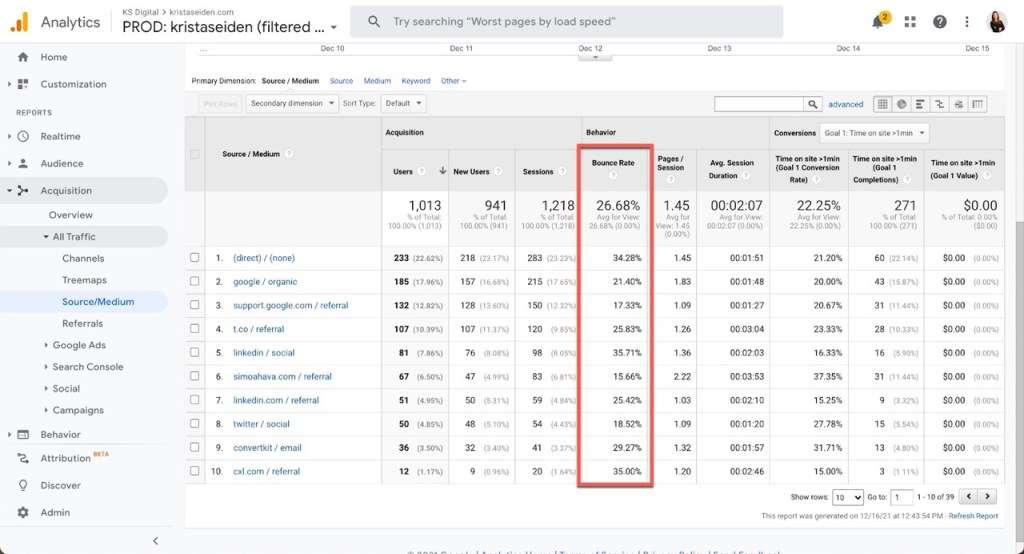
Bounce rate in GA4. Source: Digital Debrief
Once you save, bounce rate will appear as a column in your Pages and Screens report. From there, you can monitor how engaged, or disengaged, visitors are on different parts of your site.
Factors That Lead To High Bounce Rate
A high website bounce rate means visitors are leaving without engaging, and that’s often a red flag that something about the page experience isn’t matching their needs. Let’s look at the most common reasons and why they matter:
- Slow-loading pages – Online, every second counts. If your site takes too long to load, visitors assume the experience will be frustrating and hit the back button. Even a 2–3 second delay can send people straight to your competitors.
- Misleading titles or meta descriptions – When your search listing promises one thing but the page content delivers another, users feel misled. This disconnect breaks trust and makes them leave before exploring further.
- Technical SEO errors or blank pages – A broken page signals unreliability. Instead of waiting or refreshing, most users immediately abandon, which spikes bounce rates and damages your reputation.
- Weak or unoptimized content – Visitors come for answers. If your content is thin, full of errors, or hard to scan, they won’t stay long enough to find value. Engaging, well-structured content reduces bounces dramatically.
- Poor user experience (UX) – Pop-ups, cluttered layouts, or auto-playing media overwhelm users. A site that’s hard to navigate makes visitors leave, not because they didn’t want the info, but because finding it was too frustrating.
- Not mobile-friendly – With most searches happening on phones, a site that doesn’t adapt to smaller screens loses visitors fast. Worse, Google uses mobile-first indexing, so poor mobile usability hurts both engagement and rankings.
- Asking too much too soon – If a page immediately pushes for sign-ups or forms before showing value, users feel pressured. They’re more likely to bounce instead of committing to something they don’t fully trust yet.
Each of these factors isn’t just about “losing a click.” A high bounce rate means lost opportunities for engagement, conversions, and even search visibility, since Google considers user behavior as part of its ranking signals.
Still seeing visitors vanish after a few seconds? That’s your bounce rate shouting for help, and ROI Digitally will help to rebuild the journey so people stick around. Talk to us today!
How To Reduce Bounce Rate
1. Fasten Up Page Speed
One of the biggest reasons for a high website bounce rate is slow-loading pages.
Think about it: if a site takes more than a few seconds to load, most visitors won’t wait around. They’ll click back and find a faster option.
That’s why improving page speed is one of the simplest yet most effective answers to how to reduce bounce rate.
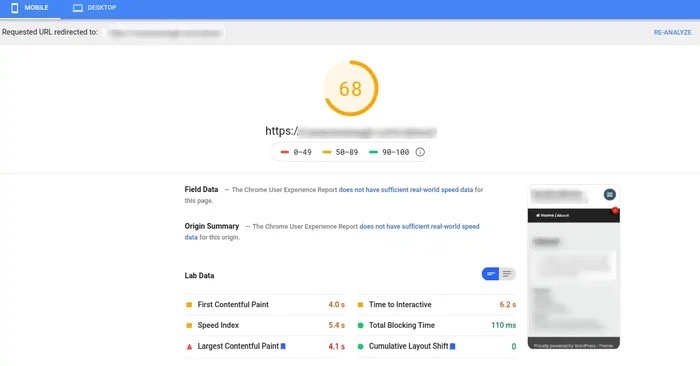
Use Google Pagespeed Insights to test your page speed. Source: HubSpot Blog
Start by optimizing your images so they’re lighter without losing quality, minifying CSS and JavaScript files to cut down unnecessary code, and enabling browser caching so repeat visitors don’t reload everything from scratch. You can also compress large files to make your site run more smoothly.
To know where you stand, tools like Fullstory’s Web Experience Scorecard can help you measure site health and pinpoint problem areas. The faster your pages load, the easier it is to keep visitors engaged, and the lower your bounce rate will be.
Learn more: SEO Audit: What It Is and How To Do It
2. Optimize For Mobile Users
Today, more than half of all web traffic comes from mobile devices. That means if your website doesn’t work well on phones and tablets, you’re instantly losing a huge chunk of your audience. Nobody wants to pinch-zoom to read tiny text, struggle with buttons that are too close together, or wait for a page that doesn’t load properly on mobile.
Google’s Mobile-Friendly Test is a quick way to check how your site performs on smaller screens. It highlights problem areas, like fonts that are too small, elements that aren’t clickable, or layouts that break on mobile, and gives suggestions for improvement.
Simple fixes such as using a responsive design, enlarging tap targets, and cutting down intrusive ads can make a big difference.
3. Insert Internal Links Strategically
One of the simplest ways to keep people from leaving your site too quickly is by guiding them to more of your content with internal links. These are links that connect one page on your site to another, helping visitors explore further instead of stopping at just one page.
For example, adding a “related posts” section at the end of an article gives readers something else to dive into that matches their interests. You can also sprinkle internal links naturally within your content to lead people toward deeper, more valuable pages on your site.
This strategy not only keeps visitors engaged but also benefits your SEO.
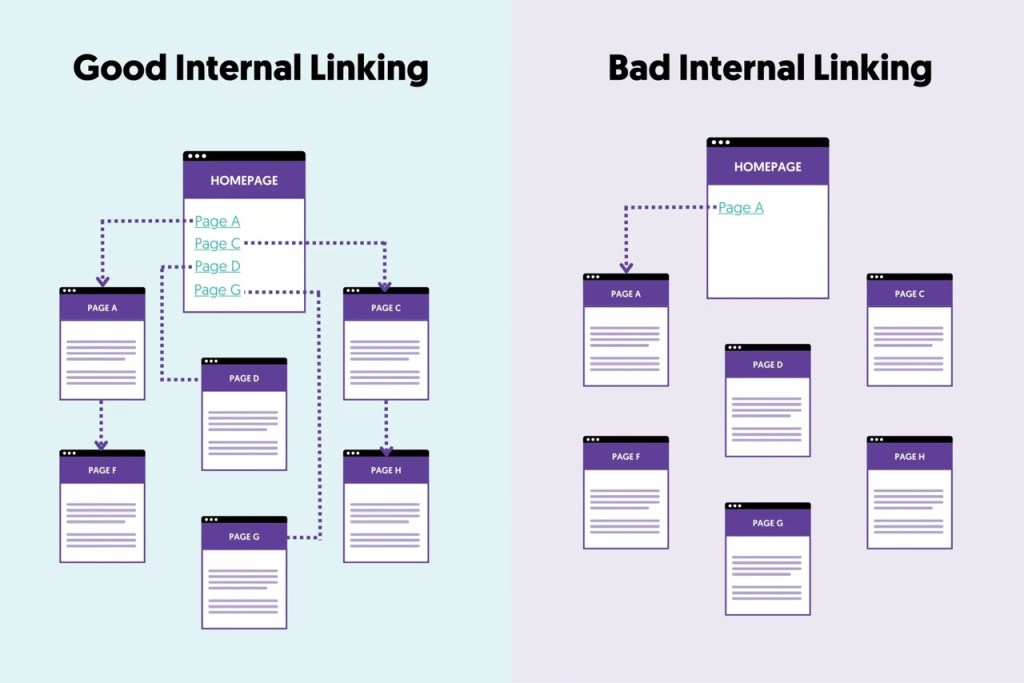
Distribute your internal links evenly and logically. Source: Reliablesoft
Internal links help search engines understand how your site is structured and which pages matter most. When implemented right, they improve user experience and strengthen your site’s overall visibility.
4. Write Quality Content
One of the simplest ways to decrease the bounce rate of a page, or even your entire website, is to improve the content itself. This may sound obvious, but it’s overlooked more often than it should be.
The truth is, the more interesting, relevant, and higher-quality your content, the more likely visitors will stick around and explore further.
Start by making your content easy to read and understand:
- Use clear, concise sentences broken into short paragraphs.
- Add headings and subheadings to break up long sections of text.
- Include visuals like images and videos to keep readers engaged and to avoid overwhelming them with blocks of text.
- Enhance your visuals with tools or photo editors so they look professional and polished.
Learn more: How to Optimize Content for AI Overviews: An Expert Guide
But readability is only part of the equation. Relevance is just as important.
If your site is about camping, posting unrelated content, say, on politics, will quickly turn visitors away, no matter how well-written it is. Content requires planning and forethought if your site is going to truly “absorb” visitors instead of bouncing them away.
On top of this, high-quality content today means more than just being useful—it must also signal trust and authority, which is exactly what Google’s E-E-A-T (Experience, Expertise, Authoritativeness, Trustworthiness) framework emphasizes:
- Experience: Show that you’ve actually tried, tested, or lived what you’re writing about. First-hand accounts carry weight.
- Expertise: Share accurate, well-researched knowledge that proves you know your field.
- Authoritativeness: Link to credible sources, cite data, and build recognition as a go-to voice in your industry.
- Trustworthiness: Keep information accurate, your website safe, and avoid misleading claims or spammy practices.

Google EEAT Content. Source: LinkedIn
When your content is both easy to consume and backed by E-E-A-T principles, visitors are far more likely to stay, explore other pages, and trust your brand.
5. Don’t Overuse Pop-Ups
If you’re wondering how to reduce bounce rate, one of the easiest fixes is to take a hard look at your use of pop-ups. Nothing disrupts the flow of a website quite like the dreaded flashing form or ad that blocks the screen.
For most users, pop-ups feel pushy, distracting, and downright annoying, leading them to click away before they’ve even given your content a chance.
That doesn’t mean pop-ups are useless. When used sparingly, they can still be effective for building email lists or promoting special offers. The key is timing and moderation.
Instead of bombarding users as soon as they land on the page, let them engage with your content first and then gently present the option. Even better, consider alternatives such as personalized banners or well-crafted email campaigns that allow visitors to choose interaction on their own terms.
6. Understand Search Intent
One of the most effective ways to lower your website bounce rate is to make sure your content matches what people are actually searching for, this is called search intent.
When someone types a query into Google, they have a goal in mind: maybe they want a quick answer, a step-by-step guide, or a product recommendation. If your page doesn’t deliver what they expect, they’ll click away in seconds.
To align your content with search intent, start by analyzing the SERP (search engine results page) for your target keywords.
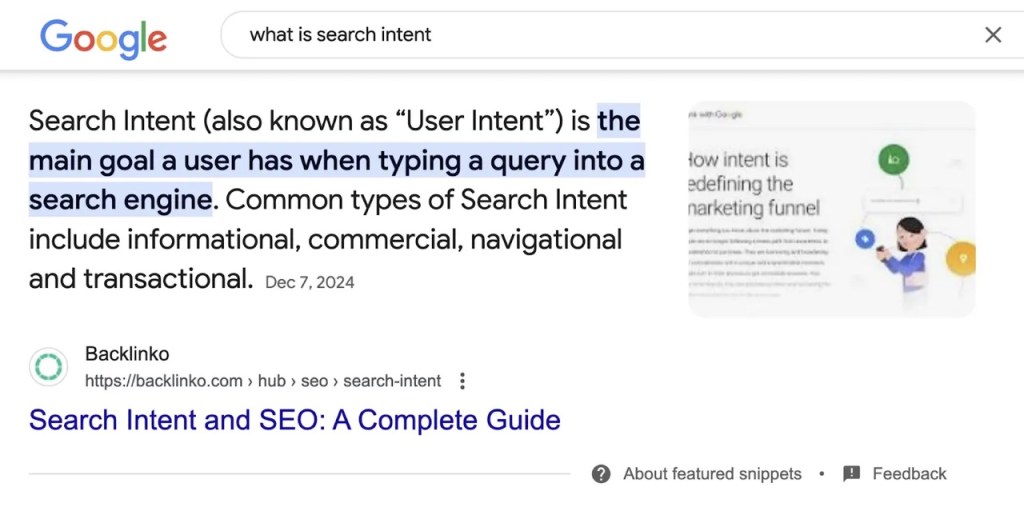
Find SERPs on Google search to analyze for the key information of the keyword. Source: Semrush
Look closely at the type of content that already ranks: are they blog posts, tutorials, product pages, or FAQs? This tells you what Google has already decided users want. Your job is to create content that not only fits but improves on what’s there by being more useful, engaging, or in-depth.
Learn more: What is Organic Search? How To Effectively Increase It?
Equally important is keyword relevance.
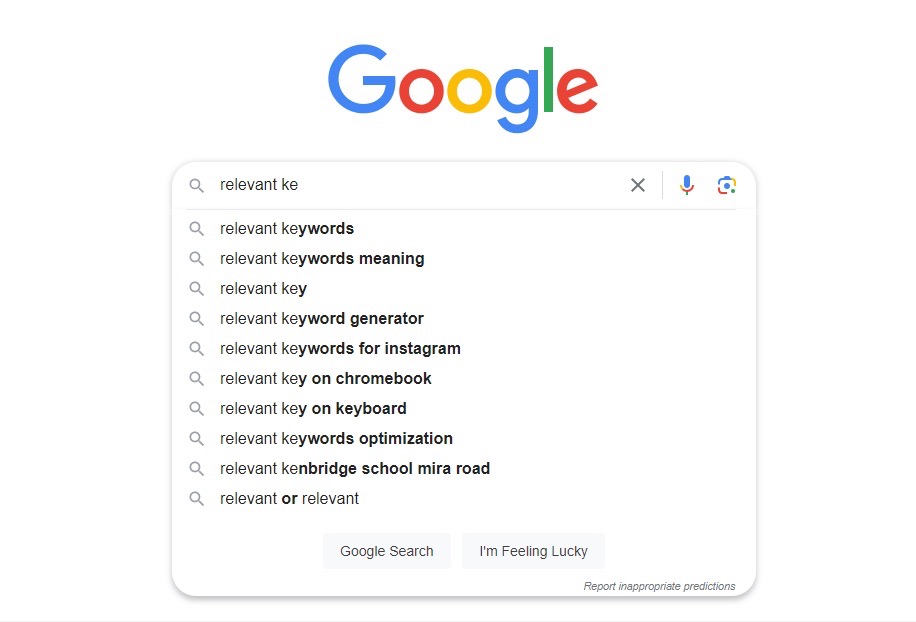
A simple way to find relevant keywords. Source: Verbolia
Using unrelated or misleading keywords might get people to click, but it will almost guarantee a bounce if the page doesn’t actually deliver. Instead, focus on high-value, low-competition keywords that truly match your topic. Tools like Google Keyword Planner can help you find those opportunities.
Finally, make sure your titles and meta descriptions accurately reflect what’s on the page. Overpromising in your snippet but underdelivering in your content is one of the fastest ways to drive up bounce rates. When you satisfy search intent quickly and honestly, visitors are more likely to stick around and even explore other areas of your site.
Frequently Asked Questions
- What is the bounce rate?
Bounce rate is the percentage of visitors who land on a page of your site and leave without taking any further action, like clicking a link, visiting another page, or interacting with your content. It measures how engaged users are with your website.
- What is a good bounce rate?
A “good” bounce rate depends on your industry and page type. Generally, between 40%–55% is considered average, under 40% is excellent, and above 70% often signals issues with relevance, content, or user experience.
- What does 80% bounce rate mean?
An 80% bounce rate means 8 out of 10 visitors leave your site after viewing only one page without engaging further. It often suggests problems with page relevance, load speed, or user experience, but could be normal for quick-answer content like blogs.
- Is 40% bounce rate good?
Yes, a 40% bounce rate is generally considered good. It means most visitors are staying on your site and engaging with more than one page, showing your content is relevant and your website is performing well.