The market for AI picture makers is predicted to reach $917.4 million by 2030, growing at a rate of 17.4% annually. With so many options available, figuring out which AI image generator to choose can be challenging.
In this guide, ROI Digitally’s experts explore the top 10 cutting-edge AI image generators standing out in 2024.
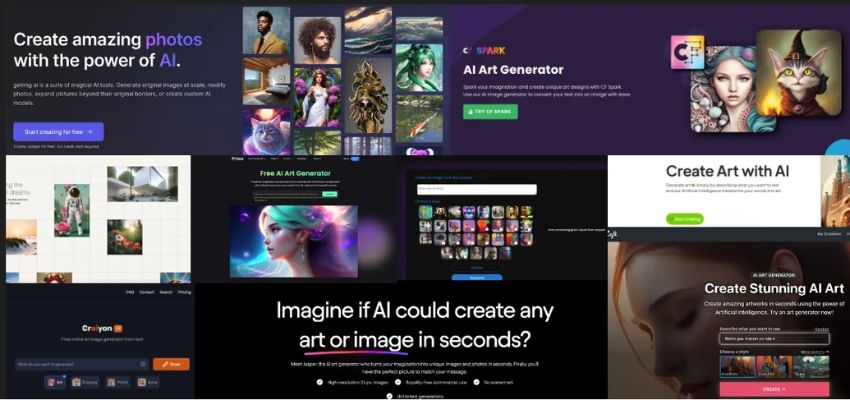
AI image generators can transfer text to the image.
What Are AI Image Generators?
An AI text-to-image generator does precisely what its name suggests. It’s an AI-driven application that reads a written prompt, analyzes it, and generates an image that most closely resembles the description provided.
They can be used to produce artwork or pictures in any style, from realistic pictures to original works of art. Popular text-to-image models are DALL-E by OpenAI, Stable Diffusion by Stability AI, and other proprietary programs. Many professionals, designers, artists, and product owners use them to expand their work.
Best Features To Look For In AI Business Photo Generator
When considering an AI business photo generator, several features can significantly enhance its utility and value:
- Quality of Generated Images: Look for generators producing high-quality images comparable to real photographs.
- Customization Options: The customization generated can align with your brand’s aesthetic. Adjusting the background and adding logos can be valuable.
- Diverse Image Styles: A good AI photo generator should offer many styles like professional headshots, casual portraits, or thematic imagery.
- Ease of Use: The platform should be user-friendly, with an intuitive interface allowing even non-designers to create compelling images quickly.
- Copyright and Licensing: The generated images comply with copyright laws and you have the necessary usage rights for commercial purposes.
- Cost-effectiveness: Consider the pricing structure of the AI generated images. Look for a solution balancing affordability and features.
Top 10 AI Image Generators In 2024
1. DALL-E 2 and DALL-E 3 by OpenAI
Highlighted Features:
- Copyright-free images.
- Ability to customize generated images.
- Fast output timing.
- Inpainting, outpainting, and adding image variations options are available.
- Ability to combine attributes, concepts, and styles.

Interface of DALL-E 3.
DALL-E 2, an AI image generator by OpenAI, crafts lifelike images and diverse digital artwork. This technology follows in the footsteps of OpenAI’s renowned GPT-3 and ChatGPT, leading natural language processing models.
Knowing how to use DALL-E 2 can help you with product design, artwork, and even the generation of new business concepts. Moreover, it doesn’t require any technical expertise or artistic training.
DALL-E 3 advanced model creates intricate, realistic images based on text prompts..
Open AI’s built-in safety precautions guarantee no offensive or copyrighted images appear in the content.
Results appear after entering a prompt and take 15 to 20 seconds to display two photographs by default. If you are unsatisfied with the response, you can ask for adjustments or redo. The AI art generator then quickly creates two more for you on top of it. Overall, this is among the greatest AI text-to-image solutions available.

Images created by DALL-E 3.
| Pros | Cons |
| Ensure ease of use with no learning curve. Offer a pocket-friendly option. Prohibit the creation of violent, abusive, or harmful content. Include an out-painting feature to produce larger AI art. | Make limited editing adjustments.Experience variable outcomes from requests.Face the absence of DALL-E 2’s direct editing tools. |
Pricing:
- DALL·E 2 costs $15 for 115 credits
- DALL·E 3 is provided as part of ChatGPT Plus at $20/month and is free through Microsoft Copilot
- Midjourney
Highlighted Features:
- Import and merge images effortlessly.
- Pan the generated images in any direction for extension.
- Obtain four image generations with a single prompt.
- Customize image variations and upscale options.

User Interface of Midjourney.
Launched on July 12, 2022, the Midjourney AI image generator made waves worldwide with its ability to produce stunning visuals with no copyright.
This remarkable AI image creator empowers users to fine-tune the quality of their generated images, aspect ratio, variance, style, and filters. It caters to a diverse audience, from novice artists, professionals, and AI for designers alike.
Learn how to use Midjourney.
Originally exclusive to the Discord server, Midjourney now boasts a fully functional website.
To get started, join the Discord server or visit the official website and input your text prompts with a straightforward prefix. Your text is then queued up for processing, with the AI swiftly attending to it within seconds.

Midjourney Discord Interface.
The final output may take some time, but the gradual improvement of the image before your eyes is captivating. Moreover, users can choose from various variations, upscale the image, or order the bot to reinterpret the art based on different textual inputs. The AI also adeptly handles complex prompts, effortlessly incorporating additional elements based on your requests without confusion.

Image created by Midjourney.
| Pros | Cons |
| Generate text at lightning speed.Enjoy the privacy of a dedicated DM channel for all your interactions.Access a collection of content created by the community.Tackle even the most intricate prompts with superior understanding. | Struggle to maintain character consistency across diverse backgrounds. Raise privacy concerns due to potential data misuse. |
Pricing:
- Basic Plan: $10/ month
- Standard Plan: $30/ month
- Pro Plan: $60/ month
- Mega Plan: $120/ month
3. Bing Image Creator (Microsoft Designer)
Highlighted Features:
- Access with just a Microsoft account for easy accessibility.
- Employ advanced AI, incorporating features from DALL-E 3, to generate realistic images.
- Provide customization options to refine image outputs.
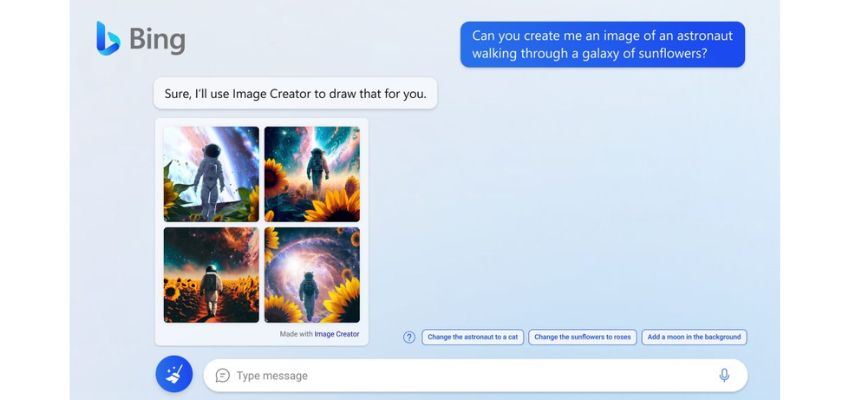
Integrate Bing Image Creator into Bing chat, starting with Creative mode.
Bing Image Creator, an AI art generator from Microsoft, is completely free to use and allows you to craft unlimited AI artwork. Remember that it comes with 98 boosts by default, fueling the generation process. Once these boosts are depleted, image generation may slow down slightly, though still remains functional.
One of the standout features of the Bing Image Creator is its accessibility via smartphones. While it operates as a standalone website, Microsoft has also developed dedicated Copilot apps for both Android and iOS. Utilizing DALL-E 3, Copilot swiftly generates images in response to your requests.
The images produced are remarkably detailed and accurate, with minimal distortion (unless the prompt lacks specificity). After inputting, Copilot generates four different variations by default.
Furthermore, Copilot integrates the power of ChatGPT-4 at no extra cost, enhancing its utility for everyday tasks. With its comprehensive features, Copilot emerges as a top-tier AI art generator, offering a versatile solution for various creative endeavors.
Before, users got 25 boosts, but now they get 100. Each time they use a picture prompt, it uses up one boost. When they run out of boosts, making images takes longer, up to five minutes.
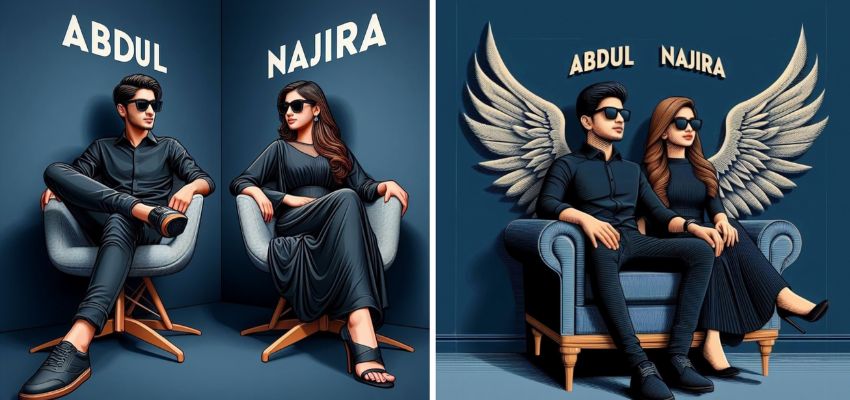
3D AI Photo Editing With Bing Image Creator.
| Pros | Cons |
| Generate AI images effortlessly with this completely free tool.Enjoy its user-friendly interface for seamless navigation.Compatible with the latest DALL E 3 for advanced image creation. | Edit the images further is not possible.Can’t change the aspect ratio, style, seed, or variation. |
Pricing: Free without unlimited number of generated images.
4. NightCafe
Highlighted Features:
- Can access a mobile app
- Own the copyright of every image you create.
- Take control of advanced image generation with intuitive tools.
- Generate stunning logos in seconds.
- Join an interactive community of creators

Interface of NightCafe.
Nightcafe includes Stable Diffusion and DALL E 2, allowing users to create and use their own models.
Every user gets 5 free credits daily, with each image taking up one credit. Nightcafe specializes in adjusting images, such as changing the aspect ratio or runtime and tweaking prompt weights.
Users can choose the style and algorithm the AI uses, such as Clip Guided Diffusion or Stable Diffusion.
Clip Guided Diffusion ensures that AI-generated images follow the laws of physics, making them seem more grounded. However, this doesn’t limit the AI’s ability to create fantastical images like a space odyssey.
The downside is Night Cafes image quality can sometimes be cracking. Fortunately, you can improve the output by paying more credits to upscale or evolve the images with additional prompts.
It’s worth noting that generating images might take longer with certain algorithms, like Stable Diffusion, but it’s not a significant issue. Overall, NightCafe is a solid tool for creating art, although the credit limit can be a drawback.
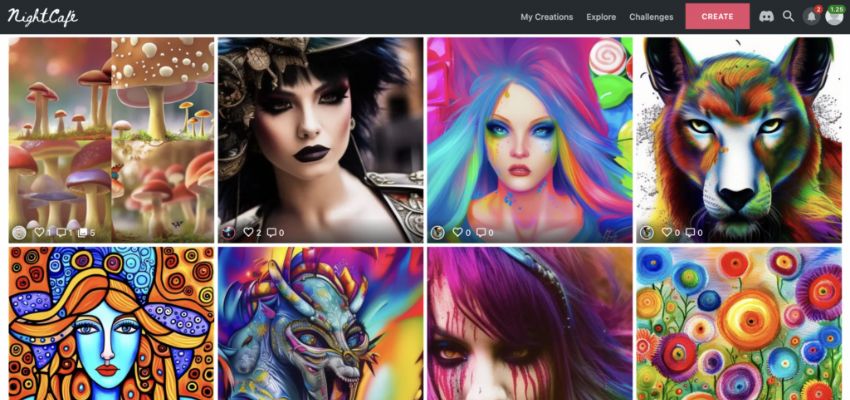
Images created by NightCafe.
| Pros | Cons |
| Curate an expansive library of user-generated artworks.Craft an intuitive interface suitable for all skill levels.Foster a community-driven platform for collaboration and inspiration.Provide detailed customization for AI-generated art. | Require a steeper learning curve to master advanced features.It Takes a lot of time to generate 3D landscapes and scenes. |
Pricing:
- Basic plan: Free
- AI Beginner Plan: $5.99/month or $4.79/month.
- Top Tier – AI Artist: $49.99/month or $39.99/month.
5. StarryAI
Highlighted Features:
- Can access a mobile app
- Generate AI art automatically without requiring any user input.
- Utilize text-to-image AI to transform words into artistic creations.
- Access a free NFT generator to craft distinctive NFT artwork you can sell.
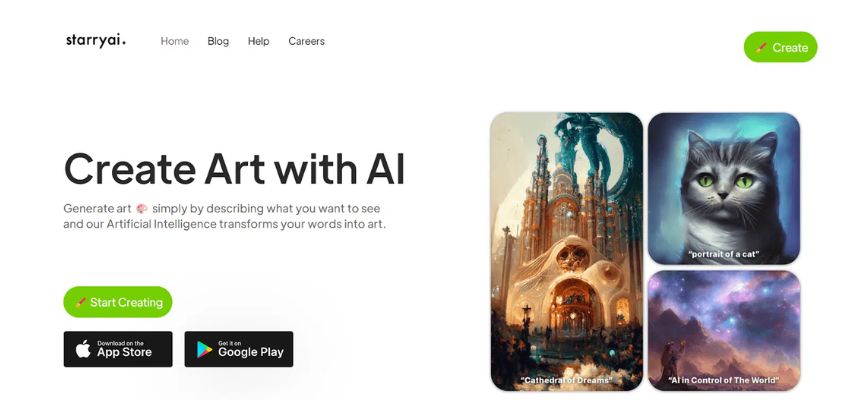
Interface of StarryAI on PC.
StarryAI is the most accessible AI art generator as it’s available on the web, iOS, and Android for free with an easy-to-use interface.
Using StarryAI is simple. Just input your prompts into the text bar on the home screen, and the AI will generate your artwork. You’ll receive a notification when it’s ready.
This AI tool specializes in transforming images into NFTs (Non-Fungible Tokens) using advanced machine learning algorithms. What sets StarryAI apart is that it gives users complete ownership of the generated images, which can be used personally or commercially.
It offers extensive customization options, allowing users to select from three different AI types depending on their needs. Plus, you can adjust the canvas size, model, and runtime to refine your image further. Remember that longer runtimes consume more credits, so consider that when using this text-to-image generator.

StarryAI is available on Android & iPhone.
| Pros | Cons |
| Deliver a special tool for making personalized images.Let you own your pictures without any marks.Give tons of styles and templates to choose from.Can create lots of artwork all at once. | Restrict the daily image generation in the free plan.Keep pricing details for premium features unclear. |
Pricing: Free with 5 credits daily.
6. Wombo Dream
Highlighted Features:
- Empower your image editing with Dream by Wombo, a potent neural network app.
- Experience effortless synchronization across devices, ensuring your creations are always within reach.
- Explore an intuitive interface and a diverse array of styles and effects at your fingertips.
- Unleash your creativity anytime, anywhere with the Dream by Wombo mobile app.
- Choose between the browser and desktop versions, catering to various user needs.
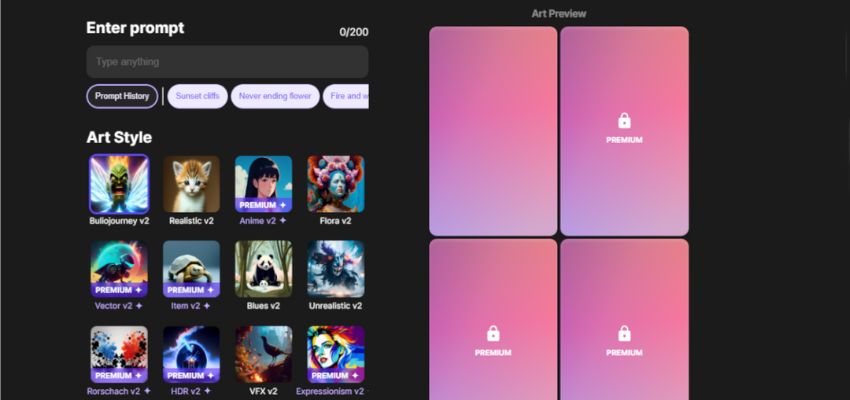
Interface of Wombo.
Dream by WOMBO is a new free realistic Ai image generator. Users can access through website, mobile apps, or Discord. A “dream” member will get faster image generation and access to many different styles. Plus, you can generate multiple images at once.
With this tool, you can mix up your NFTs and use them to make images. Another neat feature is that you can watch your image being made in real-time on your phone.
There’s also an impressive part of the app called the ‘Community Feed’ where you can check out art made by other people using the AI. Think of Wombo Dream like a digital paintbrush that can make all sorts of interesting art, from realistic to abstract. It’s a great place to get ideas for your creations.
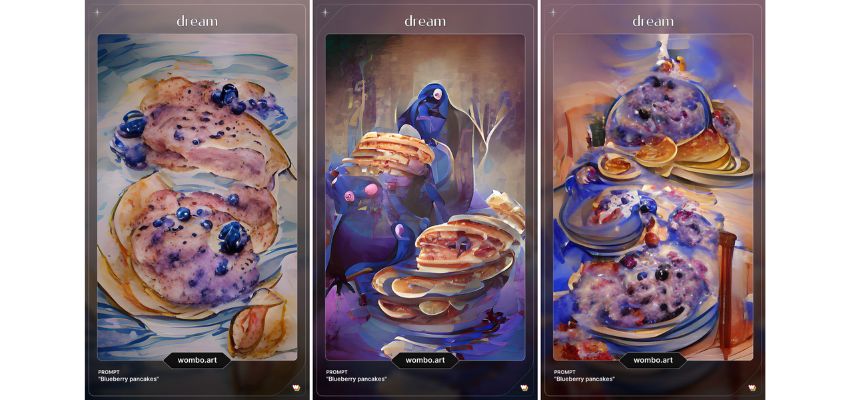
Images created by Wombo.
| Pros | Cons |
| Keep mobile and desktop versions working together smoothly.Make it easy to move around and control with a simple interface.Give lots of choices for styles and effects.Make it easy to create and edit images wherever you are.Let users switch between browsers and desktops easily. | Restrict some styles and effects to premium users is a feature of the app. Might encounter occasional advertisements while using it. |
Pricing:
- Basic plan: Free
- Monthly Subscription: $10/ month.
- Yearly Commitment: $90/ year.
- Lifetime Access: $170.
7. Jasper Art
Highlighted Features:
- Generate limitless distinct images
- Remove watermarks from images
- Explore various styles and mediums of AI-generated art selections.
- Select from a range of modes to match your skill level, from Basic to Freeform.
- Incorporate Jasper’s brand voice functionalities to craft AI art tailored to your brand management strategy.

Interface of Jasper Art.
Jasper Art, part of the Jasper AI package, helps with writing and creating images using AI. It’s based on Open AI’s DALL E 2 model and offers Free-Form and Template modes for generating AI art. In Free-Form mode, all options are neatly organized in drop-down menus, with a text box for entering prompts.
Once submitted the request, this AI image generator provides four 2k px AI images to view individually with no watermark,enlarge for better inspection, and then copy or download. If you’re unsatisfied, click “Create” again to get four new images. Also, there’s a feature to flag inappropriate images.
The key benefits include unlimited monthly creations, various styles, and no watermarks on your images. Plus, you’ll find support from an active online community and excellent customer service whenever needed.

Images created by Jasper Art.
| Pros | Cons |
| Process most prompts in under 10 seconds. Customize images to suit your preferences. Generate images for potential sale as your artwork. Enjoy enhanced control over editing. Retain copyright ownership of generated images. | Omit certain features such as image importing, manipulating, or outpainting. |
Pricing:
- Creator Plan: $49 billed monthly or $39 per month, billed yearly.
- Teams Plan: $125 billed monthly or $99 per month, billed yearly.
- Business Plan: Contact for pricing.
8. Canva AI
Highlighted Features:
- Customize art to match your preferred aspect ratio within Canva.
- Utilize Canva’s features to craft artwork tailored to your specific aspect ratio requirements.
- Employ style options designed to guide users new to AI art generators within Canva.
Popular image editing software also incorporates artificial intelligence into image creation. It supports various image models, including DALL E, Google Imagen, and Canva Magic Media, with additional options for creating QR code art, high-quality portraits, etc.
Users can apply these models to generate images within desired templates, similar to regular images and videos in a Canva project.
The Canva Magic Studio provides access to an AI editor, text generator, and imagery options, enabling diverse content creation. To maximize Canva AI’s features, detailed prompts for image or text generation are essential.
Furthermore, since Canva is an all-encompassing tool, users are encouraged to adjust and refine the generated content. Utilize the available design features to modify it until it meets your requirements.
| Pros | Cons |
| Create high-quality visuals quickly.Experiment with various design elements, including typography and visual effects.Feel confident even if you’re a beginner, as the interface is user-friendly. | Offers less control and fewer customization options compared to other models mentioned. |
Pricing:
- Canva Pro: £12.99 per month
- Canva for Teams: £25.99 per month
9. Fotor GoArt
Highlighted Features:
- Choose from over 9 style presets for a variety of looks.
- Select from three aspect ratios to fit your needs.
- Customize your art styles, composition, light effects, and more.
- Generate up to 5 images for each prompt to explore different possibilities.
- Upload your image to the platform and tweak it further with AI for personalized adjustments.
Fotor GoArt is an AI tool perfect for crafting NFT art effortlessly. It’s user-friendly, and no technical skills are required. Unlike many AI art tools, it doesn’t turn text into images. Instead, it excels at transforming images into artistic creations.
With Fotor, you just supply an image, and its AI convert into digital art. There’s a vast selection of over 10,000 templates to pick from, ensuring you’ll find one that suits your project. You can also tailor aspects like size and aspect ratio to fit your preferences. The interface is sleek and offers customization options like aperture, golden ratio, and effects.
Your creations are stored in a library for easy access, allowing you to download past works and review the settings used. Fotor even enables batch generation of up to six images at a time. Plus, the recent release of Fotor M2 promises even greater accuracy in AI-generated art, making it one of the top premium tools available.
Whether you prefer uploading images or using text prompts, Fotor accommodates both. You can also adjust the output size and the number of images generated to suit your requirements.
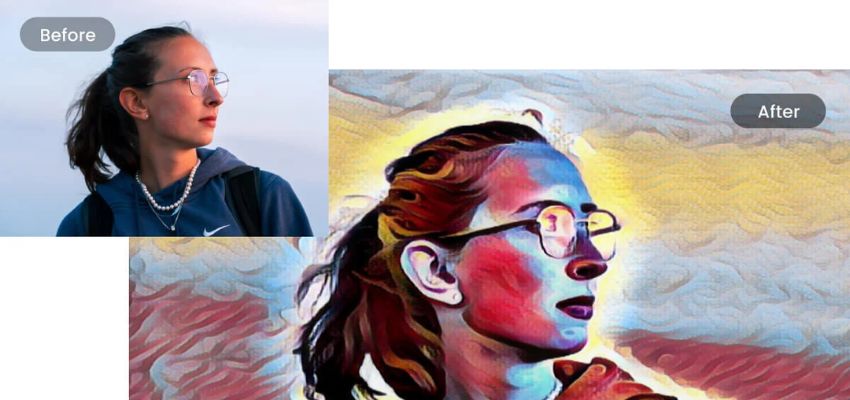
Transform your photos into sketches using Fotor’s photo-to-painting tool.
| Pros | Cons |
| Utilize AI to improve or entirely change your pictures. Easily enhanced to elevate image quality. Remove backgrounds effortlessly, handy for projects like NFTs. Add color pops to emphasize image hues. | Purchase credits or subscriptions are necessary to generate more images. |
Pricing:
- Basic Plan: Free
- Pro Plan: $8.99/month
- Pro+ Plan: $19.99/month
10. Adobe Firefly
Highlighted Features:
- Train Adobe’s AI on a blend of Creative Commons media and Adobe Stock for versatile usage in creative projects.
- Generate images and 3D text, insert or delete objects using generative fill, and alter SVG colors with generative recolor.
- Love how swiftly you can make minor edits if you’re in need of quick adjustments.
- Utilize it regardless of your budget, with both free and paid options available to creators.
- Get prompt suggestions from Adobe as you type, fostering a more imaginative approach.
Adobe Firefly is an online tool with AI features like creating images and 3D text, changing colors, and filling in content. It’s seamlessly integrated into Adobe’s Creative Cloud software like Photoshop and Illustrator.
What makes it stand out is its vast collection of training data, sourced from Creative Commons, Flickr Commons, and over 300 million Adobe Stock images and videos with no copyright issues.
New features include Image 2, a significant upgrade from the original text-to-image model. It offers various customization options, such as style settings, aspect ratios, content types, styles and effects, negative prompts, and image matches.
With image match, users can find photos with similar styles to inspire them. As you type, Firefly suggests prompts to spark creativity. After generating an image, users can edit it further with generative fill, create similar images, or use them as style references.
Another standout feature is the generative recolor tool, which simplifies creating different color variations for scalable vector graphics (SVGs) through text prompts. This tool seamlessly integrates into Illustrator, enhancing the workflow for Creative Cloud subscribers.
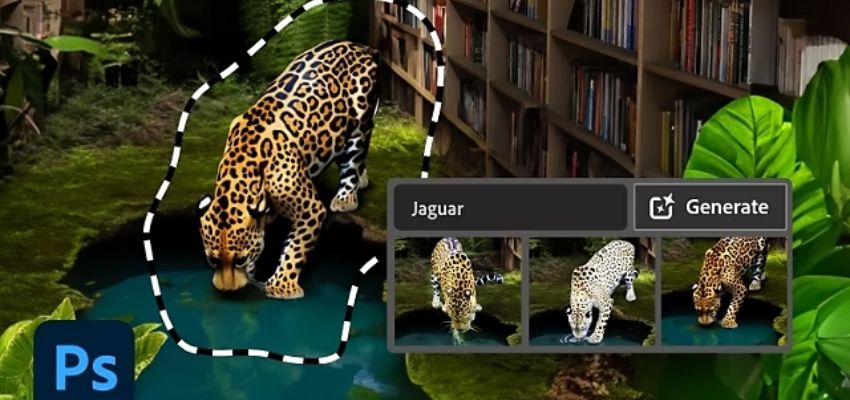
You can change objects with Adobe Firefly.
| Pros | Cons |
| Simplify the user interface to be suitable for both novices and experts.Integrate smoothly with Adobe Creative Suite.Ensure creators avoid infringing on other artists’ work. | Make quick edits in generative fill, but remember that its tools have limitations. |
Pricing:
- Free plan: 25 monthly credits
- Premium subscribers: 100 monthly credits for $4.99 per month.
Conclusion
In conclusion, exploring the top 10 AI image generator reveals the diverse approaches each takes to interpreting prompts and generating images. Each offers a distinct experience, contributing to the richness of the AI art landscape.
ROI Digitally encourages you to test out the free options firsthand to find the best fit for your needs. Additionally, mastering the art of guiding these tools requires careful consideration of various parameters.
Frequently Asked Questions
- Which Is The Best AI Image Generator?
There isn’t a single “best” AI image generator, as different tools have their strengths and weaknesses. It depends on your needs! Here are some AI image generators that you can consider: DALL-E 2 and DALL-E 3, Midjourney, Bing Image Creator, NightCafe, StarryAI, Wombo Dream, Jasper Art, Canva AI, Fotor GoArt, Adobe Firefly.
- How Do AI Image Generators Impact The Skills Of Artists And Designers?
AI image generators can impact artists and designers in both positive and negative ways:
Positive Impacts:
- Increased Productivity: AI can generate variations and ideas quickly, allowing artists time to focus on refining concepts and adding creative touches.
- Accessibility: AI tools can help non-artists create visuals and bring their ideas to life.
- Exploration: AI can help explore artistic styles and generate unexpected results.
Negative Impacts:
- Job Displacement: There’s a concern that AI could automate some design tasks, potentially reducing demand for human artists.
- Over-reliance: Overdependence on AI for idea generation could stifle creativity.
- How Do AI Image Generators Work?
AI image generators are trained on massive datasets of images and text. They learn to recognize patterns and relationships between the two. When you provide a text prompt, the AI uses its knowledge to generate an image that reflects that prompt.