With the development of AI, more and more people want to create stunning pictures with their computers in no time. DALL-E 2 is a website where you can effortlessly bring your ideas to life simply by typing in prompts.
If you’ve ever wondered how to create stunning images with just a few words, you’re in the right place. This guide will walk you through how to use DALL-E 2 effectively, from crafting the perfect prompt to editing and saving your creations.
What Is DALL-E-2?
DALL-E 2 is an impressive AI system developed by OpenAI that can turn words into pictures. Based on what you tell it to generate, Dall-E 2 can create images with different styles that look like drawings, paintings, or even real photos.
How Does DALL-E-2 Work?
DALL-E 2 learned from a massive collection of labeled images online. It uses that knowledge to create new images based on text prompts. In other words, when you give it a creative prompt, it analyzes the relationship with discovered patterns to craft original artwork.
For example, you write a sentence describing what you want to see, like “a cat wearing a tiny cape flying through a rainbow.” DALL-E 2 has a special tool called CLIP that reads your sentence and figures out its meaning. CLIP thinks of each word as a part of the image you described.
Now, DALL-E 2 uses a “diffusion mode” tool to create a rough idea of the image. It’s like the painter making a quick sketch to capture the main elements. This model slowly refines the sketch, replacing it with details that match your description, like a cat, a cape, and a rainbow.
DALL-E 2 doesn’t just give you one picture. It gives you several options, like different positions for the cat or different colors for the rainbow.
How To Use DALL-E 2?
Step 1: Create An Account
- Go to: https://openai.com/dall-e-2 and click “Try DALL-E“.
- Sign up: Create an account (for free) or use existing Google/Microsoft login.
- Credits: You need credits to generate images. You can start with the free trial and then buy more if needed.

Step 2: Input Prompts To Generate Images
In the search bar, describe clearly what you want the image to be. The more specific you are, the better DALL-E 2 understands your desires.
Instead of just typing “cat,” the more details you provide, like the cat’s fur color, the helmet size, and the cabin’s design, the clearer the picture DALL-E 2 will paint.
For example, try something like: “A fluffy orange tabby cat wearing a tiny astronaut helmet, floating weightlessly in a spaceship cabin filled with colorful buttons and levers.”
You can also use references to famous artists, styles, or emotions to guide DALL-E 2.
For example, you can tell DALL-E 2 to incorporate Van Gogh’s style into your creation. All you need to do is add “in the style of Van Gogh” to your prompt. You can even reference specific paintings, like “a starry night landscape in the style of Van Gogh’s ‘The Starry Night.’“
If you’re unsure how to word your prompt, click the “Surprise Me” button. It’ll suggest interesting ideas based on what others are creating. You can then use this as a starting point to add your personal touch and create something truly special.

In short, the key is to be clear, descriptive, and specific. Think of yourself as a director giving instructions to a team of talented artists. The more detailed and passionate you are, the more likely they will capture your vision perfectly.
Step 3: Generate and Edit Your Outputs
Click “Generate“, DALL-E 2 will cook up 4 images based on your prompt.
If the results are what you are looking for, please pick your favorite or download them all. If they aren’t, you can edit the prompt and try again or use “Variations” to get similar but different images.
If you want to replace an object or area, use the eraser tool to select it and describe what you want in its place. DALL-E 2 will seamlessly incorporate your vision into the existing image.
If you want to extend your image beyond its starting size, use the “Add generation frame” tool. Just tell DALL-E 2 what you want to add in the new space, and it will expand your artwork while keeping it consistent with the original.

Step 4: Save And Share
When you’ve finished creating your artwork, click “Save” to preserve it indefinitely. If you’d like to share your artistic creation, you can post it on the public DALL-E 2 feed or download it.

10 DALL-E 2 Prompts To Maximize Your Output
This guide shows you 10 powerful prompts you can use on Dall-E to make amazing art. Just visit the Dall-E website to try them out yourself!
Visual environment for a play or performance
Dall-E can help you create amazing stage sets! Just tell it what you’re thinking, like the play’s name, what the set should look like, or who it reminds you of. The more details you give, the better the picture will be. You can use the prompt below:
“The award-winning set design for [Your Play Title] draws inspiration from [an artist’s name], a captivating photograph featured in a theatrical press release.”
For example:
- The award-winning set design for “The Midnight Sonata” draws inspiration from Salvador Dali, a captivating photograph featured in a theatrical press release.
- The award-winning set design for “Echoes of Eternity” draws inspiration from Vincent van Gogh, a captivating photograph featured in a theatrical press release.
- The award-winning set design for “Echoes of Silence” draws inspiration from Frida Kahlo, a captivating photograph featured in a theatrical press release.

Nail Arts, Makeup Style, Hairstyle, And Cosmetics
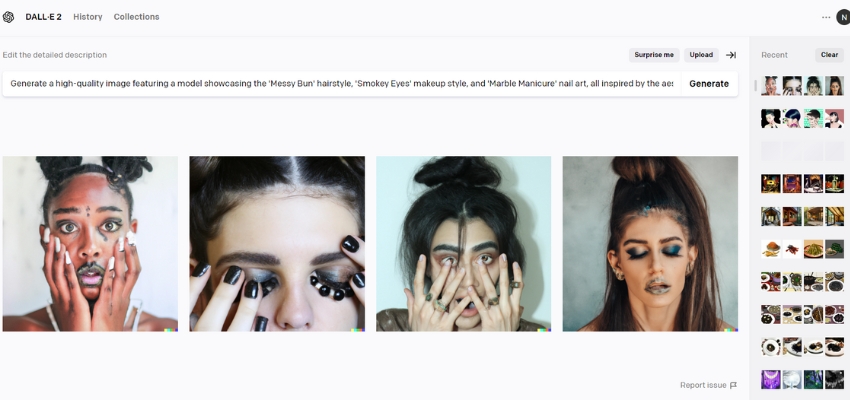
Dall-E offers a powerful way to bring creative ideas to life in fashion. Generating images of diverse hairstyles, makeup designs, and nail art helps visualize concepts for fashion shows, photoshoots, and other creative projects.
“Generate a high-quality image featuring a model showcasing the [Hairstyle’s name] hairstyle, [Makeup style’s name] makeup style, and [Nail art’s name] nail art, all inspired by the aesthetic of [Your Inspiration’s name]”
For example:
- Generate a high-quality image featuring a model showcasing the ‘Sleek Bob‘ hairstyle, ‘Natural Glow‘ makeup style, and ‘Geometric Patterns‘ nail art, all inspired by the aesthetic of ‘Audrey Hepburn’.
- Generate a high-quality image featuring a model showcasing the ‘Messy Bun‘ hairstyle, ‘Smokey Eyes‘ makeup style, and ‘Marble Manicure‘ nail art, all inspired by the aesthetic of ‘Bohemian Rhapsody‘.
- Create a high-quality image featuring a model showcasing the ‘Braided Crown‘ hairstyle, ‘Dewy Skin‘ makeup style, and ‘Abstract Splatter‘ nail art, all inspired by the aesthetic of ‘Japanese Cherry Blossoms‘.
Visuals For Products
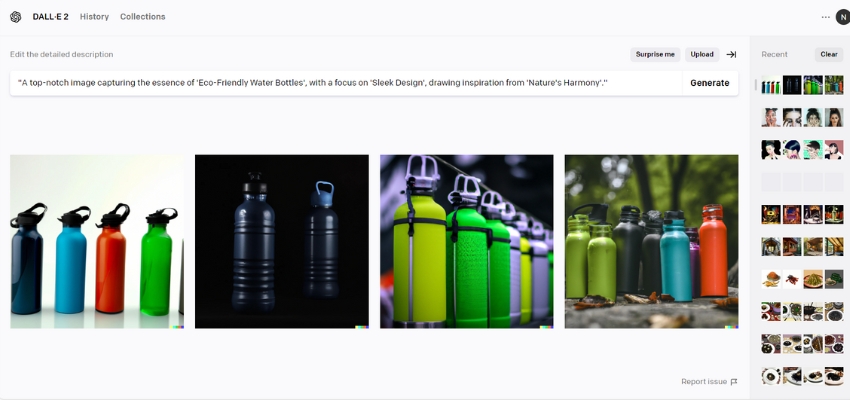
Dall-E has exciting possibilities for product development by generating images of innovative designs. This allows you to visually bring your prototypes and concepts to life and simplify the design process. To get started, try a prompt like:
“A top-notch image capturing the essence of “Product type’s name”, with a focus on “Product feature’s name, drawing inspiration from “your inspiration’s name”.
For example:
- A top-notch image capturing the essence of ‘Eco-Friendly Water Bottles‘, with a focus on ‘Sleek Design‘, drawing inspiration from ‘Nature’s Harmony’.
- A top-notch image capturing the essence of ‘High-Performance Running Shoes‘, with a focus on ‘Advanced Cushioning Technology‘, drawing inspiration from ‘Athletic Excellence’.
- A top-notch image capturing the essence of ‘Gourmet Coffee Blends‘, with a focus on ‘Rich Aroma‘, drawing inspiration from ‘Global Coffee Culture‘.
Movie Posters
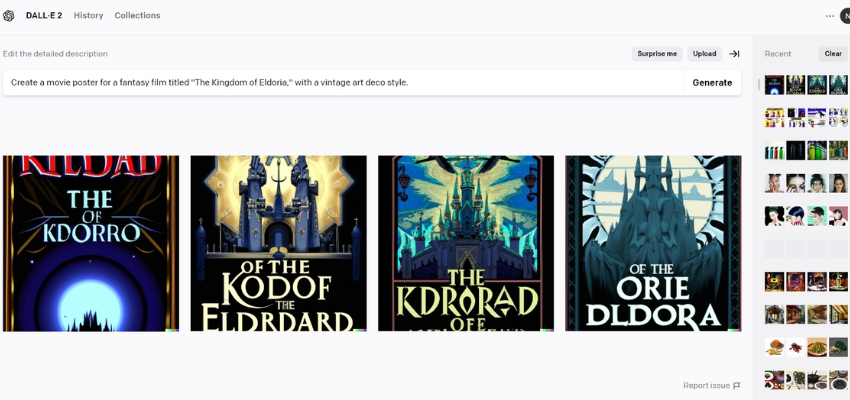
Tell Dall-E the title, what the movie is about, and how you want it to look. Use easy keywords and describe the main characters, setting, and mood. Thanks to it, DALL-E 2 can create an attractive poster:
“Design a film poster for a [particular genre, for instance, ‘science fiction’], named [insert title, such as ‘Galactic Warriors’], incorporating [mention the style].”
For example:
- Create a movie poster for a fantasy film titled “The Kingdom of Eldoria,” with a vintage art deco style.
- Create a movie poster for a horror film titled “Shadows in the Attic,” with a minimalist noir style.
- Create a movie poster for a romantic comedy film titled “Love in Bloom,” with a retro 1950s pop art style.
Book Cover
With its cutting-edge capabilities, DALL-E 2 can generate stunning book covers tailored to your genre and style preferences. Whether you’re a fantasy, mystery, or romance fan, DALL-E 2 has you covered.
All you need to do is simply provide a brief description of your book and watch as DALL-E 2 crafts a cover that perfectly complements your story.
“Create a book cover for a [Particular Genre] book named [Book Title] with [Specific style].”
For example:
- Create a book cover for a Fantasy book named “The Chronicles of Eldoria” in Epic Fantasy style.
- Create a book cover for a Mystery book named “Midnight Murders” in Noir style.
- Create a book cover for a Science Fiction book named “Galactic Convergence” in Futuristic style.
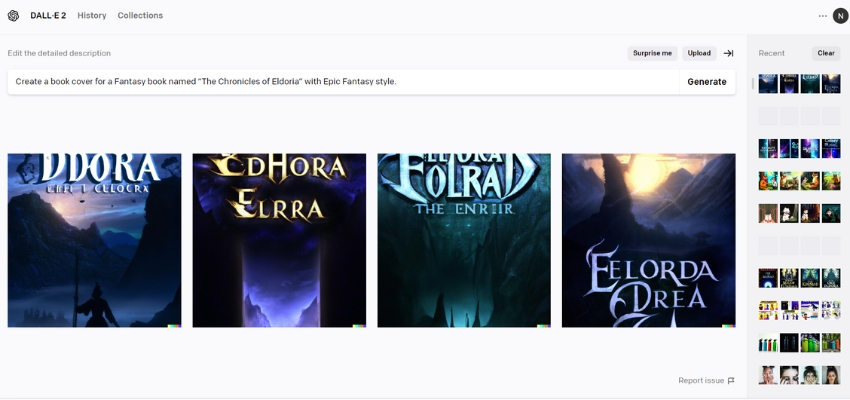
Illustration for Children’s Books
DALL-E presents a unique tool for illustrating children’s books. Its ability to create diverse and imaginative visuals can breathe life into characters and scenes, enhancing the storytelling experience.
“Generate a children’s book illustration showcasing [specific characters or scene, such as a conversing cat in the woodland’].”
For example:
- Generate an illustration for a children’s book showcasing a curious fox and a wise owl having a picnic in a sunlit meadow.
- Generate an illustration for a children’s book showcasing a group of adventurous rabbits exploring a magical underground burrow.
- Generate an illustration for a children’s book showcasing a mischievous monkey teaching a shy squirrel how to swing from one tree to another in the jungle.
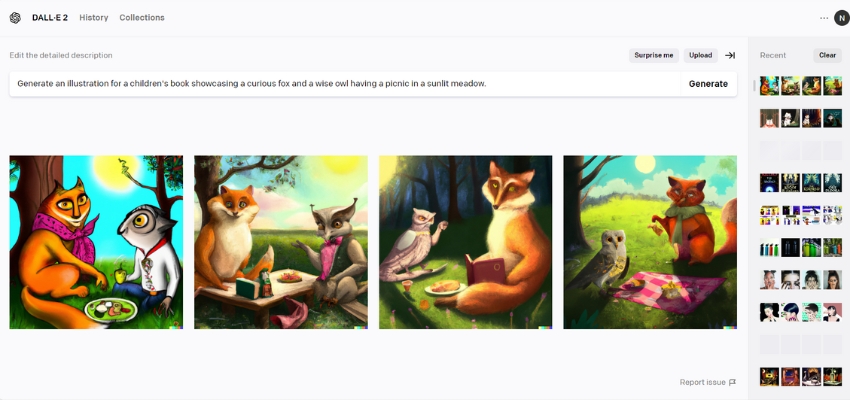
Poster for Advertisement
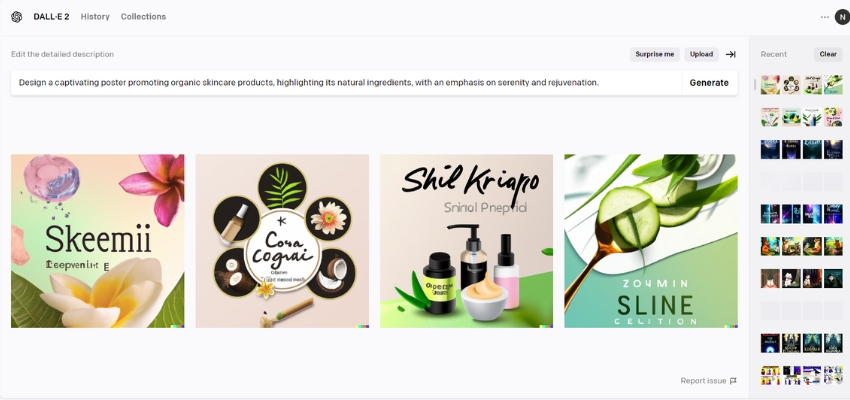
The Poster plays an important role in promoting products or services of the companies, highlighting the features of USP of them. With DALL-E 2, marketing team members can save time to design or pay a lot of money for design agencies. You can try this prompt and then customize it based on your demand:
“Design a captivating poster promoting [your product or service], highlighting its [key feature or benefit], with an emphasis on [desired mood or emotion].”
For example:
- Design a captivating poster promoting organic skin care products, highlighting its natural ingredients, emphasizing serenity and rejuvenation.
- Design a captivating poster promoting the fitness app, highlighting its personalized workout plans, emphasizing motivation and determination.
- Design a captivating poster promoting artisanal coffee, highlighting its rich flavor profiles, emphasizing warmth and comfort.
Packaging for Products
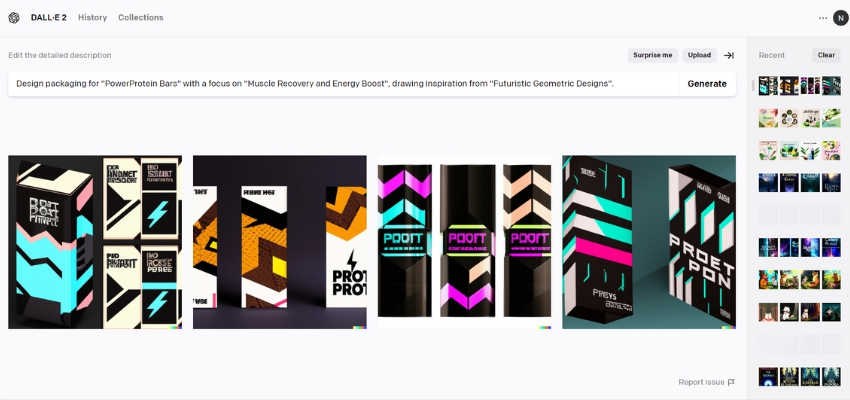
Over 60% of consumers decided to buy a product based on its packaging. It is also the reason why a lot of companies invest in research to update their packaging continuously. If you want to find an idea for your new one, you can try this prompt:
“Design packaging for [Product Name] with a focus on [Specific Feature or Benefit], drawing inspiration from [Theme or Style].”
For example:
- Design packaging for “EcoClean Laundry Detergent” with a focus on “Biodegradability and Sustainability“, drawing inspiration from “Nature-Inspired Minimalism.”
- Design packaging for “PowerProtein Bars” with a focus on “Muscle Recovery and Energy Boost“, drawing inspiration from “Futuristic Geometric Designs“.
- Design packaging for “ZenTea Herbal Infusions” with a focus on “Relaxation and Stress Relief“, drawing inspiration from “Japanese Zen Garden Serenity“.
Coloring Page
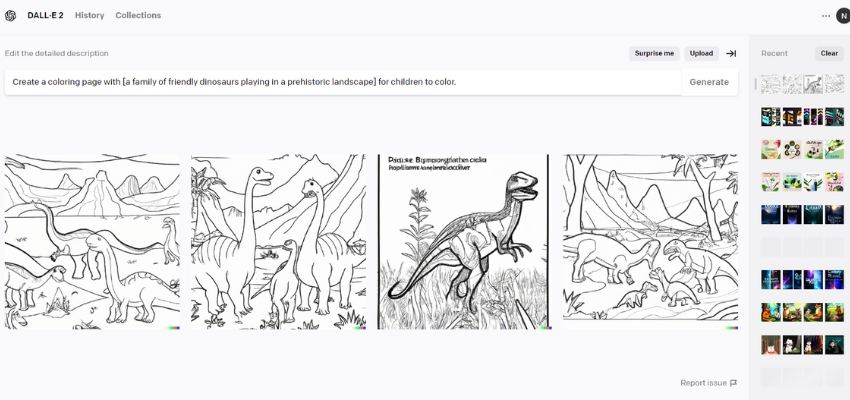
Coloring can help children relax instead of using a smartphone. With DALL-E 2, you can customize some coloring images appropriate to your children’s desires. The special thing is that all the images you created are unique. Let’s try the prompt below:
“Create a coloring page with [specific characters or objects, e.g., ‘a pirate ship sailing on rough seas’] for children to color.“
For example:
- Create a coloring page with [a family of friendly dinosaurs playing in a prehistoric landscape] for children to color.
- Create a coloring page with [a whimsical underwater scene featuring colorful fish, coral reefs, and a smiling octopus] for children to color.
- Create a coloring page with [a magical forest filled with fairies, unicorns, and talking animals] for children to color.
Logo
Logo plays a vital role in brand repositioning or identity. Consumers can easily identify your products or services through the logo. To brainstorm or have some ideas, please refer to the following formula:
“Design a [Style] logo for [Your Organization] reflecting its core values of [Your Values], incorporating [Specific Colors or Imagery].”
For example:
- Design a minimalist logo for Acme Innovations reflecting its core values of creativity, reliability, and innovation, incorporating a blend of sleek lines and geometric shapes in vibrant blue and green hues.
- Create a vintage-inspired logo for Heritage Foundation embodying its core values of tradition, community, and integrity, incorporating classic typography and imagery of a stylized oak tree in warm earthy tones.
- Develop a modern and dynamic logo for TechXpert Solutions, showcasing its core values of expertise, efficiency, and collaboration, incorporating futuristic elements and a bold electric blue and vibrant orange color palette.
Wrapping Up
DALL-E 2 is an exciting tool that allows users to generate images from textual descriptions, offering endless creative possibilities. To use DALL-E 2 effectively, enter clear and concise descriptions of the image you want to create. You should be specific with details such as colors, shapes, and objects to ensure accurate results. Also, do not forget to experiment with different prompts and refine your descriptions to achieve the desired outcome.
Once you have generated an image, you can customize it using the available editing tools. Whether you’re a designer, artist, or simply looking to boost your creativity, DALL-E 2 can be valuable. Learn how to use DALL-E 2 today and transform your ideas into stunning visuals!
Frequent Ask Question
How Do I Use Dall-E 2 Now?
To use it:
- Access this link: https://openai.com/dall-e-2 and click “Try DALL-E“
- Log in to your OpenAI account.
- Input a text description, and click Generate.
- Edit and save your favorite one.
What Are Some Ways That You Could Use Dall-E 2?
DALL-E 2 can be used for various purposes including but not limited to:
- Generate unique and creative artwork
- Design product prototypes and concepts
- Create visuals for marketing materials
- Enhance user experience in applications or websites with customized imagery
- Generate illustrations for storytelling or educational purposes
How Many Credits Do You Need To Make An Image On Dall·e 2?
During the Beta, users receive 50 free credits in the first month and 15 credits every subsequent month. Each use costs 1 credit, resulting in 3–4 images. Additionally, you can purchase 115 credits for $15.
Is Dall·e 2 Open Access?
Yes, DALL·E 2 is now available without a waitlist. It’s part of OpenAI’s mission to empower creativity while ensuring safety. The system has safety mitigations to prevent harmful or inappropriate content.
How Do I Use My Picture In Dall-E?
DALL-E 2 allows you to use your pictures in two ways:
- Image Variations: Upload an existing image and click “Generate variations” to create different versions with DALL-E 2’s modifications.
Editing: Click “Edit” and upload your image. You can then use text prompts to add or remove elements, change styles, or manipulate the image in various ways.