Broken link building is a widely used tactic driving valuable referral traffic. Despite its popularity, it does not always work, and you need a deep understanding of SEO to master it. Therefore, our guide will reveal step-by-step instructions on how to do broken link building to help you make the most of this strategy.
Broken Link Explanation & Its Benefits
Based on a survey with 800 experts in the SEO industry, 67.5% believe that backlinks have a significant impact on search engine rankings. Before diving into the detailed instructions, let’s start with the basics.
What Are Broken Links?
A broken link is a hyperlink on a webpage that doesn’t lead to a working page—it could be internal or external. Typically, links to external pages show a 404 Not Found error, meaning the page has been deleted.

404 Not Found error (Source: Hostinger)
Broken link building is the process of finding pages in your niche with non-working backlinks. Once you’ve seen these pages, you contact the websites’ admins and recommend they link to your content instead. It is a white hat technique since site owners link to your content because they genuinely like it.
Many choose this approach because it is a win-win solution—the web owners replace broken links on their site, and your page potentially gets a new quality backlink.
5 Benefits of Broken Link Building
There are various reasons why broken link building become a favored SEO tactic:
- Earning Quality Backlinks: You can get backlinks from pages with a strong reputation and audience through link building. Also, replacing broken links on those sites with your content adds diversity to your backlink profile and boosts your site’s authority.
- Driving Referral Traffic: Successful broken link building not only improves SEO but also brings in valuable traffic. When users click on the fixed links, they visit your site, increasing visibility and potential engagement.
- Improving Ranking: Backlinks are like votes for your site in the eyes of search engines. By getting you relevant and high-quality backlinks, broken link building effectively enhances your site’s SEO and search engine rankings.
- Higher Success Rate: Broken link building tends to be more successful than other tactics. By helping web admins fix issues on their sites, you build positive relationships, making them more likely to link to your content.
- Replacing Competitors’ Links: Building broken links helps you grab links pointing to your competitors. By fixing broken links, you redirect valuable links to your content, weakening your competitors and strengthening your position.
Does Broken Link Building Still Work?
Even when many marketers add broken link-building to their SEO strategy, some still doubt this off-page SEO tactic. Its effectiveness is a topic that creates varying opinions among SEO experts. Some believe it to be an almost pointless tactic, while others may argue differently.
Let’s clarify that broken link-building is not a flawed tactic. Its success or failure depends on various factors, and it’s crucial to understand that backlink building is challenging.
Our answer is that broken link-building can bring great results with the right mindset and process (revealed in the next section). Even though this strategy takes time, it’s still a good way to get high-quality links and improve your website’s Google ranking.
How To Do Broken Link Building Effectively
Now, we will explore the key steps to build broken links effectively. This process includes four steps:
- Look For Broken Pages With Backlinks
- Check The Link Prospects
- Create A Replacement Page
- Do Outreach
Step 1: Look For Broken Pages With Backlinks
Finding pages with many broken links is challenging without SEO tools. Even when you find dead pages manually, you’ll need a backlink checker to count their links. Then, how do I find broken link-building opportunities? Here are some ways to do this step seamlessly:
Find your competitors’ broken pages with backlinks
Your competitors likely have some inactive pages due to content changes and reorganization. If they forget to redirect old URLs, their backlinks could lead to broken pages. Here’s how to locate these inactive pages on your competitors’ sites using Ahrefs:
1. Visit Site Explorer.
2. Enter a competing domain.
3. Open the “Best by links” report.
4. Filter “404 not found” pages.
5. Arrange the report by Referring domains from highest to lowest.
For example, you offer online content marketing courses, and your competitor is Content Marketing Institute’s. After this step, you will know that their website has 134 inactive pages, some linked by over 50 referring domains.

You must review these pages for relevant topics to create content about. If there’s a page about “best content marketing courses,” and you have a blog category on courses, it’s a suitable topic to build links to.
Another way to find your competitors’ broken pages with backlinks is by using Check My Links, a free Chrome Extension.
Once installed, you’ll see its icon in the top right corner of Chrome. Click the icon, and the tool will automatically scan all the links on the page. It will then provide a report highlighting broken links (404 pages) or other errors – a quick and efficient way to find broken links on a webpage.
Discover broken pages about a topic
Traditionally, broken link building focused on a limited method, limiting chances to a few websites. A more effective solution is searching the web for broken pages with backlinks related to a specific topic. A tool that enables you to do this is Ahrefs’ Content Explorer. Here’s how to use it:
1. Visit Content Explorer and choose a topic.
2. Switch the search mode to “In title” and click search.
3. Filter for broken pages.
5. Filter for pages with at least 20 referring domains.
Here is an example of 188 broken pages with at least 20 backlinks about the topic “content marketing”:
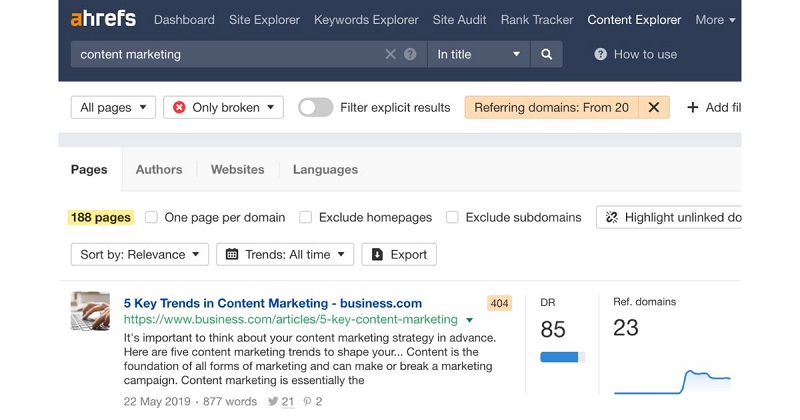
To confirm a broken page, click the title to open it in a new tab. Before analyzing these pages, remember to check their traffic. The backlinks may not be high quality if the page never had traffic.
Find broken links on resource pages
Resource pages gather and link to various resources related to a specific topic. These pages are rarely updated, making them likely to connect to inactive resources. Also, they have helpful resources, often drawing links from other sites.
To find these resource pages, use Google and apply search operators. Here are some templates to get you started:
- “useful links” AND [keyword]
- [keyword] intitle:”useful resources”
- [keyword] inurl:resources
- [keyword] + intitle:links
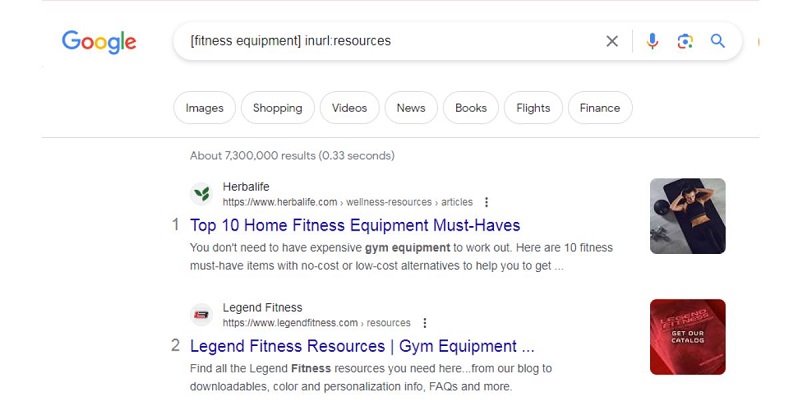
With a simple click, you will get a list of valuable resources related to your topic or niche. Now, you can use tools like Ahrefs’ SEO Toolbar, SEMrush’s Backlink Analytics, or Check My Links to detect invalid links on these pages.
Use The Wikipedia “Dead Link” Technique
Wikipedia is a goldmine for finding numerous 404 pages, especially those with dead links that have attracted substantial attention. Here is how to do broken link-building using this technique:
Begin a Google search with the following string:
site:wikipedia.org “keyword” intext:”dead link”
This search reveals Wikipedia pages with at least one broken external link.
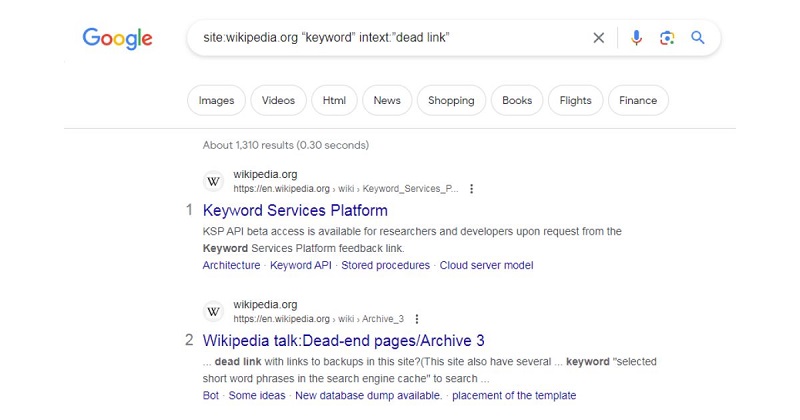
Remember to use a broad keyword to get more results related to your topic. Then, choose a Wikipedia page and scroll down to the References section. Broken links are ones marked as “Dead Link.”
However, replacing the link on Wikipedia with a link to your site is not recommended. Wikipedia links are nofollow, meaning they don’t pass link juice for SEO purposes. Also, Wikipedia editors are cautious, and unless your link genuinely deserves inclusion, it’s likely to be swiftly removed.
Instead, input the invalid link into a broken link builder. That tool will unveil other websites linking to the same page. Then, you can move to step 2.
See more: Social Backlinks.
Step 2: Check The Link Prospects
A mistake after identifying a broken link is creating a similar replacement page immediately. Your broken page may lack valuable backlinks, making crafting a replacement page pointless. To create an adequate replacement, you must understand why people link to the dead page.
The synchronization between your content and outreach will enhance success rates. Therefore, you should check the page’s link potential through these tasks:
Check link quality
Whether a link-building opportunity is worth your effort depends on the quality of the link. So, the first task is a quick spot-check to assess the desirability of backlinks to the dead page.
1. Visit Site Explorer.
2. Enter the URL of the dead page.
3. Open the Backlinks report.
4. Set the grouping mode to “One link per domain.”
5. Change “Show history” to “Don’t show.”

The Backlinks report within Ahrefs’ Site Explorer allows you to check the links and calculate their quality visually. While you can manually review, a more efficient approach is filtering the report for links with factors commonly associated with quality. These filters are a good starting point:
- Include only “Dofollow” links to exclude low-value links from directories, forums, and blog comments.
- Exclude subdomains to eliminate links from potentially low-quality and spammy sources.
- Set a minimum Domain Rating (DR) of 5+ to exclude links from very low-authority websites.
- Filter for links from domains with a minimum traffic of 20+, excluding those with little to no traffic.
Applying these filters to the Backlinks report may reduce the backlinks significantly, helping you save time.
Measure Authority Score
Semrush’s Authority Score (AS) metric measures authoritativeness on a scale of 0-100. It showcases the potential value of each backlink, with higher scores generally meaning more valuable backlinks for SEO. Follow these steps:
1. Sort the “Page AS” and “AS” spreadsheet columns in dropping order.
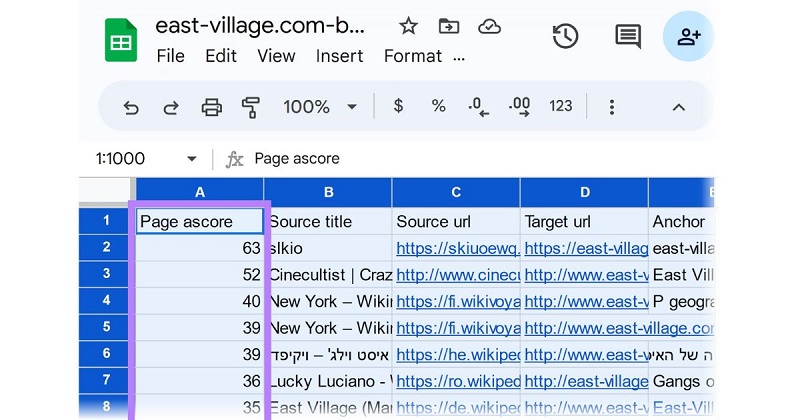
2. Review each broken link’s context by opening the source URL and finding the hyperlinked element.
3. Use the Wayback Machine to view the deleted page and identify a comparable resource on your website.
Find link reasons
Many might skip this step, but understanding why your broken page attracted links is crucial for creating effective outreach angles. Hence, this step involves analyzing the filtered report for link reasons, which generally fall into two broad types: general links and deep links.
- General links involve recommending the resource without a clear context for why it was linked. They provide limited insights for creating a better page.
- Deep links recommend a resource for a specific reason, and the context for the recommendation is visible. They provide valuable information for creating a replacement page.
Remember, some link reasons may be challenging to replicate. For example, original stats and research might be difficult to replace unless you can do the same level of analysis or study for your replacement page. In such cases, consider returning to step 1 and repeating the process.
Step 3: Create A Replacement Page
Now that you understand the reasons behind the links to the invalid page, it’s time to create a suitable replacement. Some copy the exact content from the dead link to their site, but it is unethical and not recommended. Instead, use the old content as a template to create a similar, improved, and up-to-date resource.
To bring out the best results, follow our detailed guide:
Create an outline
We want to create something similar to the dead page with a comparable purpose and content. So, after finding a dead link, put the inactive URL into Archive.org to see what the page used to be.
Based on that, you can create a rough outline and move to the next step.
Focus on linkable points
Remember the research you did in step 2 on the Authority Score? Include those points in your content to make your outreach more relevant. Also, double-check for accuracy and update any outdated information. If a deep link mentions an old statistic, replace it with a more recent one.
Find ways to refine it
Since most links to the dead page are likely general links, focus on overall improvements. Strengthen your content’s value proposition by addressing the “why” for general linkers. Consider these simple ways to improve content:
- Simplify: Make it more accessible and easier to understand.
- Visualize: Present the content with graphics.
- Templatize: Add a plug-and-play template.
- Rectify: Ensure accuracy by fixing any issues.
Step 4: Do Outreach
Outreach means contacting website owners, usually via email, to ask them to link to your site. In broken link building, you identify invalid backlinks and suggest an alternative. There are two main ways to do it:
- Shotgun Outreach is when you send the same email to everyone without personalization. It might get you some links, but the low success rate can be risky for your domain.
- Sniper Outreach involves sending unique, personalized emails to each person. It can get better results, but it takes more time and effort.
Our recommended approach is a mix of both. This combination will maximize efficiency and success in your link-building outreach strategy.
For each group of deep linkers, you must create a different template. For instance, we have three groups for the net worth page:
- People mention advice on growing net worth.
- People mention the definition of net worth.
- People mention how to calculate net worth.
Here is a simple template for the first group:
Dear [Name],
I recently read your post about [Topic], where you shared valuable advice on growing net worth, mentioning [Dead page author]. It appears that the page is no longer accessible.
If you’re still updating older posts, my guide expands on that advice and provides several additional tips. Here’s the link placement on your page:
[Screenshot]
No pressure—I just thought it might be beneficial.
Best,
[Your Name]
Similarly, try creating samples for the two remaining groups. While our example is typical and requires more creativity, we help you understand how to create personalized templates and enhance the outcomes of your backlink-building efforts.
For those dead pages with no apparent reason for linking, use a generic pitch. Highlight improvements you made and present a generic value proposition.
To make your outreach effective, send it to the person responsible for updating the webpage. Find them on the staff page, usually listed as an “editor,” “webmaster,” “blog manager,” or “web admin.” This extra effort is worth it for better results.

Understanding how to do broken link-building is crucial for improving your website’s authority and search engine rankings. If you need help on this process, contact us at ROI Digitally. We’re here to help you complete it smoothly and effectively.
Frequently Asked Questions
How do you make a broken link work?
To fix a broken link, find it on the webpage, get the correct URL of the intended resource, and update the link. You can contact the website owner or edit it yourself if you have control over the content.
Is link building illegal?
Building links is not against the law. There are proper and ethical ways to do it, known as white hat link-building techniques.
Conclusion
How to do broken link building is a complex process. However, using the link-building tactics we have shared above, you can boost your website’s credibility and enhance your online visibility.
The crucial factor is to send personalized outreach messages, ensuring a solid value proposition for different partners. Follow us for more valuable guidelines, and be sure to check out our latest blog about guest blogging.