
Are you struggling to improve your website’s visibility and rankings on search engines? With Google’s 200+ ranking factors and seemingly endless updates, an SEO audit requires an exhaustive list of tasks, potentially taking weeks and numerous resources.
ROI Digitally‘s experts simplify a 10-step SEO audit checklist, providing you with the tools to conduct a thorough SEO evaluation, technical aspects, on-page content, and off-page factors.
What is An SEO Audit?
An SEO audit comprehensively evaluates a website’s performance regarding search engine optimization (SEO) factors. It involves analyzing various SEO aspects such as technical SEO, on-page SEO, off-page SEO, and content quality to identify areas for improvement. The benefits of an SEO audit include:
- Improve website visibility on search engines.
- Identify technical issues hindering search engine crawling and indexing.
- Enhance user experience, leading to increased engagement and lower bounce rates.
- Identify keyword optimization opportunities to attract targeted traffic.
- Gain insights into competitors’ strategies to stay ahead in the digital landscape.

SEO audit checklist and elements.
10 Major Types of SEO Audits
- Competitive SEO Audit
Ever wonder how your competitors consistently rank higher in search engine results? Conducting a competitive SEO audit can reveal their strategies and help you succeed.
Through a competitive SEO audit, you discover they’ve secured high-quality backlinks from local food bloggers and have optimized their website for local search terms like “best coffee in [city].” Armed with this information, you can devise a strategy to replicate their success by contacting local influencers or fine-tuning your website’s local SEO elements.

Ahrefs can audit competitor’s website.
- In-depth Technical SEO Audits
An in-depth technical SEO audit means analyzing a website’s technical website factors to ensure it’s optimized for search engine crawling and indexing. This includes examining site speed, mobile friendliness, crawl errors, and structured data markup.
According to a report, pages that load within 2 seconds have an average bounce rate of 9%, compared to 38% for pages loading in 5 seconds.
You can identify technical issues like:
- Broken links
- Crawl errors
- Duplicate content
Here’s a snapshot of what an in-depth technical SEO audit may entail:
- Examination of website speed and performance metrics.
- Analysis of XML sitemap and robots.txt file for proper indexing instructions.
- Evaluation of website structure, including URL structure and internal linking.
- Assessment of mobile-friendliness and responsive design.
- Inspection of schema markup implementation for enhanced search engine understanding.
- Identification and rectification of crawl errors and server response codes.

- SEO Content Audits
Businesses with optimized content witness a 14.6% increase in organic search traffic. That’s why you can create a prioritized improvement plan by identifying outdated information, thin content (content lacking depth), or keyword gaps (missing terms users search for).
For instance, an e-commerce website might find through an SEO content audit that several product descriptions are generic and don’t target relevant long-tail keywords. This audit would reveal an opportunity to revamp these descriptions with keyword-rich content highlighting unique product features and benefits.
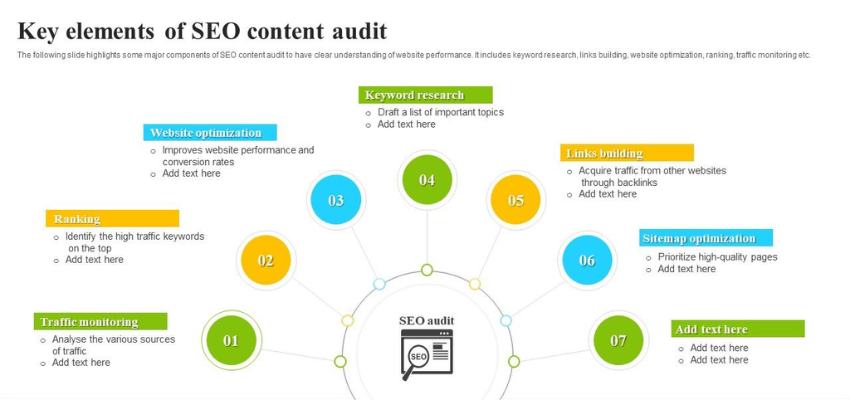
Key elements of SEO content audit.
- Keyword Research Audit
Keyword Research Audit delves into the chosen keywords’ effectiveness, relevance, and potential for driving organic traffic. It begins by examining the current keyword list and assessing its performance in search volume, competition, and relevance to the target audience. Tools like Google Keyword Planner, SEMrush, or Ahrefs can aid this analysis.
For instance, a clothing retailer may have initially targeted keywords like “men’s shirts” and “women’s dresses.” However, a keyword audit might reveal that long-tail keywords such as “organic cotton men’s shirts” or “sustainable women’s dresses” could attract more qualified traffic. Identifying these opportunities allows the retailer to adjust its keyword strategy, aligning better with its audience’s preferences and search behavior.

You can research keyword volume to optimize your content.
- On-page SEO Audit
An on-page SEO audit optimizes individual web pages to improve search engine rankings and attract more organic traffic. This audit involves analyzing various elements directly within the pages themselves, including:
- Keyword usage: Ensure relevant keywords are incorporated naturally into page titles, headings, meta descriptions, and content.
- Content quality: Evaluate content depth, relevance, and uniqueness to provide value to users and satisfy search intent.
- Meta tags: Review meta titles, meta descriptions, and other HTML tags for optimization and relevance.
- URL structure: Check URL structures for readability and include target keywords when appropriate.
- Internal linking: Assess internal link structures to facilitate navigation and distribute link equity effectively.
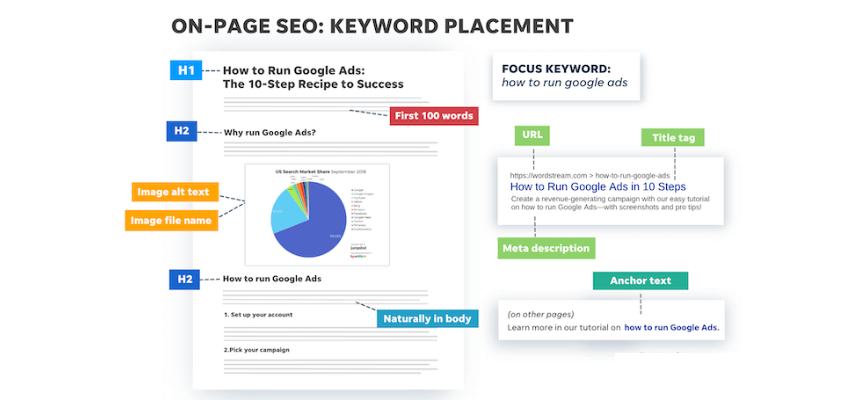
Elements of on-page SEO. (Source: Wordstrem)
- Off-page SEO Audit
An off-page SEO audit evaluates external factors influencing a website’s search engine rankings and authority: backlink quality, social signals, brand mentions, and online reputation across various platforms and websites. It assesses the effectiveness of off-site optimization efforts and identifies opportunities for improvement.
Through an off-page SEO audit, businesses gain insights into their digital footprint beyond their website, understanding how they are perceived and connected within the broader online ecosystem. Businesses can refine their link-building strategies and enhance their overall off-page SEO efforts by analyzing backlink profiles and assessing the quality and relevance of external links.

Off-page SEO audit checklist.
- Penalty Recovery Audits
A penalty recovery audit aims to regain search engine trust and restore a website’s rankings and visibility. Every month, Google issues over 400,000 manual penalties, which doesn’t even cover the websites affected by core algorithm updates.
The initial step towards successfully recovering from a Google penalty involves identifying the specific type of penalty that has been imposed. Here’s a concise breakdown of the various penalty types you may encounter:
- Manual Penalty: Imposed directly by a member of Google’s team after manual review.
- Algorithmic Penalty: Automatically triggered by Google’s algorithms.
- Content-related Penalty: Resulting from issues such as duplicated content or excessive keyword usage.
- Link-related Penalty: Arising from questionable or low-quality backlinks.
- User-generated Spam Penalty: Targeting spammy content generated by users.
- Technical Penalty: Issued for violations like cloaking or other technical malpractices.
Adherence to guidelines is paramount to shielding your website from the repercussions of a Google penalty. Maintaining original, valuable, and user-friendly content is crucial, as is consistently monitoring your backlink profile to detect any potential issues.

Some tools can help penalty recovery audit.
- Link Profile Audits
Over time, the significance of backlinks in SEO has remained constant, although the specifics may have evolved. Essentially, the more high-quality and relevant links a website garners, the more favorable its performance in Google’s SERPs tends to be.
In recent years, one critical area of concern has been the presence of toxic links. The introduction of Google’s Penguin update in 2012 marked a significant shift in SEO dynamics, targeting questionable backlinks.
By 2016, Penguin had become integrated into Google’s core algorithm, operating in real-time rather than through periodic updates. Consequently, the ongoing evaluation of toxic links became a continuous endeavor, diminishing the demand for standalone link audits.
- Social Media Audits
A social media audit comprehensively reviews a brand’s channels, content, and performance metrics. During a social media audit, several key aspects are typically examined:
- Evaluate content quality and relevance across various social media platforms.
- Analyze engagement metrics, including likes, comments, and shares to gauge audience interaction.
- Examine audience demographics and growth trends to understand the reach and appeal of the content.
- Assess consistency in brand voice and messaging to ensure alignment with overall marketing objectives.
- Review the effectiveness of paid advertising campaigns in reaching target audiences and driving desired actions.
- Compare and contrast competitors’ social media strategies to identify strengths and weaknesses.
- Ensure compliance with platform guidelines and best practices to maintain a positive brand reputation.
- Identify opportunities for improvement and optimization to enhance overall social media performance and impact.

Evaluate content quality and analyze engagement metrics.
- Local SEO Audits
Local SEO audits are check-ups for your online presence to attract more local customers. They assess how your business shows up in local search results (like Google Maps and local searches) and identify areas for improvement.
These audits examine various aspects of a website’s optimization for local SEO strategy, including:
- Google My Business profile completeness
- Local keyword targeting
- NAP (Name, Address, Phone number) consistency
- Online reviews
- Local backlinks
Google Business Profile is your free business listing on Google Search and Maps. The audit will check if your profile:
- Optimized with accurate information (including address, hours, and category)
- Have good-quality photos
- Managed with things like posts and responding to reviews.

Analyze the business’s online reviews across various platforms.
SEO Audit Checklist To Learn and Apply
- Identify link-building opportunities
Search engines view backlinks as an indication of appointed trust, which affects how highly your website ranks in search results. Here is how to do it:
- Identifying well-known websites and publications in your industry and niche.
- Reach out to them with guest post ideas or data you can contribute to their existing content.
- Publish a guest post and link it back to your relevant website links.
Backlink tools check on your website’s links to guide your link-building.
According to 42% of SEO professionals (1), brand mention link building is one of the most effective ways to build new links for a website. Use tools or manual searches to find spots where your brand is mentioned online but not linked back to your website. Contact the website owner and politely request a backlink.
Participate in industry-related Q&A forums and discussions such as Quora and Reddit. Groups are potential sources generating questions and insights your website can reply to. Provide valuable answers and news, including links to your content for further details.
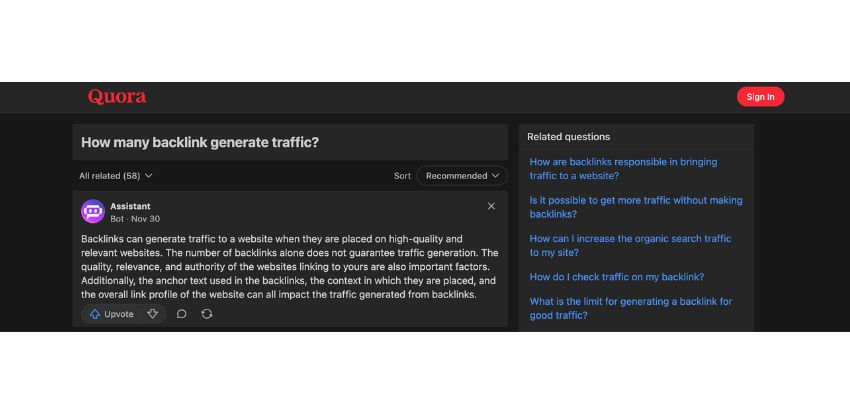
Sharing platforms for questions is a potential channel for backlinks.
- Find potential information architecture improvements
Identifying potential information architecture focuses on optimizing a website’s structure for search engines and users.
You need to map out the typical user journey on your website. How do users find the information they need? Are there logical flows to transfer from landing pages to deeper content? Look for buttons or areas where users might get lost or frustrated.
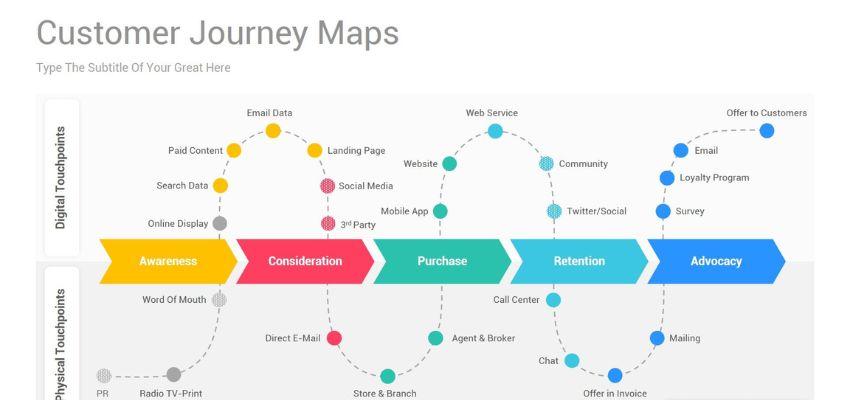
Be specific when visiting your website as a customer to increase weak points.
Identify relevant keywords your target audience is searching for. Analyze your existing content to see where keyword gaps exist. If some keywords are missing, you need to create new content. Otherwise, optimize existing content for these keywords and improve its placement in search results.
Over half of all web traffic globally comes from mobile devices. All brands should ensure your website offers a convenient user experience on all devices. Is your website mobile-friendly? Does your content load quickly and appear correctly on different screen sizes?
- Find (and fix) thin content
Start by reviewing your website content individually. Look for pages to be short, lack depth, or offer minimal value to users. These pages might be repetitive, poorly written, or simply not informative enough.
Google Search Console‘s Coverage report can highlight potential thin content issues. Look for pages marked with warnings like “no index” or “dropped”. They might indicate Google doesn’t consider them valuable enough to index.
Regularly checking Google Search Console to update the latest warning from Google.
Analyze your website traffic data with tools like Google Analytics. Pages with low traffic, high bounce rates, and short average session times might indicate thin content.
Check out Google Analytics for the website’s metrics.
If a page offers minimal value and can’t be easily improved, consider deleting it. This is especially true for duplicate content or pages serving no real purpose.
For pages with some potential, rewrite and expand the content to offer more value. You should conduct thorough research and provide comprehensive details on the topic.
- Identify (and fix) duplicate content
Start by manually reviewing your website content. Especially pages with similar themes or product categories. Look for identical or highly similar text blocks.
Website crawler tools like Screaming Frog or SEMrush can scan your website. Quickly, it identifies pages with duplicate content based on title tags, meta descriptions, and even content similarities.
Applying Screaming Frog in finding duplicate contents effectively.
Tools like Copyscape can help identify instances of your content appearing on other websites. It helps to avoid plagiarism and create unique content.
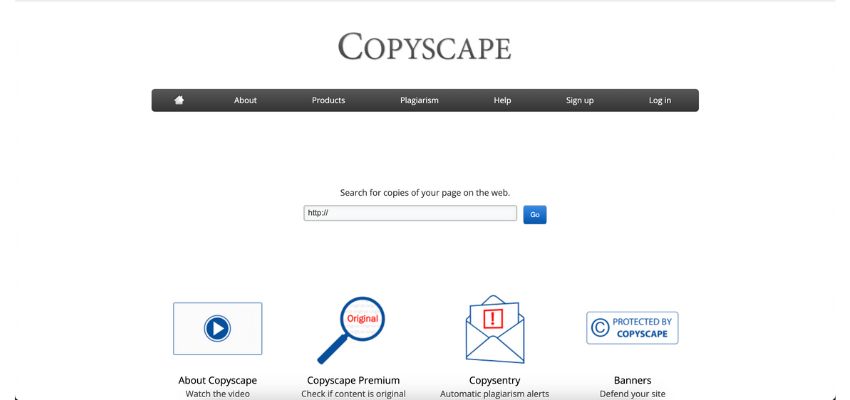
Make sure your content is organic and valuable.
If you have a preferred version of a page (original), implement a 301 redirect from the duplicate page to the original. This signals to search engines which the duplicate is no longer relevant. It directs users to the correct version.
For pages with slightly different content targeting the same topic (e.g., products), use a “rel=canonical” tag to specify the original or preferred version. This avoids duplicate penalties while maintaining separate URLs.
- Scan for keyword optimization
In an SEO audit, analyzing your website’s content and structure to see how well it’s optimized for relevant keywords is a significant task.
The first step is understanding the keywords your target audience uses to search. Listing out all options for products, services, or information related to your niche.

Google Keyword Planner is a great option for identifying your keywords goals
Analyze your website’s content (pages, blog posts, product descriptions) to see how effectively you’ve worked your target keywords. Focus on including keywords in strategic locations like page titles, meta descriptions, header tags (H1, H2, etc.), and the body.
Prioritize a mix of high-value keywords with huge search volume but manageable competition. Also add, alongside some longer-tail keywords (more specific keyword phrases) with lower competition. A study highlights long-tail keywords make up over 90% of all web searches.
Ensure your content is well-structured, informative, and addresses the specific needs. Also, search for frequent questions to make sure users can find answers when searching for those keywords.
- Optimize metadata
Title tags, meta descriptions, and other metadata elements show search engines understand your content and how users perceive it

Metadata plays a crucial role in SEO Needs.
To optimize title tags, you need to improve:
- Clarity and Relevance: Ensure your title tags clearly and concisely convey your page’s topic.
- Target Keywords: Include your target keywords naturally within the title tag, but avoid keyword stuffing, which can be viewed as web spam.
- Character Limits: Search engines typically display around 60 characters of a title tag. Keep your titles within this limit to avoid truncation in SERPs.
To optimize meta descriptions, you need to improve:

An example of Metatag in Google Search.
- Compelling Call to Action: Craft a compelling meta description to encourage users to click on your result. Briefly highlight the value your content offers.
- Keyword Integration: Consider including relevant keywords naturally within the description. This is the next thing viewers read after the title.
- Character Limits: Aim for meta descriptions between 150-160 characters for full appearance.
- Identify page update opportunities
Find existing website pages could benefit from improvements to enhance a brand’s search engine ranking and user experience. Start by thoroughly reviewing your website’s content. Then, answer the questions below about different angles of content audit:

Wittypen is a great tool for SEO experts in checking content audits.
- Lack of Depth: Are pages thin or overly promotional? Are they offering minimal value to users?
- Outdated: Does the content contain outdated information or lack freshness? Over the years, is there any news or updated data needed to change?
- Duplicate Content: Are there instances of duplicate content across multiple pages?
- Target Irrelevant Keywords: Do pages target irrelevant keywords not align with your overall SEO strategy? For example, if you are mentioning environmentally friendly refrigerators, “Low-quality refrigerators” are not a good choice.
During your analysis, prioritize user experience. Does the content provide value, and answer user queries? Always offer a clear and engaging experience for every user. UX improvements led to conversion rate increases ranging from 37% to 400%.
- Run page speed analytics
Large images can significantly slow down page load times. Consider image compression tools like TinyPNG and Kraken.io or using appropriate image formats.

Automate your image in smaller formats with tools such as TinyPNG.
Every element on your page (image, script, etc.) requires an HTTP request. Minimize unnecessary requests by combining files or leveraging techniques like lazy loading.
In computing, caching refers to a hardware or software component that stores temporary copies of data. Caching allows browsers to store website elements locally and increases the web’s speed.

Web Page Test is a well-known tool for page speed analytics.
- Scan for site errors
Scanning for website errors helps identify potential issues affecting user experience, SEO performance, and even website security.
Tools for Scanning Website Errors:
- Google Search Console: This free tool by Google offers website error monitoring features. It can identify broken links, server errors, and mobile usability issues.
- SEMrush: SEMrush offers a paid website audit tool with error detection, broken link checking, and SEO performance insights.

SEMrush provides a detailed report of your website issues.
3 Steps to scan for site errors:
- Prioritize Critical Errors: Focus on fixing critical errors significantly impacting user experience or SEO performance. Then, come to small issues or improved experiences.
- Develop a Fixing Plan: Create a plan to address the identified errors based on the tool’s recommendations and your technical expertise.
- Re-scan After Fixing: Once you’ve fixed errors, re-scan your website to verify the issues have been resolved. Do this monthly for the best result.
- Switch from HTTP to HTTPS
Differences between HTTP vs. HTTPS include:
- HTTP (Hypertext Transfer Protocol): The standard protocol for communication between web servers and browsers. However, HTTP transmits data in plain text, making it vulnerable to security.
- HTTPS (Hypertext Transfer Protocol Secure): HTTPS builds upon HTTP by protecting communication between the browser and server. This Secure scrambles data, making it unreadable to anyone intercepting it.

Ensure HTTPS is enabled for all pages on your website
By encrypting data transfer, HTTPS guards against unwanted access to sensitive user data. Including credit card numbers, login credentials, and form submissions.
The symbol and “HTTPS” indicator in the address bar. It assures users your website is secure and protects their data. This fosters trust and encourages users to interact with your website confidently.
Search engines like Google have increasingly prioritized HTTPS as a ranking factor. In 2014, Google publicly announced HTTPS is a “ranking signal” used in their search algorithms.
4 Needed Tools for A Comprehensive SEO Audit
- SEO Softwares
Website owners and marketers can optimize their online efficiency for search engines using SEO tools. These tools provide a number of features, such as competition analysis to comprehend your rivals’ tactics. They also provide on-page optimization to customize website keywords. In some paid options, you can find keyword research to determine what customers are searching for.
SEO software such as Semrush, Ahrefs, and Moz Pro can save you time, increase your website’s rating in search results (which could result in more traffic), and keep you updated on the newest SEO trends by offering useful data and automating processes.
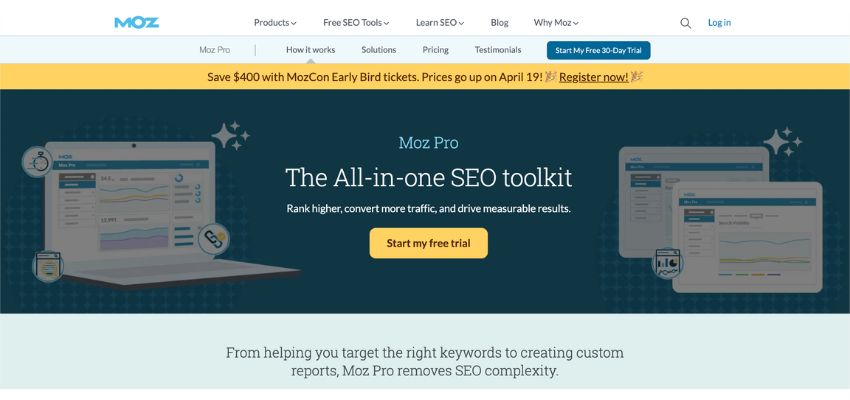
MozPro is also a great option as an SEO tool.
It is a free webmaster tool providing information on how to improve your website’s search engine optimization. It monitors search engine traffic, and finds technical problems lowering your rating. You can also assess how mobile-friendly your website is.
Additionally, you can test how rich results, such as star ratings, show up in searches by submitting your sitemap. You can increase your website’s rating and visibility in search results for free by utilising Search Console’s data and resolving any problems.
Google Analytics is a free web analytics service from Google helping website owners understand how users interact with their websites. It tracks website traffic, user demographics, user behavior, views, clicks, and even conversions.
It provides insights into where your traffic comes from, what content resonates with users, and how they navigate your website. Google Analytics empowers you to make data-driven decisions to improve your website’s overall effectiveness.
- Page Speed Tools
- Google PageSpeed Insights: This tool analyzes your website’s mobile and desktop versions. Then it provides performance scores and specific recommendations for improvement.
- GTmetrix: Another free tool offering page speed analysis. GTmetrix provides detailed performance reports with actionable insights.

Just by pasting your website link, you can check its speed.
- Pingdom Website Speed Test: This paid tool offers more in-depth analysis and historical data tracking compared to free options.
- WebPageTest: This paid tool allows for more control over testing parameters. It is very useful for advanced users.
Conclusion
In conclusion, a comprehensive SEO audit checklist is a tool for businesses aiming to enhance their online visibility and attract organic traffic. By systematically reviewing various elements such as website structure, content quality, backlink profile, and and technical aspects, businesses can identify areas for improvement and develop effective SEO strategies.
Take action now for expert guidance and assistance in optimizing your website for better search engine performance. Contact ROI Digitally, where our SEO specialists can help you unlock the full potential of your online presence and drive sustainable growth.
Frequent Ask Question
What Is The Purpose Of An SEO Audit Checklist?
Evaluates various aspects of a website’s search engine optimization. It helps identify strengths, weaknesses, and opportunities for improvement in areas such as technical SEO, content quality, and backlink profile.
How Often Should I Conduct An SEO Audit Using A Checklist?
At least once every six months is generally recommended to ensure ongoing optimization. However, the frequency of SEO audits depends on factors such as the website’s size, the pace of content updates, and changes in search engine algorithms.
Can I Conduct An SEO Audit Checklist On My Own, Or Do I Need Professional Assistance?
Yes. Website owners can perform some basic aspects of an SEO audit checklist. However, a thorough audit often requires specialized knowledge and tools. Professional assistance from SEO experts can ensure a comprehensive evaluation and implementation of effective optimization strategies.

Jeng Nguyen has nearly 10 years of experience ranging from project management, operations, business development, customer service, content creation, video production, photography, website development, social media marketing, email marketing, advertising, SEO and sales.
Well-known as an ace Digital Marketing expert throughout various industries in Vietnam, Australia and the USA - Jeng is known for the success rate that he achieves whilst finding solutions tailored best for each unique business.
Jeng's mission is to revolutionize customer experience, starting with the journey of Attraction - Interest - Desire – Action. Together with a multi-expertise team at ROI Digitally, Jeng aims to provide businesses unprecedented breakthroughs in Return-on Investment from their customers.