With the advent of intelligence technologies, content creation has gotten considerably easier in the modern era. One such potent tool is Jasper AI, which is made to work for everyone, independent of writing or AI experience.
If you’re curious about how to use Jasper AI, you’ve come to the place. A detailed explanation of Jasper AI applications will be given in this article. You can take advantage of its ability to produce excellent content even if you have no prior AI knowledge. So let’s delve into the steps and explore how to maximize your Jasper AI usage.
What is Jasper AI?
Jasper AI, previously known as Jarvis, is a writing assistant powered by artificial intelligence. It helps users produce high-quality and various types of content quickly and efficiently. It utilizes natural language processing (NLP) to comprehend your requirements. Moreover, Jasper AI also generates text formats such as:
- Blog posts
- Product descriptions
- Social media captions
- Video scripts
- SEO articles
The writers can input information and follow some steps provided by Jasper AI to create content. This tool will help them generate ideas and customize outputs to match their writing style.

Getting Started With Jasper AI
You should select a plan that suits your needs when using Jasper AI. When your account is successfully registered, you will have access to various templates that make it easy for you to create content effortlessly and efficiently.
Setting Up Your Account And Choosing A Plan
First, you should choose the plan that best fits your needs. Jasper AI typically offers plans tailored to individual users, teams, and enterprises. Consider factors such as the number of users and specific features included.
Billing Information
To finish the subscription procedure, you must provide your billing information. You may have monthly or yearly billing choices, depending on the package. You should review the pricing details and choose a suitable payment schedule.

Free trial code (if applicable)
If you have a free trial code, enter it during sign-up. This allows you to explore Jasper AI’s capabilities without an immediate financial commitment.
Create Your Password
Remember to set up a secure password for your Jasper AI account. Ensure it meets the platform’s security requirements to protect your account information.
For successful email verification, you must follow the instructions before clicking the verification link in your email.
Plan Features
Every Jasper plan has various features to enhance your content creation experience. Explore tools such as:
- Copywriting templates and workflows
- Document editor
- Plagiarism checker
- Language translation features
- Jasper Everywhere Chrome Extension
Jasper Interface And Tools
Once your account is set up, familiarizing yourself with the Jasper interface is crucial. This section provides insights into navigating the dashboard and utilizing the available tools effectively.

| Recent documents and AI outputs | From the dashboard, you can access your documents then the AI tool will generate your ideas directly. This section gives you an overview of your recent activities. |
Content organization | Jasper helps you maintain your orders and multiple projects by organizing your content for campaigns and related documents. |
| Brand Voice Customization | Users can explore the “Brand Voice” feature on the left sidebar. To customize Jasper’s understanding of their brand, do not forget to upload relevant documents such as interviews, chat transcripts, and social media posts. |
| Frequently Used Tools | In the dashboard, it is convenient for you to find tools, workflows, and templates, including a plagiarism checker, language translation, and document editor. |
| Favorites Sidebar | By clicking “Star” on your favorite documents and templates, you will mark your preferred resources and enhance your workflow. |
| AI Chat Assistance | Jasper AI will respond promptly and assist users if they need the dashboard’s chat feature to solve their problems through the platform. |
| Image Generation | You can generate images to complete your content by clicking on the relevant option in the dashboard. |
Responsive Interface | The responsive interface ensures an enjoyable user experience by optimizing visibility and customizing the dashboard layout to suit users’ needs. |
| Search and Filter Options | When your content library expands, you need this feature to search and filter options to find documents and templates. Users can organize items in specific locations before the system enhances accessibility for better workflow. |
| Stay Organized with Campaigns | It is difficult for writers to manage multiple projects at the same time. Fortunately, the campaign organization feature helps them to effortlessly arrange and organize their content by managing it in one space. |
| Customize Your Writing Style | Before diving into content creation, writers should customize Jasper in a unique writing style. Writers should explore “Brand Voice” features that provide additional context and files to enhance customization. |
Different Types of Content You Can Create
Jasper AI offers diverse templates, making it versatile for various content creation needs. This section explores the different types of content you can generate with Jasper, from blog posts to social media content and beyond.
- Amazon Product Descriptions
- Blog Post Introductions
- Business Names
- Landing Pages
- Social Media Posts
- Customer Review Responses
- And More
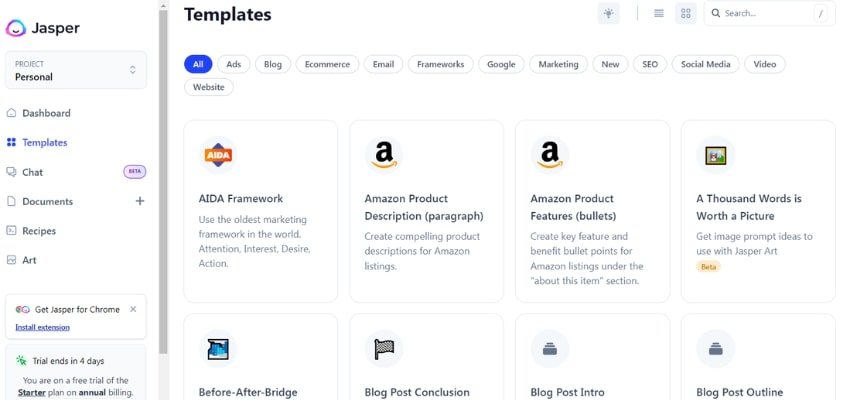
Experimenting with different templates is a way to discover Jasper’s capabilities. Jasper AI is a potential AI tool for creating engaging and high-quality content.
It is exciting to know more about content creation with Jasper AI because this process unlocks Jasper’s potential for effective communication.
How To Use Jasper AI To Create Short-form Content?
Short-form content is an effective way to attract readers by conveying thoughtful ideas. The process of producing this content becomes more effective by following the guide below.
Step 1: Access Jasper Templates
Jasper provides a variety of templates tailored for short-form content creation. To start, click the “Create Content” button on your dashboard.
Choose from options like:
- Blank Document: For a free-form experience.
- New Document from Template: Select from a range of templates.

Step 2: Choose the Right Template
Jasper provides some templates for:
- Social Media Posts
- Tweets
- Instagram Captions
- TikTok Captions
- LinkedIn Posts
- Ads (Google, Facebook, etc.)
- And More
Step 3: Customize Templates
Filling in the template fields is the first step to generate a prompt. Detailed information is necessary to ensure Jasper understands the content requirements. The more context you provide, the more accurate and relevant the output will be.
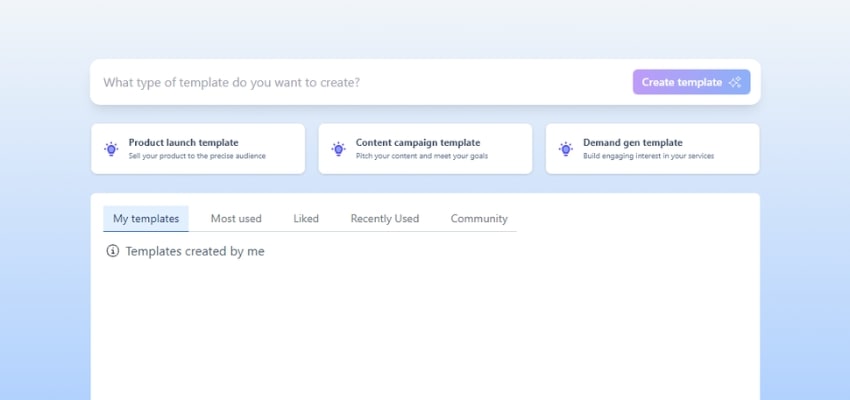
Jasper also allows us to create a personalized template for private needs.
Step 4: Generate Content
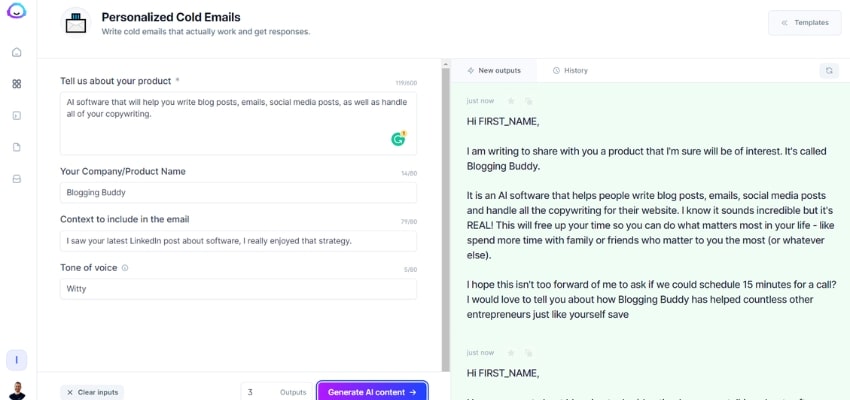
Click “Generate Content” to see the output on the right side of the screen. Jasper allows you to create multiple versions simultaneously, providing flexibility in choosing the most suitable content for your needs.
NOTE: Jasper is a tool that can be utilized for creating catchy headlines. These headlines are suitable for various social media platforms. In addition to headlines, Jasper can also create captivating captions and content snippets. These templates help tailor content for specific channels, ensuring engaging and platform-specific content creation.
Step 5: Experiment with Blank Documents
For a more free-form approach, use a blank document. Click on the eye symbol at the top middle of your screen to edit without templates. Hover over the last word in Jasper’s output, and click “continue writing” or use Ctrl+J to extend the content based on your original prompt.

Step 6: Integrate AI Art
Explore the option to create art alongside your short-form content. Type in your basic prompt, enhance it for more details, and fill out additional fields like mood, medium, and artistic inspiration.
By following these steps, you can create short-form content with the helping hand of Jasper AI. Experiment with different templates and approaches to discover how Jasper can elevate your communication on social media and other platforms.
Step 7: Use Different Templates to Create Various Types of Short-form Content
Create Engaging Social Media Posts
Jasper AI simplifies the process of crafting compelling social media content. To generate attention-grabbing posts, choose the “Social Media Posts” template. It would help if you customized your prompts with relevant hashtags, included concise messaging, and experimented with tones to align with your brand.

Tip: Utilize Jasper’s multiple output feature to explore various versions, ensuring variety in your social media strategy.
Craft Email Subject Lines
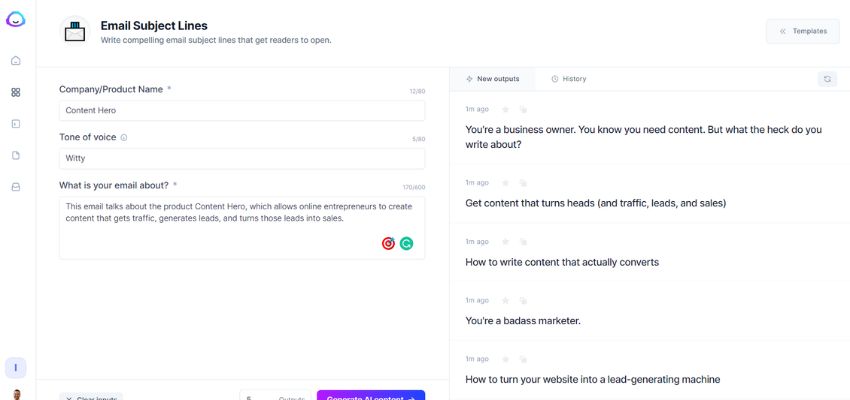
Elevating email marketing is possible with Jasper AI’s proficiency. This proficiency lies in crafting catchy subject lines. The “Email Subject Lines” template is an option to consider. Inputting key details about content or offers is necessary in this template.
You are encouraged to experiment with different tones and lengths because they help discover the most effective approach. A tip to remember is to keep subject lines concise, and making them curiosity-inducing can boost open rates.
Generate TikTok Captions
Jasper AI’s “TikTok Captions” template proves invaluable for those diving into the world of short-form video content. With a simple prompt detailing the desired mood and style, the template generates engaging, playful, or informative captions to boost video impact. Remember, a touch of humor or curiosity within the limited caption space can ignite user interest and draw them in.

Craft Blog Post Introductions
Even in short form, blog post introductions play a crucial role. Opt for the “Blog Post Introductions” template to create impactful openings. Experiment with different hooks and tones to captivate readers instantly.
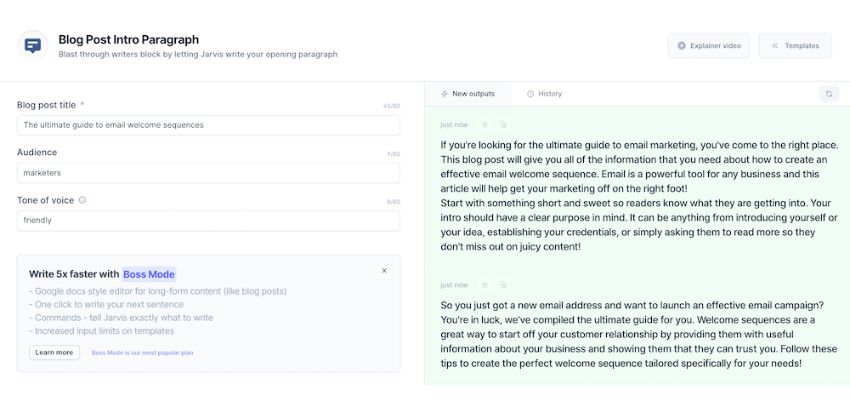
For example, when starting your blog, you can mention a question “Do you know that coffee was banned in Europe? Although it is known as a popular drink worldwide, it was forbidden in some European countries in the 17th century. But what is the reason? Let’s explore the interesting reason behind this ban and coffee’s journey full of ups and downs to become an indispensable part of modern culture.”
The information about the ban on coffee in Europe is an interesting historical fact that many people may not know. This further urges readers to continue reading to explore more details.
The beginning of the article not only raises questions and surprising facts but also promises to explain the reasons and journey of coffee. This helps readers navigate the content and look forward to other interesting information in the article.
Creating Google My Business Descriptions
Businesses can leverage Jasper AI to enhance their online presence through compelling descriptions on Google. Select the “Google My Business Profiles” template and provide critical details. Keep the content informative yet concise for easy reading.
Tip: Include essential business information and highlight unique selling points to attract potential customers searching on Google.
About unique selling points, you can add some highlights of materials, ingredients, formula, or price. In particular, you should let readers know the value of the service or goods you can provide.
For example, if you sell cake, you can write about your traditional recipes, which another store may not have. If you have a lower price but maintain the quality, do not forget to mention it, such as “Cheap but quality SEO service” or “Affordable car”.
How to use Jasper AI boss mode and create long-form content?
Jasper AI provides a smooth method to produce large pieces without the usual time commitment. Long-form material is essential for communicating detailed information. The process of using Jasper AI to produce engaging long-form content will be covered in detail in this guide.
Blog Posts
Step 1: Open Jasper AI and click on “Create Content.”
Step 2: Choose the “New Blog Post” template for a structured start.
Step 3: Fill in details like blog title, key points, and target audience.
Step 4: Experiment with different prompts for varied perspectives.
Step 5: Click “Generate Content” and refine as needed.
Helpful Tips:
- Use the blog post outline template for a structured approach.
- Incorporate brand voice adjustments for a personalized touch.

Product Descriptions
Step 1: Select the “Amazon Product Descriptions” template.
Step 2: Input product details, features, and benefits.
Step 3: Experiment with tone to match product type (formal, casual).
Step 4: Generate multiple versions for product variety.
Step 5: Edit and refine for clarity and persuasion.
Helpful Tips:
- Highlight unique selling points prominently.
- Ensure a concise yet compelling description.

Whitepapers
Step 1: Opt for a blank document for a more comprehensive start.
Step 2: Structure the whitepaper with sections and headings.
Step 3: Provide in-depth information on the chosen topic.
Step 4: Use Jasper’s AI writing workflows for detailed content.
Step 5: Proofread and ensure a cohesive flow.
Helpful Tips:
- Utilize Jasper’s workflow for well-structured whitepapers.
- Incorporate authoritative language for credibility.

Email Campaigns
Step 1: Choose the “Email Campaigns” template.
Step 2: Specify campaign details, goals, and target audience.
Step 3: Experiment with different subject lines and email bodies.
Step 4: Use Jasper AI writing workflows for campaign sequences.
Step 5: Edit for the consistency of emails.
Helpful Tips:
- Create engaging subject lines to boost open rates.
- Ensure a clear call to action in each email.
E-books
Step 1: Begin with a blank document for flexibility.
Step 2: Use Jasper AI to outline chapters and critical content areas.

Step 3: Provide detailed information for each section, so that Jasper can create details.

Step 4: Use Jasper AI’s language translation for global reach.
Step 5: Edit and polish for a professional finish.
Helpful Tips:
- Include visuals and graphics for enhanced readability.
- Keep chapters concise for reader engagement.
17 Templates of Jasper AI
Jasper AI provides 17 templates for content creation, including product descriptions and engaging captions that offer users high-quality content.
| Product Descriptions on Amazon | Product Descriptions or Listings can impact SEO ranking when buyers search for a product. With essential and captivating information, your store will incite customers to purchase. |
| Introductions to Blog Posts | An attractive introduction can draw readers in and encourage them to continue reading. Using Jasper AI, you can quickly create introductions that pique readers’ interest and set the tone for the rest of the post. |
| Blog Posts | Jasper AI can assist with crafting engaging blog posts themselves. Whether you’re writing about industry trends, product reviews, or personal experiences, Jasper AI’s templates can provide structure and inspiration for your content. |
| Company Names | For businesses, creating a strong brand identity is essential, and choosing the right company name is a critical first step. Jasper AI offers templates for generating creative and memorable company names that resonate with your target audience. |
| Responses to Customer Reviews | Responding to customer reviews is vital for maintaining a positive reputation and building consumer trust. With Jasper AI, you can craft personalized responses demonstrating your customer satisfaction commitment. |
| Subject Lines for Emails | Subject lines are the first thing customers see when they receive an email. That’s why they are crucial for grabbing attention and encouraging opening. Jasper AI’s templates can help you create subject lines that increase the open rate. |
| Enumerated Features and Advantages | Highlighting the unique selling points of a product or service is important to encourage buyers to choose yours. But it is easier if you know how to generate lists that clearly outline the benefits and advantages with the help of Jasper AI. |
| Google My Business Accounts | Optimizing your Google My Business listing is essential for local SEO and attracting customers in your area. This can include accurate information, descriptions, and photos to attract local customers. |
| Instagram Captions | You have a beautiful mountain picture, but you do not know how to write a captivating caption to attract more impressions. Jasper can create an example “Breathe in the crisp air, hike through majestic peaks, and reconnect with nature’s beauty. Find your adventure in the mountains!” |
| Landing Pages | Well-designed landing pages can significantly improve conversion rates for marketing campaigns. You can input specific instructions, and Jasper AI will craft high-converting landing pages that communicate your offer and motivate visitors to take action. |
| Posts on LinkedIn | Do you know that employees can seek a job and companies also can hire talent on LinkedIn through a post? You can engage with professionals and potential employers or clients by sharing industry insights, thought leadership content, or company updates. |
| Promotional Campaigns | Promotional campaigns are essential for driving sales and increasing brand awareness. With Jasper AI’s templates, users can create targeted campaigns with compelling messaging that resonates with their target audience. |
| Individual Biographies | Craft professional and engaging bios can showcase your experience, skills, and personality. Jasper AI can help you highlight your achievements, write compelling introductions, and tailor your bio to different platforms. |
| Press Releases | Press releases are essential for sharing news and announcements with the media and the public. Thanks to your direction, Jasper AI’s press release template helps businesses create newsworthy content. |
| Posts on Social Media | Posts on social media platforms such as Facebook, Twitter, and Pinterest require different approaches and formats, and Jasper AI’s templates cater to each platform’s specific requirements. |
| TikTok captions | TikTok captions templates are valuable for creating engaging and entertaining content on the platform. They help businesses and creators capture the attention of the TikTok community and drive engagement. |
| FAQs on Websites | FAQs are very helpful in boosting SEO for an article. Sometimes you do not have enough information or knowledge, Jasper AI can help you create useful answers. |
5 Pro Tips to Use Jasper AI and Best Practices
There are five pro tips and best practices to discover content creation mastery with Jasper AI.
Provide Clear and Specific Instructions
For example, if you want to create a blog post for your yoga class, instead of an overall input like “Create a blog post about yoga class”, you can check this reference for more detail:
“I need a 500-word blog post promoting the benefits of attending a beginner-friendly yoga class. Please highlight yoga’s physical and mental health benefits, such as stress relief, improved flexibility, and mental clarity. Use an encouraging and welcoming tone, and structure the content with an introduction, three main benefits sections, and a conclusion. Incorporate keywords like “yoga,” “beginner-friendly,” “health benefits,” and “stress relief”.
To have better results, you should outline your expectations when creating prompts, including relevant keywords, preferred tone, and specific content structure.
Experiment with Different Tones and Styles
Jasper AI allows you to explore its features by adding versatility to your content.
This exploration can transform your content creation process, leading to creating surprising and effective writing approaches.
For example, let’s say you’re a blogger specializing in travel writing. Instead of sticking to the traditional “top 10 destinations” format, you could use Jasper to generate unique itineraries based on specific interests or themes.
By requiring Jasper to write with a sharing voice, you can keep readers on your article because it has practical experience, which other websites may not have.
Edit and Refine Outputs for Optimal Results
When receiving the content, you actively edit and refine it. This process allows you to customize the generated content with your brand voice and specific preferences.
For example, you are writing about a travel destination in America, but it is temporarily closed this month for conservation. Jasper AI may not know this fact. That’s why you need to add this information after receiving Jasper’s outputs.
Enhance Content with Surfer SEO (optional)

Surfer SEO is useful for improving your website’s search engine rankings. It provides valuable insights to optimize your content with features such as keyword research, content analysis, and SERP (Search Engine Results Page) analysis.
Surfer SEO allows writers to dive into insights through keyword usage, content structure, and other SEO factors, while Jasper AI guides them in creating content that meets their needs.
Explore Multi-Language Support
The multi-language support feature is available for toggling. This feature is used to create or translate content in different languages. Specifying input and output languages is a necessary step for versatile content generation.
Conclusion
In conclusion, knowing how to use Jasper AI will help you create content effectively, build up content strategy, and manage multiple projects simultaneously. Using Jasper AI in your content creation will save time to generate ideas and unlock a valuable tool that enhances your digital presence.
The future of AI platforms is coming, so you should stay updated on emerging technologies and trends in artificial intelligence to remain competitive in the market. Don’t miss out on the chance to develop your business with state-of-the-art AI technology in content creation!
Frequently Asked Questions
Which aspect of Jasper AI stands out?
Japer AI boasts an AI writing tool to create various content, including blog posts, social media captions, product descriptions, and scripts.
By employing Jasper AI, who stands to gain?
Anyone who needs a writing help tool can benefit from Jasper AI. This tool helps writers create text for websites, marketing brochures, and product descriptions but also increases productivity in managing content projects and improves writing skills.
How is Jasper AI operated upon?
Jasper AI is operated through a combination of software infrastructure and human interaction through your comprehensive prompts, directions, and details.
How is Jasper AI used?
- Templates: Jasper AI’s template feature allows users to quickly generate various types of content by providing structured inputs.
- Boss Mode: This mode lets you quickly describe your writing intentions and options for Jasper AI.
Is there a cost to use Jasper AI?
Jasper AI provides a 7-day free trial. There are different paid programs with different features for multiple brands & collaborate on campaigns. Jasper AI offers the “Creator plan” ($39/mo) for creating short content, including headlines, bios, and descriptions.
If you want to create articles, write stories, and more, “Pro Plan” ($59/mo) suits you. This plan allows writers to the “workflows” feature, which makes it easy to create long-form content from user inputs.
Does Jasper AI outperform ChatGPT?
The choice between Jasper AI and ChatGPT depends on your specific needs and preferences. Both of these tools are strong language models and communication machine learning.
You will use Jasper AI and Chat GPT based on your requirements. Just remember to consider cost, material, and features:
- Cost: Jasper AI generally has higher pricing options compared to ChatGPT.
- Content: Jasper AI focuses more on marketing and creative content, while ChatGPT offers broader general text generation.
Features: Each tool has unique features. Research those relevant to your needs (e.g., specific templates, translation, plagiarism checking).