Key Takeaways
- Website management is an ongoing process that involves updating content, fixing bugs, optimizing performance, maintaining security, and applying SEO strategies to ensure a website stays functional, user-friendly, and aligned with business goals.
- 5 proven tactics for effective website management include maintaining a clear update schedule, improving UX/UI design, promoting your site through SEO and marketing, auditing performance, using a CMS, and organizing team responsibilities to keep everything consistent and efficient.
- Website management services offer tailored solutions for different business needs, such as small business support, eCommerce management, or full-service web management, helping companies save time while ensuring their site remains secure, modern, and optimized for growth.

Website management
What Is Website Management?
Website management is the ongoing process of keeping a website secure, functional, and up-to-date after it’s been built. It involves a mix of technical and creative tasks such as updating content, adding new features, fixing bugs, maintaining servers, and optimizing performance for speed and user experience.
It also includes managing security updates, tracking website analytics, ensuring mobile-friendly design, and applying SEO strategies to keep the site visible in search engines. The ultimate goal of this strategy is to ensure your site runs smoothly, stays up-to-date with search engines, and continues to meet your business goals while adapting to changes in technology and user expectations.
Why Do You Need Website Management?
Website management is like taking care of your online “storefront.” Just like a physical shop needs regular cleaning, updates, and security, your website needs ongoing attention to stay effective and trustworthy. Here’s why it matters:
- Better User Experience: A well-managed website is smooth, easy to navigate, and visually appealing. When visitors enjoy using your site, they’re more likely to stay, explore, and make a purchase. In fact, investing in user experience can bring huge returns, where every $1 spent on UX can bring up to $100 back.
- Fresh and Relevant Content: Regular updates, such as adding new blog posts or refreshing product pages, keep your website interesting and relevant. This also helps improve your search engine rankings, making it easier for people to find you online.
- Strong Technical Performance: Good website management ensures everything works properly. Since 41% of people leave a website if it’s too slow, performance is key to keeping visitors engaged.
- Improved Security: Regular checks and updates protect your site from hackers, malware, and data breaches. A secure website not only safeguards your business but also earns the trust of your visitors.
- Positive Brand Reputation: Your website reflects your brand. A poorly managed site can make you look unprofessional, while a smooth, well-maintained one builds credibility and trust with your audience.
5+ Tactics To Properly Manage Your Site (2025 Updated)
1. Maintain Your Website Regularly
One of the most important tactics in website management is having a clear maintenance schedule. Without one, updates and fixes often get pushed to the bottom of the to-do list, which can hurt your site’s performance and user experience.
A well-planned schedule ensures you regularly:
- Test links and navigation to make sure everything works smoothly.
- Refresh blog content (at least once a year) so it stays relevant and valuable.
- Update CTAs (calls-to-action) to keep them engaging and effective.
- Sharpen SEO practices to maintain or improve search rankings.
- Review analytics and run user tests to understand how people use your site and what can be improved.

How to maintain your website properly. Source: Threshold Media
These tasks don’t all happen at the same time, which is why having a proper calendar for website management is so important. If you don’t have the time or expertise, website management services can help you stay on top of these tasks and ensure your site continues to perform at its best.
2. Actively Improve Your UX/UI Web Design
Great website design goes beyond how it looks. Instead, it must also focus on creating a smooth and enjoyable user experience (UX) that keeps visitors engaged. In website management, focusing on UX and UI (user interface) can dramatically improve how people interact with your site and how likely they are to convert into customers.
If your website feels outdated or hard to navigate, users will leave. As of the 2025 survey, 38% of visitors will stop engaging with a site they find unattractive, and 89% will look for an alternative if the user experience is poor. On the other hand, a well-designed UI can increase conversion rates by up to 200%, and a strong UX strategy can boost them by up to 400%.

Focus on constantly improve your user experience when managing a website. Source: Figma
Here’s how to actively improve UX/UI as part of your website management:
- Keep your design modern and clean. Regular updates show visitors that your brand is current and trustworthy.
- Focus on navigation and accessibility. Use clear menus, color contrast, and easy-to-read fonts.
- Use strong and consistent CTAs (calls-to-action). Make it simple for users to take the next step.
- Optimize for mobile. With most traffic coming from mobile devices, a mobile-first design is essential.
- Refresh content regularly. Keep information up-to-date, and handle redirects when needed to maintain a smooth experience.
- Add important pages like a privacy policy. This builds credibility and ensures compliance.
3. Promote Your Website Diversely
The goal of website management is not only to keep your site running smoothly, but also to make sure people can find and engage with it. To do this, you need a throughout knowledge that combines SEO best practices and effective digital marketing strategies.
SEO (Search Engine Optimization) is key to making your website visible on search engines like Google. By using simple but effective SEO techniques, you can attract more visitors without spending on ads. Focus on:
- Keyword research to find the terms your audience is searching for.
- Internal & external links to improve credibility and navigation.
- Tags, headers, and meta descriptions to help search engines understand your content.
- Technical SEO for fast loading and mobile-friendliness.
- Backlinking to build authority with links from other trusted websites.
If SEO feels overwhelming, start with small steps, like optimizing your blog posts and meta descriptions, and build from there.
Marketing is an important role of website management because it helps you connect with your audience in meaningful ways. A well-promoted site gets more traffic, builds trust, and converts visitors into customers. Some simple yet powerful marketing tactics include:
- Email campaigns to keep your audience updated and engaged.
- Referral programs that reward customers for bringing in new business.
- Paid ads on Google, Facebook, Instagram, and other platforms to target the right audience.
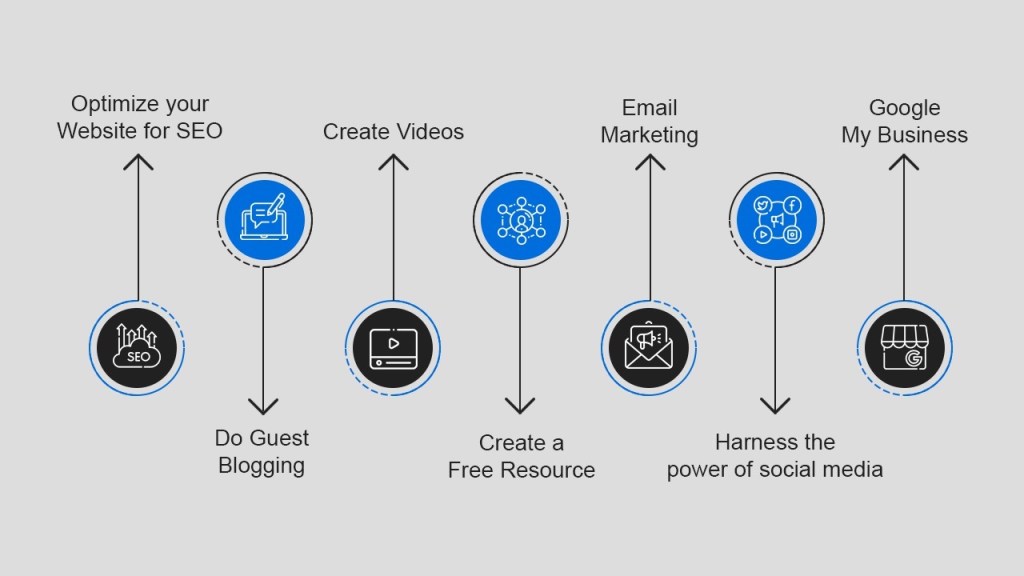
Try various ways to promote your website, start with SEO. Source: identixweb
By combining SEO with smart marketing efforts, you make your website not only visible but also effective at converting visitors.
4. Audit Your Website
Auditing your website is a crucial part of website management because it helps you understand what’s working, what’s not, and what needs immediate attention. Think of it as giving your website a regular “health check” to keep it running smoothly and competitively.
To audit your website, you’ll need to:
- Monitor traffic and performance: Use analytics tools (like Wix Analytics or Google Analytics) to track how visitors are finding and using your site.
- Test every page: Regularly browse your own site to ensure all pages load correctly and that there are no broken links or errors.
- Update plugins: Outdated plugins can slow down your site or create security risks. Keep them updated to maintain performance and security.
- Check speed: A slow website can cost you visitors and revenue. Use tools like Google PageSpeed Insights to test and improve your site’s loading times.
- Stay competitive: Review competitor websites to make sure your design and functionality are up-to-date with current trends.
- Run tests for improvements: Use A/B testing to compare different versions of landing pages, CTAs, or buttons to see which works better. Tools like UserTesting can show how real users interact with your site.

Utilize those free website audit checklists to get to know how to thoroughly audit your website. Source: Ahrefs
Regular audits as part of website management help identify problems early and create opportunities to improve user experience, performance, and conversions.
5. Use The CMS
A Content Management System (CMS) is one of the best tools you can use for smooth and efficient website management. It’s a software application that helps you create, edit, and organize all the content on your website without needing to dig into complex coding.
A good CMS makes website management easier right from the start by offering:
- User-friendly interfaces so you can update text, images, or pages with just a few clicks.
- Pre-built templates for quick website setup or customization.
- Support for both static and dynamic websites, giving you flexibility as your site grows.
Beyond content updates, a CMS can handle many key tasks like:
- SEO optimization to help your site rank better.
- A/B testing to see which designs or messages work best.
- Analytics tracking to monitor performance.
- Managing memberships or gated content if your site offers exclusive areas for users.

Having a website management system will benefit your business in various ways. Source: Gigde
As your site grows, spreadsheets and manual tracking simply won’t cut it. A quality CMS, such as WordPress, HubSpot Content Hub, or Wix, becomes essential for seamless website management, saving you time and reducing the risk of errors.
6. Organize Key Tasks For Your Team
Successful website management isn’t a one-person job as it often involves multiple departments like marketing, design, development, and content creation. Without proper coordination, tasks can get delayed, blogs may be inconsistent, and updates might not align with branding or product launches.
To avoid this, someone needs to take charge of overseeing the entire website. A website manager (or a designated team member) plays a crucial role in:
- Creating a clear website management schedule that outlines what needs to be done and when.
- Coordinating with different departments to ensure content, design, and technical updates all work together.
- Keeping branding and messaging consistent across all web pages and blog posts.
If your company doesn’t have a dedicated website manager, assign responsibility to the team or person best equipped to handle this role. Having a clear leader ensures that every part of website management runs smoothly and stays on track with your business goals.
Should You Hire Website Management Services?
Before choosing one, you should identify the type of service, whether it is partially management or entire website, and also depends on your business scale.
Types of Website Management Services
Website management services come in different forms, each designed to meet specific business needs. Whether you run a small business, an online store, or need a complete hands-off solution, there’s a service tailored to your goals. Here are the main types of website management services:
Website Management Services for Small Businesses
Small business owners often don’t have an in-house IT team, which makes managing a website challenging. This type of service offers a practical solution by taking care of essential tasks like:
- Website maintenance, updates, and upgrades.
- Content management, such as blog posts and product pages.
- Security management to protect against cyber threats.
These services are flexible and can be customized to fit your budget, making them perfect for businesses that want professional website management without hiring a full-time team.
eCommerce Website Management Services
If your business relies on an online store, you need more than just basic updates. In reality, you need a team to ensure your e-commerce platform runs smoothly 24/7. These services usually include:
- Product updates and catalog management.
- Order and payment processing.
- Inventory tracking and updates.
- Technical support to avoid downtime during peak sales periods.
For eCommerce businesses, website management services are essential for providing a seamless shopping experience that boosts sales and customer satisfaction.
Your website deserves expert care. With ROI Digitally’s all-in-one website management, from design, optimization to 24/7 support, you’ll never miss a sale. Get started now!
Full-Service Web Management
This is the all-in-one solution for businesses that want every aspect of their website taken care of. Full-service management often includes:
- Website design and development.
- Regular maintenance and updates.
- Advanced security monitoring and backups.
- Content creation and SEO optimization.
Full-service website management is ideal for companies that don’t want to juggle multiple providers or manage any technical tasks. It ensures your site remains secure, user-friendly, and fully optimized for performance and growth.

In fact, there are diverse types of website management services available. Source: Appsierra
Are Website Management Services Right For You?
If your goal is to grow your business online, yes, they are. Hiring website management services is a smart choice as they ensures your website is well-designed, secure, and optimized to attract more customers. Without proper website management, your site can become slow, outdated, or even vulnerable to security risks.
The website management services will:
- Handle design, content updates, and security, so your website looks professional and runs smoothly.
- Improve SEO, helping your site rank higher on search engines.
- Provide analytics and performance reports so you can track your growth.
- Save you time, letting you focus on your business instead of technical tasks.
However, to really consider if a website management service is right for you, ask these questions:
Ask yourself these key questions:
- Do you want to grow your business online? If your website is a key part of attracting customers and generating sales, proper management is critical.
- Do you have the skills and time? Website management can be time-consuming and requires technical know-how. If you lack the experience or simply want to focus on running your business, hiring professionals makes sense.
- Is your website essential to your brand? A poorly maintained site can harm your reputation, while a well-managed one builds trust and credibility.
- Can you afford to invest in professional services? While there is a cost to hiring website management services, it often pays off by improving conversions, user experience, and security.
Frequently Asked Questions
1. What do you mean by website management?
Website management is the process of keeping a website updated, secure, and running smoothly. It involves tasks like updating content, improving design, monitoring performance, and protecting against security threats.
2. What does a website manager do?
A website manager oversees everything needed to keep a website functioning well. This includes coordinating design and development, updating content, monitoring performance, handling security, optimizing for SEO, and generating reports on traffic and user behavior.
3. What are the 7 C’s of a website?
The 7 C’s of a website are key principles that make a website effective:
- Context: The overall layout and design.
- Content: Quality and relevance of the information.
- Community: How the site encourages user interaction.
- Customization: Personalization for users.
- Communication: Ways to engage with visitors.
- Connection: Links to other sites or platforms.
- Commerce: Features that enable transactions (for eCommerce sites).
4. How much should I pay for someone to manage my website?
The cost of website management varies based on the site’s complexity and the services needed. For small businesses, basic website management can range from $50 to $300 per month. More advanced services, like full eCommerce management or SEO optimization, can cost $500 to $2,000 per month or more.