Key Takeaways
- Core Web Vitals show how real users experience your site. They measure loading speed (LCP), interactivity (INP), and layout stability (CLS). Improving these scores boosts both usability and SEO performance.
- Core Web Vitals impact SEO, but they aren’t everything. While they’re part of Google’s ranking signals, content quality and relevance still carry more weight. However, a smooth and fast experience can give you an edge, especially in competitive markets.
- You can improve Core Web Vitals with practical fixes. Optimizing hosting, compressing images, reducing JavaScript, and setting size attributes for media are just a few ways to improve your scores and user experience.

Core Web Vitals. Source: Beyonds
Want help optimizing your Core Web Vitals for better rankings and performance? Let ROI Digitally handle it, visit roidigitally.com to learn more.
What Are Core Web Vitals?
Core Web Vitals are a set of key performance metrics that Google uses to measure how real people experience your website.
Instead of just looking at behind-the-scenes technical stuff, these metrics focus on things that matter to users, like how fast your site loads, how smoothly it works, and whether anything on the page shifts around while someone is reading or clicking.
So, what are Core Web Vitals exactly? They measure three main things:
- Largest Contentful Paint (LCP): How quickly the biggest content (like a large image or heading) shows up on the screen. A good LCP score is under 2.5 seconds.
- Interaction to Next Paint (INP): How fast your site reacts when someone clicks, taps, or interacts. You want this to be under 200 milliseconds.
- Cumulative Layout Shift (CLS): How much the page moves around while loading. A CLS score under 0.1 means your page is visually stable.
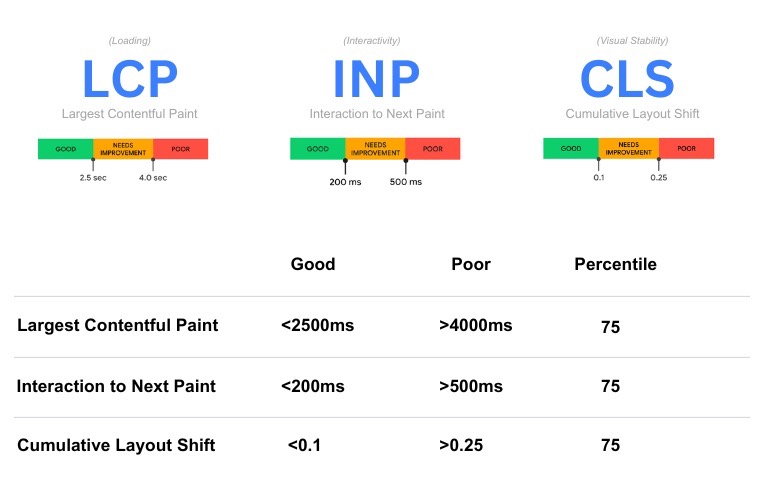
The three key factors of Core Web Vitals. Source: DebugBear
These three factors are part of Google’s broader “page experience” ranking signals, basically, how enjoyable your site is to use. That’s why Core Web Vitals SEO is important.
If your site offers a smooth, responsive, and stable experience, it can help improve your rankings in search results.
Do Core Web Vitals Affect SEO?
The short answer: Yes, Core Web Vitals do affect SEO. However, they’re not the biggest ranking factor.
Google has confirmed that Core Web Vitals are part of its ranking signals under the broader “page experience” category.
But here’s the catch: they play a supporting role, not a leading one. Factors like content quality, search intent, and how trustworthy your site is still matter a lot more.
Even if your site has perfect Core Web Vitals, it won’t magically jump to the top of search results if your content isn’t relevant or helpful. Google itself has said that good Core Web Vitals can improve user experience, but they won’t guarantee higher rankings on their own.
That said, if your site is new or you’re competing in a tough niche, optimizing Core Web Vitals can give you an extra edge. Since building authority and backlinks takes time, having a fast, smooth, and stable site can help you stand out, especially when all other factors are equal.
Best Tools To Measure Core Web Vitals
1. Google PageSpeed Insights
If you’re wondering what are Core Web Vitals and how your website stacks up, Google PageSpeed Insights is one of the best places to start.
It’s a free tool that shows how your web page performs when it comes to user experience, and it gives you clear, helpful suggestions to improve.
Here’s how to use it:
- Visit the PageSpeed Insights website
- Paste in the URL of the page you want to check
- Click “Analyze”
In just a few seconds, you’ll get a breakdown of your Core Web Vitals scores, including metrics like LCP (loading speed), INP (interactivity), and CLS (visual stability). The tool gives you two types of data:
- Lab data: Based on a simulated test in a controlled setting
- Field data: Based on real-world user experiences
This makes PageSpeed Insights incredibly valuable for anyone serious about Core Web Vitals SEO.
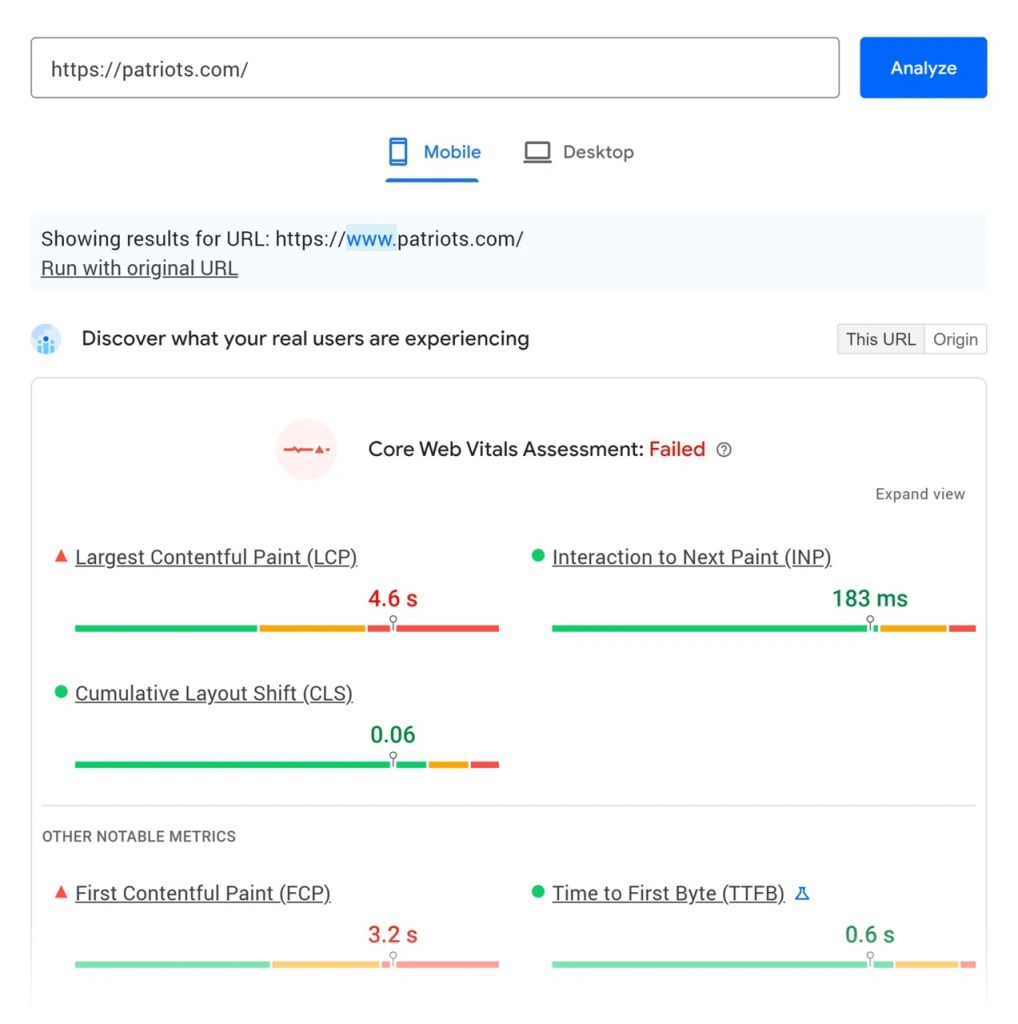
How Google Page Speed analyzes Core Web Vitals of a website. Source: Search Engine Land
2. Google Search Console
Another great free tool to check your Core Web Vitals is Google Search Console. It gives you real insights into how your website performs in Google search, and more importantly, how users experience it.
Here’s how to view Core Web Vitals in Search Console:
- Log in to your Google Search Console account
- Choose your website from the property list
- Click on “Core Web Vitals” under the “Experience” section in the left-hand menu
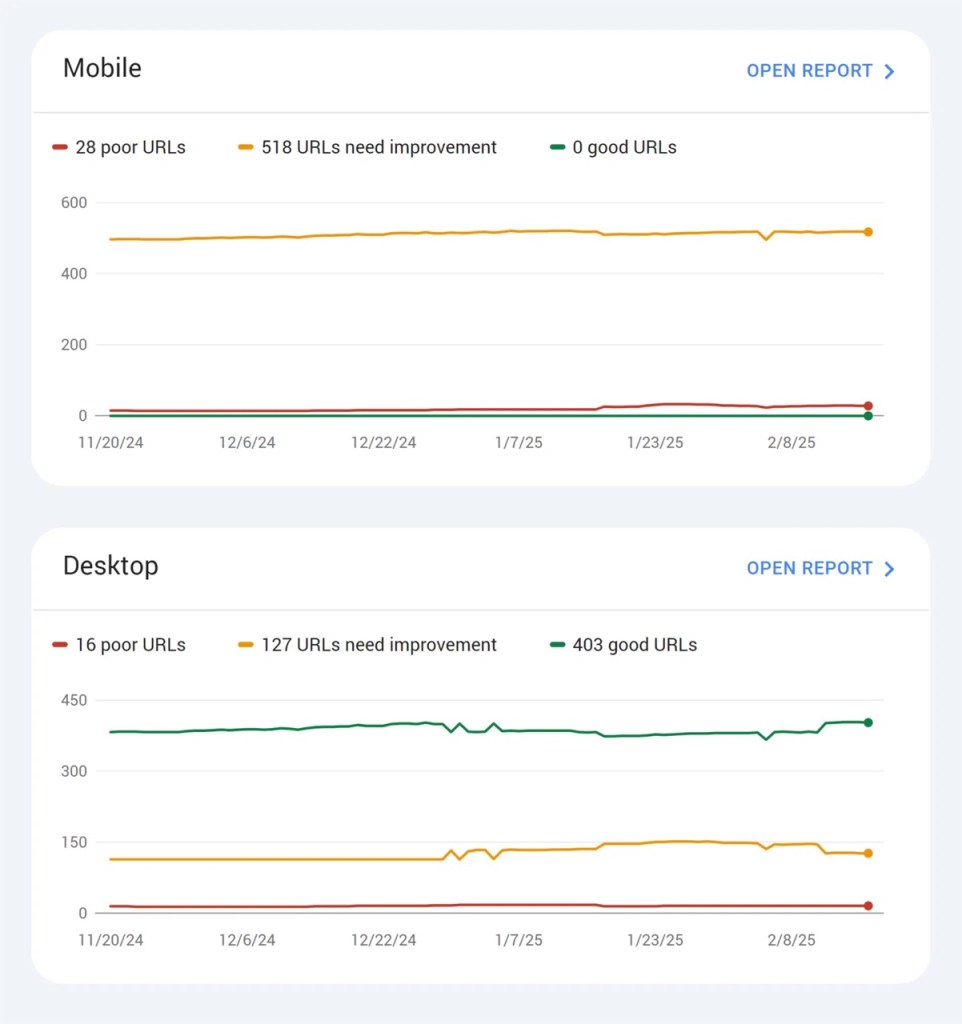
Example of a Core Web Vitals analytic from Google Search Console. Source: Search Engine Land
The report above shows how a page is performing, broken into three categories:
- Poor URLs (need serious work)
- URLs that need improvement
- Good URLs (meeting all Core Web Vitals standards)
Through the example, we can see that the mobile report reveals that 518 URLs need improvement, 28 are poor, and none are rated as good, a sign that the mobile experience needs attention. On desktop, however, things look better with 403 good URLs, 127 needing improvement, and only 16 poor URLs.
The best part? This data comes from actual user visits, not just lab tests, giving you a realistic view of how your site performs in the real world. You can even click on each category to find the specific pages causing issues, helping you prioritize what to fix.
3. Lighthouse
Lighthouse is a free tool built right into the Chrome browser that helps you check how well your website is performing. It’s especially useful if you want to improve user experience and boost your Core Web Vitals SEO.
Here’s how to run a Lighthouse audit:
- Open your page in Chrome
- Right-click anywhere on the page and choose “Inspect”
- In the DevTools panel that opens, click the “Lighthouse” tab
- Choose what you want to test (make sure “Performance” is selected)
- Click “Analyze page load”
Lighthouse will then scan your page and give you a full report. This includes your Core Web Vitals scores and suggestions on how to make your site faster, more stable, and more responsive.
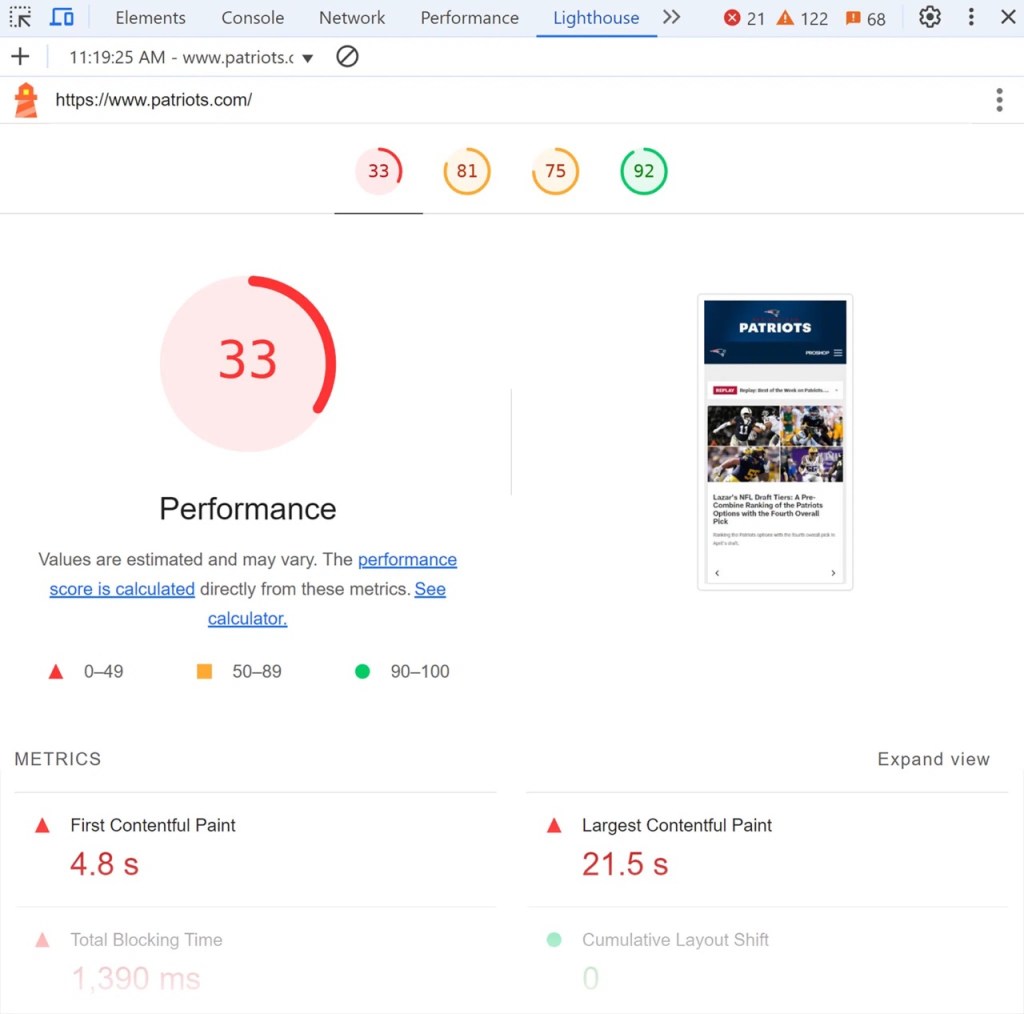
Core Web Vitals report by Lighthouse. Source: Search Engine Land
It’s a great tool for developers or anyone who wants a deeper look at what’s slowing down their site and what to fix to improve both user experience and SEO rankings.
How To Improve Core Web Vitals
If you’ve been wondering how to improve Core Web Vitals, the good news is that it’s not about guessing, it’s about fixing three key things: how fast your page reacts to clicks (INP), how stable it looks while loading (CLS), and how quickly the main content shows up (LCP).
Let’s break it down.
1. Improve INP (Interaction to Next Paint)
NP measures how quickly your site responds when someone interacts with it, like clicking a button or typing in a form. A good score is under 200 milliseconds.
To improve this, you’ll need to:
- Minimize or defer JavaScript: JavaScript controls how interactive your site is, but too much of it can slow things down. Use “code splitting” to load only the JavaScript needed for each page. Add async or defer tags to non-essential scripts so they don’t block loading.
- Audit third-party scripts: Tools like analytics trackers, chat widgets, or ad scripts can hurt performance. Only keep what’s necessary. Use Chrome’s Performance tab or tools like WebPageTest to see which scripts delay interaction.
- Enable browser caching: Set up browser caching so returning visitors don’t have to reload everything. Services like Cloudflare or hosting providers often offer easy caching solutions. Cached content helps pages respond faster and improves INP naturally.
- Break up long tasks: If a script runs for too long, it freezes the page. Split long JavaScript functions into smaller tasks to keep the site responsive.
Want to improve your INP: Experience Website Management Services at ROI Digitally

Follow these tricks to improve better INP. Source: NitroPack
2. Improve CLS (Cumulative Layout Shift)
CLS measures how much your content jumps or shifts around while loading. A good CLS score is less than 0.1, meaning your page stays visually steady as it loads.
To optimize CLS, follow these steps:
- Set fixed sizes for images and videos: Always define width and height in your HTML or CSS. This tells the browser how much space to reserve before media loads, preventing layout shifts.
- Reserve space for ads and embeds: Ads, if not handled properly, can cause your content to shift after they load. Use static containers (with fixed height and width) where ads or third-party embeds will appear.
- Avoid injecting content above existing content: Don’t drop banners, buttons, or pop-ups at the top of the screen after the user starts reading. Instead, load these UI elements below the fold, where they won’t affect visible content.
- Use font-display: swap: Custom fonts can delay text rendering and cause layout shifts when they load. The font-display: swap property lets text appear with a fallback font first, reducing visual jumpiness.
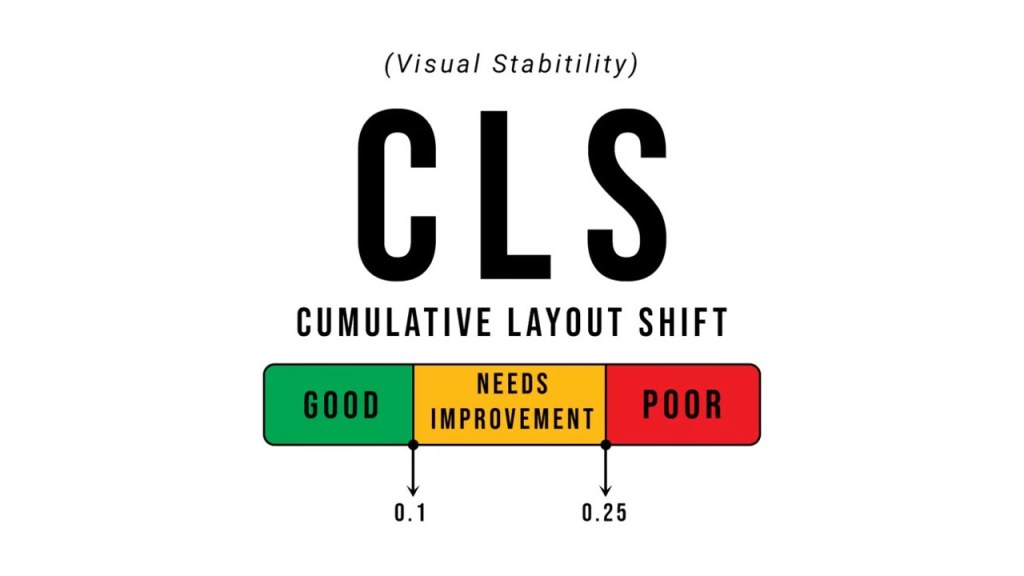
Consistently implement these tips to achieve 0.1 CLS. Source: Angular Gems by Vasileios Kagklis – Beehiiv
3. Improve LCP (Largest Contentful Paint)
LCP tracks how quickly the largest visible element on your page (like a hero image or heading) fully loads. A good LCP score is under 2.5 seconds.
For better LCP, prepare to:
- Use a fast hosting provider: Your server’s speed impacts LCP more than you think. Choose reliable hosting with strong response times. Pair it with a CDN (Content Delivery Network) like Cloudflare to serve images and files faster worldwide.
- Optimize and compress images: Oversized images are one of the biggest LCP killers. Use tools like TinyPNG, Squoosh, or ImageOptim to compress images before uploading them. For the web, use next-gen formats like WebP.
- Lazy-load non-critical images: Set up lazy loading for images that appear below the fold. This means only images visible to the user will load first, speeding up what matters most.
Preload key content and fonts: Use the <link rel=”preload”> tag in your HTML to tell the browser which resources (like hero images or main fonts) are most important and should load first. - Reduce render-blocking resources: Stylesheets and scripts that delay page rendering can hurt your LCP. Use tools like Google PageSpeed Insights to find and minimize these blockers. Move critical CSS inline and defer less important JavaScript.

Achieve 2.5 sec to consider a good LCP metric. Source: CSS-Tricks