Are you an SEO specialist wanting to implement small business SEO but do not know where to start?
Our small business SEO guide provides helpful tips on conducting keyword research, creating content, and more. This article will instruct you on how to boost your company’s online presence. Read on!
Why Is SEO Important For Small Business?
Small business SEO improves your website’s appearance on Google to attract more visitors. It’s a simplified version of regular SEO that needs less time and effort but still brings in potential customers.

Small business SEO is a subset of general SEO.
So, what benefits does SEO bring to small businesses?
- More website visitors: Increased Google rankings are more likely to attract visitors and significantly benefit online and offline businesses.
- Increased brand recognition: When your site ranks higher, more people see and learn about you. As they get familiar with your brand, they’re more likely to buy from you later.
- Cost-effective marketing: SEO is affordable for small businesses to market themselves. When a website shows up for specific words, it gets clicks without paying for them.
Is Small Business SEO The Same As Local SEO?
Small business SEO helps all local businesses with no requirement for physical location.
Local SEO draws customers looking for products or services in a particular location. It is a part of small business SEO aiming to attract more attention and customers in a specific area.
9 Search Engine Optimization Tips For Small Business
Applying SEO methods is a long-term process requiring much effort. Here are nine tips to help you quickly improve your small business’s SEO rankings.
Tip 1: Get Your Website Be Ready
Depending on the field and nature of the business, there are many different criteria to evaluate the quality of a website. However, most quality websites have common characteristics: they are clear, functional, easy to use, and trustworthy.
Once you have a website, the next step is to install a Google Analytics and Google Search Console account.
Tip 2: Set Up Your Google Analytics
Google Analytics and Search Console are indispensable for tracking website performance and SEO progress, and most importantly, they are FREE.
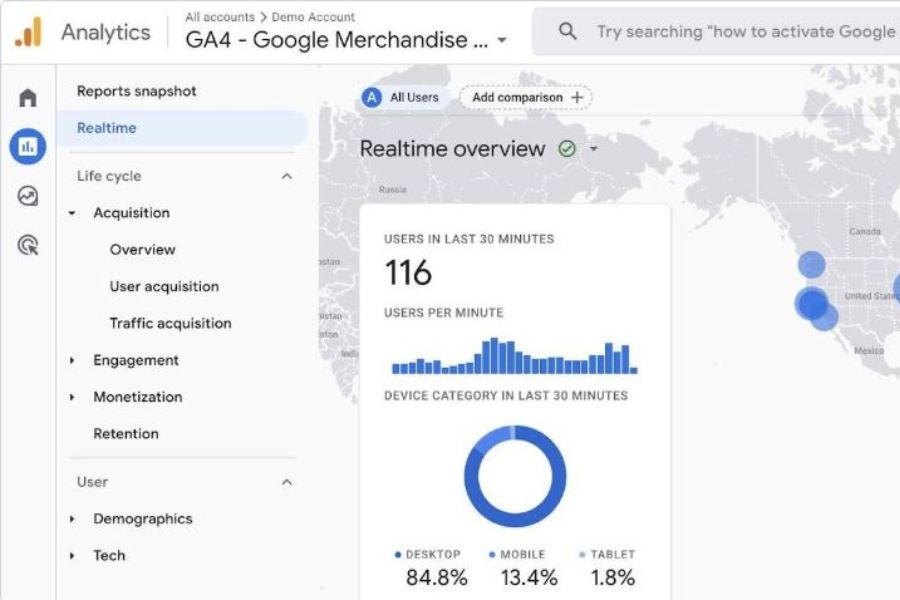
Google Analytics tracks SEO performance at no cost.
To install Google Analytics, here are some steps for you:
1. Create your Google Analytics account
2. Add properties to your account
3. Add your data stream
4. Add your data tags
5. Adjust more settings
Tip 3: Set Up Your Google Search Console
While Google Analytics showcases how visitors interact with a site, Google Search Console determines how a site performs in Google Search result pages.
This tool informs you about website issues and enables you to submit fixes, sitemaps, and other crucial details.

Search Console is critical to understanding how your site appears in Google Search.
Here are some simple steps to get started with Google Search Console:
1. Add your website to the Search Console
2. Learn how to use Search Console and Google Search
3. Regularly monitor and check your Search Console
In fact, Google suggests visiting the Search Console dashboard at least once a month. Check the status of your website and the indexation of your new content.
Tip 4: Set Up Your Google Business Profile
A Business Profile on Google is another free app allowing customers to find a business on Google Search, Maps, and Shopping. It also enables companies to share essential information related to product listings, phone numbers, opening hours, and promotions.
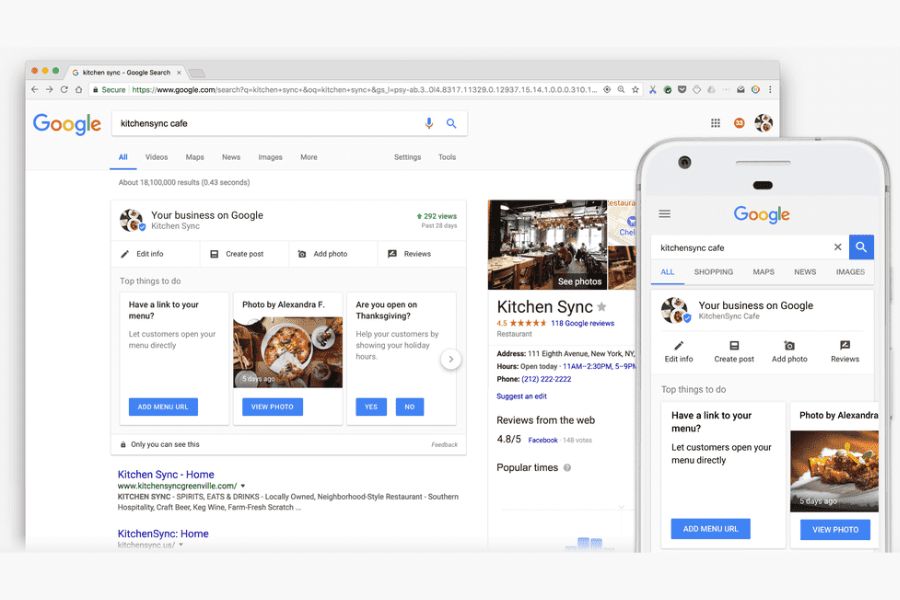
A Business Profile on Google helps you gain search visibility and collect reviews.
Creating a Google Business Profile takes just a few minutes and doesn’t cost anything. Here are the basic steps to set up yours:
1. Sign up for a Business Profile on Google
2. Provide your necessary information.
3. Optimize your profile
Tip 5: Do Your Keyword Research
Keyword research means identifying phrases that customers often use when searching for information related to your business. Many valuable tools help you target keywords relevant to your business, such as SEMrush, Ahrefs, or Google Keyword Planner.
Assuming you use SEMrush for keyword research, some steps you need to take are:
1. Write down your expected terms: Think about what customers would type into the search box when they wanted to find a business like yours. Typically, start with keywords directly related to your product category.
2. Analyze your expected terms: Go to SEMrush, open the Keyword Overview tool, and enter the list of your terms.
For example, “Sushi Bar Chicago,” “Sushi Restaurant Chicago,” and “Sushi Downtown Chicago.”
Then, press “Search”.
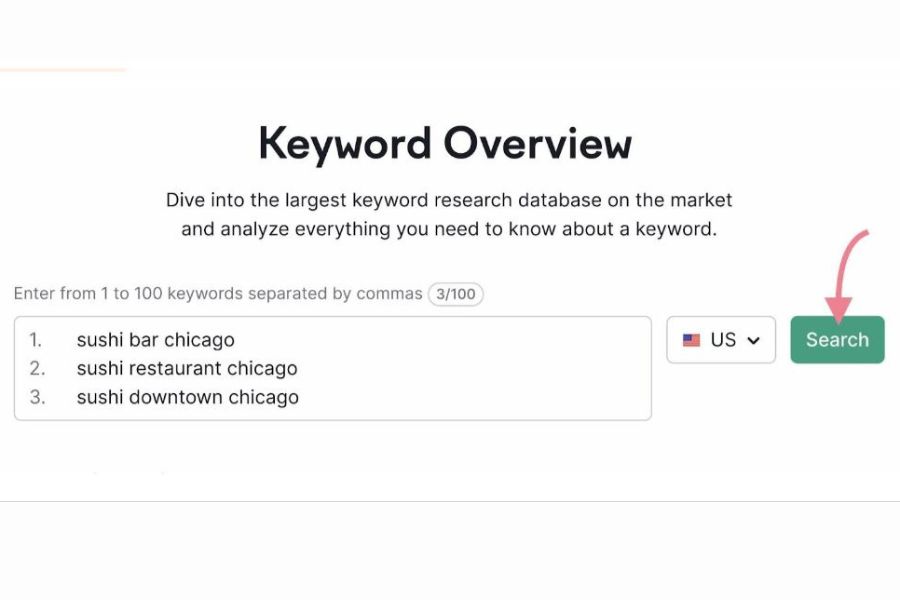
Enter the list of your terms into the Keyword Overview tool.
The three main metrics to check in Keyword Overview are:
- Volume (how many times people search for a keyword each month)
- Intent (what people want when they search that keyword)
- KD, or Keyword Difficulty (how hard it is to rank for that keyword)
When starting in SEO, focus on less competitive keywords with lower search volume to improve the chances of ranking.
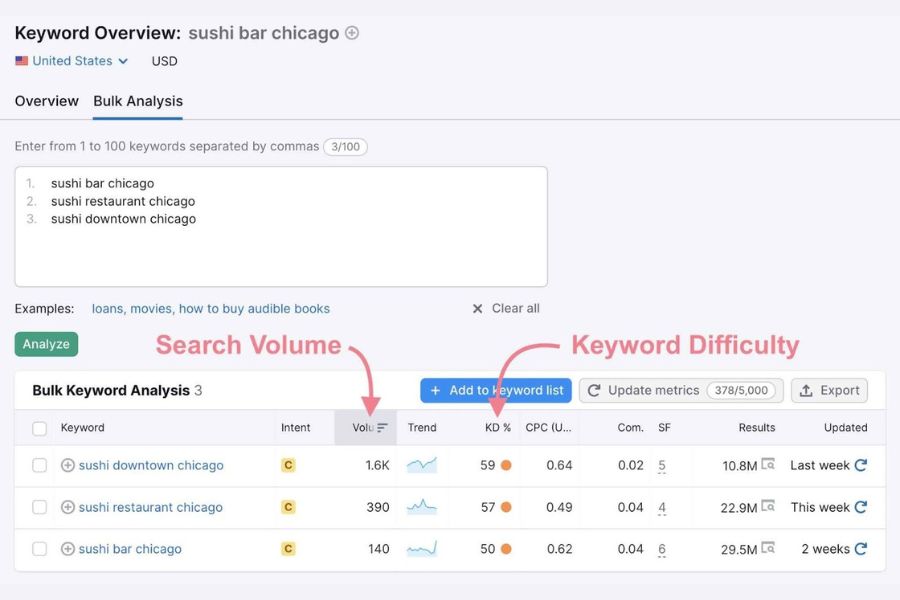
The Keyword Overview tool provides information on each of the terms you entered.
3. Extend your keyword list: The Magic Keyword Tool will help you build an extensive keyword plan based on these terms.
Why do you need to do this step? It helps you find more keywords related to your business.
Open the Magic Keyword Tool and enter any key terms you found.
For example, you want to explore more keywords in a search for “sushi restaurants in Chicago.”
You may enter “sushi Chicago” and press “Search.”

Open the Keyword Magic tool and enter any main terms you’ve identified.
You’ll quickly receive a list of keyword ideas related to the term “Chicago sushi” you entered.

You’ll get keyword ideas related to the primary search term you submitted.
Click “Add to list” to add terms relevant to your business to your keyword list.
Later, this keyword list will be the primary material for your content planning and website optimization.

You’ll use this keyword list to design your site’s structure and content later.
4. Analyze your city-specific keywords: Considering you’re focusing on SEO for a small local business, like a sushi restaurant in Chicago. Analyzing keyword data specific to that locality makes much sense.
Reopen the Keyword Overview tool, submit your phrase, and select your city (e.g., Chicago) from the drop-down menu.

Pick your location from the drop-down menu of the Keyword Overview tool.
You will now see keyword data specific to your selected city. This data includes local search volume, keyword difficulty, search intent, competitive density, and cost-per-click.
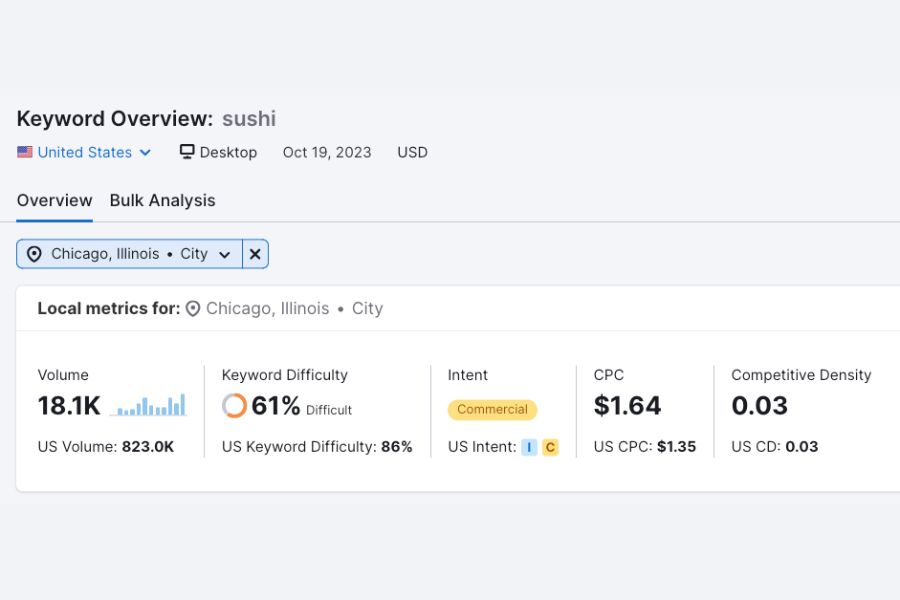
You’ll have city-specific keyword metrics for your chosen keyword.
These metrics will give you a solid basis for assessing the difficulty of ranking locally for your target keywords. You can estimate the cost of a Google Ads campaign and see which pages compete with your keywords and how trustworthy they are.
Tip 6: Optimize Your On-Page Elements
On-page elements are different components of your website, including page titles, meta descriptions, and headers.
Here are some key ways to optimize the on-page SEO for your small business:
1. Page titles
Page titles, or title tags and meta titles, display in search results pages and let customers know what your website is about.
In the example below, “Chicago’s Pizza | Pickup & Delivery” is the page title.

Page titles let customers know what your business is about.
To write an SEO standard title tag, you can apply some practices such as:
- The main keyword of each page must appear in the page title.
- Your title has 55 to 60 characters.
- You need to describe your page content clearly, concisely, and attractively.
- You can cleverly insert your brand or company name into the title.
2. Meta descriptions
Meta descriptions are the content below page titles on the search results page. They accurately describe your site to Google and entice customers to click through.
Furthermore, meta descriptions are an excellent place to add relevant keywords.
Look at the example above, the meta description for Chicago’s Pizza is:
“Since 1991, Chicago’s Pizza has been serving up Pizza, Pasta, Sandwiches, and Salads lovingly crafted from scratch”.
Here are some tips for writing an ideal meta description for your small business:
- Ensure your meta description is engaging and between 140 and 160 characters.
- Each of your pages needs to have a unique meta description that accurately states what the page is about.
- You should add 1 or 2 keywords to your keyword list.
- Add a call-to-action to your meta descriptions to motivate customers to click on your page.
3. Headings
Titles, or body tags, represent the structure and hierarchy of content to readers and search engines. They help Google and customers better understand the context of your page.
The heading format on a page is usually H1, H2, H3, H4, H5, and H6.
Among them, H1 is the largest and often serves as the site’s on-page title.
Let’s look at an example from the ROI Digitally blog category, you can see two headings, H2, and H3:

Example of H2 and H3 in the structure of a blog post.
Here are some tips for you to use titles properly:
- You use H1 as the title and H2 to H6 to divide the page’s structure.
- You should add keywords naturally and avoid stuffing.
- Write your titles to summarize the content staying in their sections.
Tip 7: Create Relevant Content For Your Customers
Producing content is a great way to increase traffic for your small business. It also helps you reach potential customers and convert them into actual customers.
But how?
The approach is for customers to find your content in the SERP and click to view it.
With time, customers remember you when seeking solutions to their problems, thus increasing the likelihood of them buying from you.
So, how do you create engaging and relevant content for your customers?
- Understand your target customers’ psychology, interests, and problems.
- Regularly stay up to date with hot trends and topics in your industry.
- Apply a set of keywords and SEO tactics to enhance the visibility and relevance of your content.
- Interact with your audience through comments or feedback to improve the quality of your content.
For instance, a Chicago pizza restaurant used the Keyword Magic Tool to find the keywords “Chicago pizza.”
Based on this cursory research, they can create articles for their business targeting keywords like “best pizza in Chicago” or “famous Chicago pizza.”
Tip 8: Build Your Linking Strategy
When talking about SEO for small businesses, don’t miss out on Link Building, including:
- Internal link building means linking different pages inside your website. This approach improves user experience and demonstrates to Google that your website has a clear structure.
- External link building means attracting other websites to link to your website. The quality of your external links significantly affects whether Google evaluates your website as trustworthy.

Most SEO reporting tools can help you analyze and track your link building.
Some relatively easy ways for you to get quality external links are:
- Sign up for resource sites, directories, or business associations so they can list your site on them.
- Create engaging content and share it with people who might be interested. Then, ask them to link to your content.
- Provide testimonials to other parties and let them know so they can link to your site.
Tip 9: Track Your SEO Performance
Although you can implement SEO changes quickly, they take a while to take effect. Moreover, your rankings can fluctuate constantly due to the constant appearance of new content on the Internet.
Hence, monitoring and adjusting your SEO strategy using SEO reporting tools ensures your website remains effective and competitive.
Conclusion
Doing small business SEO brings lasting advantages. Keep enhancing your website, creating helpful content, and watching your visitors, rankings, and how well your site works.
Contact ROI Digitally’s SEO Outsourcing Services if you need further optimization. We’re happy to deliver tangible results for small businesses like yours.
Frequently Asked Questions
- What Is SEO For Small Business?
SEO for small businesses is the process of improving your small business’s website presence on Google SERPs. In other words, SEO helps you rank highly and is visible in search queries related to what you sell.
- Is SEO Worth For Small Business?
Yes, SEO is a valuable method in small businesses’ digital marketing strategies. It’s a relatively inexpensive approach to improving your online presence on search results pages.
- How Can A Small Business Improve SEO?
Getting good backlinks from reliable websites is crucial for SEO success. Search engines see backlinks as a sign that your site is trustworthy and vital. One good backlink can increase your traffic more than many bad ones.
- How Much Is SEO For A Small Business?
Small businesses spend between $100 and $5,000 monthly on SEO help. On average, it’s around $500 per month. Typically, higher payments to agencies or freelancers result in better outcomes.