AI writing software is changing how we write and create content. However, while these tools provide high-quality output quickly, they require significant manual editing. Therefore, you need the best AI writing tools to streamline your content creation process effectively.
Read on and explore the best options.
How Do AI Writing Tools Work?
Before diving into the most-chosen AI writing software, you must understand how they work. Many AI writing tools today have similar features because most use the same large language models (LLMs) as their backend, particularly OpenAI’s GPT-3 and GPT-4 APIs. While some apps integrate their own fine-tuning or use other LLMs, the core relies on these OpenAI models.
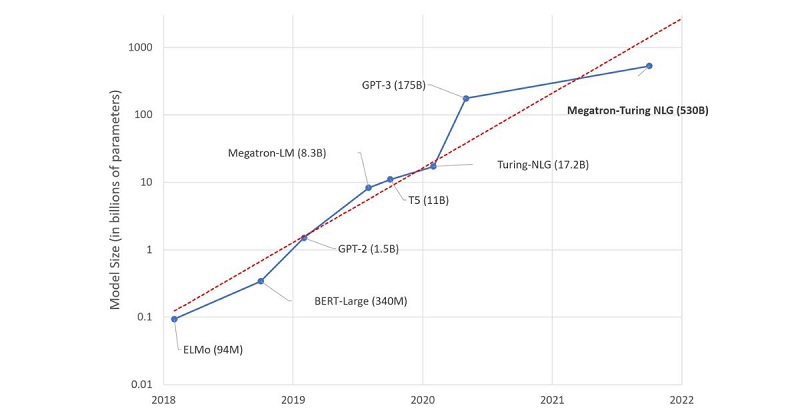
The underlying LLM, like GPT, is complex, deep-learning neural networks inspired by the human brain. Based on their training data, these models work by predicting the best words to follow a given prompt.
Although AI content generators may have similar outputs in terms of quality, the difference lies in how easily they integrate AI text generation into actual workflows. They offer a more user-friendly experience compared to using GPT directly.
Despite their ability, these writing tools still require careful editing, and many experts do not recommend using AI outputs for SEO.
What Makes the Best AI Content Generator?
As mentioned, most AI text generators use similar models with the same text output quality. So, to make it on this list, the apps needed to offer more than just basic text generation capabilities. Here are the factors we consider when choosing the best AI for writing:
- LLM-based tools: Most AI writing tools on this list rely on GPT or similar large language models. Even though some apps hide their specific models, the truth is that GPT API is often the driving force. For better content quality, especially with detailed prompts, opt for ChatGPT or machine learning models of similar size.
- Extensive control over output: Good AI writing tools have a user-friendly interface that gives you complete control over the text output. They allow you to adjust tone, style, language, and content. Moreover, these tools should enable you to set a default brand voice for consistency.
- Ease of use: AI writing software should be easy to use, allowing you to work smoothly without unnecessary challenges. Although minor adjustments may be necessary for better outcomes, the interaction should be straightforward. Clear help documents and effective onboarding enhance the overall user experience.
- Affordability: ChatGPT is free to use, and the tools on our list are built on an affordable API. While there’s no strict price limit exists, more expensive tools should have better features and a user-friendly interface to balance costs. Remember, most apps generate similar outputs regardless of their price.
12 Best AI Writing Tools At A Glance
After testing dozens of apps and websites, we’ve compiled a list of the best AI for writing at a glance:
| Tool | Best For | Features | Free Plan | Pricing |
| Jasper | Businesses | Create mature and feature-filled AI content | No | Creator plan from $49/month; Teams plan from $125/month |
| Copy.ai | Copywriting | Actively collect user feedback, offer unlimited plans at affordable prices | Yes | Pro plan from $49/month |
| Anyword | Writing assistance | Easily add specific details and SEO keywords, engagement scores | No | Starter plan from $49/month |
| Sudowrite | Fiction writing | AI support suitable for writing novels and has an easy-to-use interface | No | Hobby & Student plan from $19/month |
| Writer.com | Non-GPT content | Transparent about the AI model, as efficient as an editor | No | Team plan from $18/user/month |
| Writesonic | GPT-4 content | Offer options for GPT-3.5 and GPT-4 models | Yes | Business plan from $19/month |
| Rytr | An affordable option | Offer free and affordable plans | Yes | Saver plan from $9/month |
| QuillBot | Students and academics | Paraphrase, summarize, translate, generate citation | Yes | Premium plans from $9.95/month |
| Frase.io | SEO teams and content managers | Automatically summarize content, score content, optimize SEO | No | Solo plan from $14.99/month |
| Grammarly | Grammatical and punctuation error detection | Correct grammar errors in real-time, check plagiarism | Yes | Premium plans from $12/month |
| Hemingway Editor | Content readability measurement | Improves writing clarity, readability score | Yes | Free |
| ContentatScale.AI | Creating long-form content | Detect AI and analyze natural language processing | No | 7-day paid trial at $39.9; Plans starting from $250/month |
8 Best AI Writing Tools for Businesses
After looking at various AI writing tools, let’s focus on those designed for businesses. Here, we’ll explore top AI tools that bring specific benefits to businesses, improving communication, content creation, and more. Explore how these tools enhance your business’s writing processes.
Jasper AI: Best Overall AI Writing Software
Jasper AI is a robust AI writing tool known for its maturity and feature-rich capabilities. This tool integrates seamlessly with Grammarly and Surfer and has its AI art generator.

Features
- Jasper can craft diverse content, including blog posts, social media content, and ad copies, powered by OpenAI’s GPT-3 technology.
- Users can edit existing content quickly by inputting it into the system.
- It caters to various business needs, offering creative storylines, email subjects and bodies, and SEO-friendly blog posts.
- There are ready-made templates for different writing needs.
Pros
- Jasper integrates well with various features, including a built-in ChatGPT competitor and an AI art generator.
- Users can set a distinct brand voice and tone.
- The Knowledge Base feature lets users input crucial business facts for accurate content.
Cons
- Some find Jasper’s pricing relatively high compared to other tools.
- Sometimes, this tool struggles with creating highly niche-specific or highly technical content.
- In some instances, the AI still provides answers lacking relevance.
Pricing
- Pro Plan: $59 per month/seat
- Creator Plan: $39 per month/seat
- Business Plan: Contact for details.
Customer Reviews
- G2: 4.7/5 (1,200+ reviews)
- Capterra: 4.8/5 (1,800+ reviews)
Rytr: Best Budget-Friendly AI Writing Software
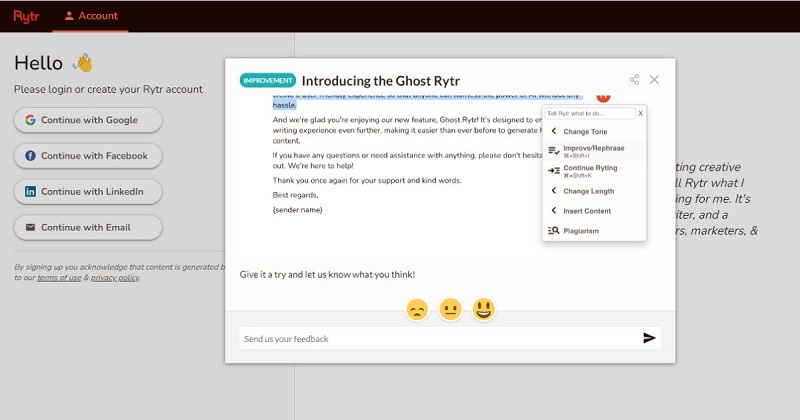
Rytr is an outstanding AI writing tool for content generators, writers, SEO experts, and copywriters. It uses OpenAI’s GPT-3 API to enable efficient content creation.
Features
- Rytr offers a built-in tool to check for plagiarism while writing articles and editing text outputs.
- The tool can generate creative, quirky, and catchy names for your brand or business.
- It crafts a clear and engaging startup pitch for your business ideas using AI assistance.
- This website enables you to create creative copies based on the Problem, Agitate, and Solution copywriting framework.
- In seconds, you will get creative and original advertisement copies for Facebook, Twitter, LinkedIn, and other social media channels.
Pros
- This tool can create content in over 30 languages with the flexibility to choose from 20+ tones and styles.
- Rytr offers a monthly free plan for 10,000 characters.
- The pricing is budget-friendly compared to other options.
- The interface is easy to use, with over 40 use cases with built-in prompts and templates.
Cons
- Rytr is less effective than pricier alternatives at creating long-form content without user guidance.
- The AI writing app has word count limitations, even on the paid plan.
Pricing
- Free Plan: Includes 10,000 characters/month.
- Saver Plan: $9/month or $90/year, offering 100,000 characters.
- Unlimited Plan: $29/month or $290/year, offering unlimited characters per month
Customer Reviews
- G2: 4.7/5 (750+ reviews)
- Trustpilot: 4.7/5 (2,300+ reviews)
Writesonic: Best For Marketing Copy
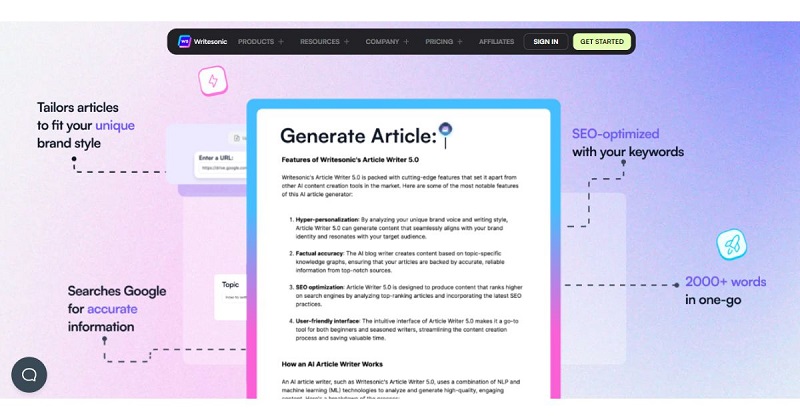
The following AI content generator we want to introduce for businesses is Writesonic. It is a standout AI writing website that uses both GPT-3.5 and GPT-4 models, giving users the flexibility to choose between them.
Features
- The tool satisfies various writing needs, including an AI article and blog writer, sentence expander, paraphrasing tool, story generator, text summarizer, and landing page generator.
- Users can streamline content publishing with a 1-Click WordPress export feature.
- It effortlessly connects with external services, enabling collaboration and extending capabilities.
Pros
- Writesonic supports up to 30 languages, enhancing versatility in content creation.
- The free plan is available with 10,000 GPT-3.5 words per month.
Cons
- The tool lacks advanced editing features, which might not be suitable for users looking for more comprehensive editing options.
- Many rated this tool as unsuitable for tech articles, showcasing limitations for users with specific content needs.
Pricing
- Free Plan: Includes 10,000 words per month.
- Small Team Plan: $13/month, offering 200,000 words per month.
- Enterprise Plan: From $500/month.
- Freelancer Plan: $16/month, offering unlimited words per month.
Customer Reviews
- Capterra: 4.8/5 (1950+ reviews)
- G2: 4.7/5 (1900+ reviews)
Frase IO: Best Combo For Research And AI Writing
While not mainly focused on AI content generation, Frase IO is a comprehensive tool offering a blend of research, content optimization, and document editing features. It aims to build an internet driven by answers that are accessible and human-friendly for everyone. Here is how it works:
Introducing Frase: The #1 Rated AI Content Platform
Features
- Frase IO conducts extensive keyword research, providing insights into topics, SERP, and community discussions.
- It gives recommendations to optimize your content.
- The tool allows you to generate content using facts and background research from search results.
- A fully-fledged editor includes an SEO checker, grammar corrections, and an essential task management system.
Pros
- While not heavily relied upon, Frase IO offers over 10 content templates as helpful starting points.
- Combining AI writing, research tools, and content optimization, Frase IO offers a complete solution for efficient content production.
- The starting guide helps users understand and navigate the features more quickly.
Cons
- The pricing is higher than that of other AI writing tools.
- Its complex interface may lead to confusion, especially when navigating between the document editor and research tabs.
- Trying too many things at once may make the user experience less smooth.
Pricing
- Solo Plan: $14.99/month
- Basic Plan: $44.99/month
- Team Plan: $114.99/month
GrowthBar: Complete Toolkit For SEO AI Writing
GrowthBar positions itself as an AI assistant focusing on SEO, offering a range of tools to aid in content creation, keyword research, competitor analysis, and SEO optimization. As one of the best AI writing tools, it aims to enhance users’ content quality and improve their overall SEO strategy.
Features
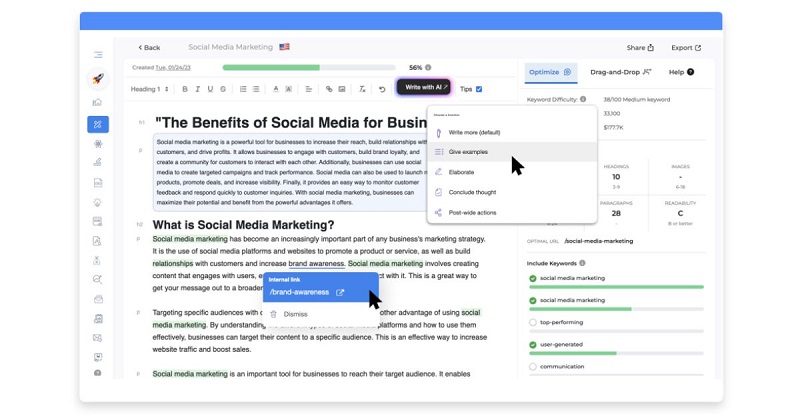
- This tool provides information on monthly searches, ranking difficulty for selected keywords, and monitoring of SERP competitors.
- GrowthBar simplifies the process by scanning Google SERP results and creating an SEO-optimized outline for your content.
- Drag and drop headlines, and GrowthBar’s AI will write the entire post with SEO optimizations in only 2 minutes.
- It has an audit feature for your existing blog posts.
- Also, the tool allows users to add images directly while editing content.
Pros
- GrowthBar has a user-friendly and smooth interface, ensuring easy navigation across its various dashboards and toolsets.
- Many people consider this tool reasonably priced in the SEO tool market.\
- Users can try it for free for 7 days.
Cons
- While it covers the basics, GrowthBar lacks more advanced SEO features than other tools.
- The AI writing tool’s effectiveness can vary, leading to inconsistent results.
Pricing
- Standard Plan: $36/month
- Pro Plan: $74.25/month
- Agency Plan: $149.25/month
Writer.com: Best AI Text Generator For A Non-GPT Choice
Many consider Writer.com to be one of the best AI for writing. The tool sets itself apart from the GPT-based controversy, offering transparency and ethical use through its Palmyra LLM. The Writer’s Creator team focuses on providing an effective editing solution, ensuring adherence to style guides and legal compliance.

Features
- Writer.com uses Palmyra LLM, allowing users to request and inspect a training dataset free of copyright restrictions.
- Enterprise users can automatically set a specific brand voice, while others can use checkboxes in settings to choose the tone.
- Users can audit Palmyra’s code and model weights and host them on servers, ensuring ethical AI use.
- Writer.com automatically applies your AI guardrails, enforcing regulatory, legal, inclusivity, and brand rules across all your work.
Pros
- If you want to avoid GPT-related controversies, Writer.com’s transparency and ethics are what you need.
- The tool has a user-friendly interface, allowing beginners to adapt quickly.
- Users can try Writer Team for 14 days.
Cons
- Writer.com needs additional setup compared to more plug-and-play GPT-powered apps.
- In direct comparisons with other tools, the quality of the generated text from Writer may appear slightly weaker.
Pricing
- Team Plan: $18/user/month for up to 5 users.
- Enterprise Plan: Contact for details.
Customer Reviews
- Trustpilot: 4.6/5 (17 reviews)
- G2: 4.4/5 (39 reviews)
ClickUp: Best for AI-Integrated Project Management
ClickUp, an all-in-one productivity platform, now features ClickUp AI—an AI content generator and assistant. This AI content generator will enhance productivity, support brainstorming, and streamline content creation.

Features
- This AI writing tool can generate bios, briefs, case studies, landing page copy, and more.
- It uses collaborative Whiteboards and Mind Maps for actionable plans.
- Seamless connections with tools like Slack and Google Drive.
- You will get a personalized AI solution designed just for you.
- Monitor work progress against strategy with measurable targets.
- Users can save time on project preparation with customizable templates.
Pros
- There are numerous prompts for various content needs.
- This all-in-one solution helps you easily manage tasks, collaborate, and create content.
- ClickUp offers a free plan, which is suitable for personal use.
Cons
- With dozens of features, this tool requires beginners to learn before using it.
- The Slack integration feature needs improvement.
Pricing
- Free Forever Plan
- Unlimited Plan: $7 per user per month.
- Business Plan: $12 per user per month.
- Enterprise Plan: Contact for details.
Customer Reviews
- G2: 4.7/5 (9300+ reviews)
- Capterra: 4.7/5 (4000+ reviews)
Simplified: Best for Streamlining Writing Process
Simplified stands out as a market leader in AI writing and content creation, with a user base of 1 million and numerous G2 awards. Beyond text, it extends its abilities to graphic design, social media scheduling, and video editing.

Features
- Users can tailor their content in 10+ tones and 30+ languages for short or long-form outputs.
- AI-powered tool to repurpose published content effectively.
- This AI writing tool creates unique and plagiarism-free content for blogs, articles, ads, products, websites, and social media.
- It optimizes content for Facebook and Instagram captions, quotes, descriptions, marketing materials, or website content.
- Users can organize teams and clients in real-time using Simplified.
- AI Writer can mimic your brand voice while generating text.
Pros
- Its user-friendly interface lets you easily navigate the AI Writer tool from your dashboard.
- Free access is available for both free and paid users.
- There are over 80 AI templates for various content types.
- The tool generates content in multiple languages, supporting over 20 languages.
Cons
- There are restrictions on the number of team members across pricing plans (maximum 5).
- Simplified has a word limit even with paid plans.
Pricing
- Pro Plan: $18/month
- Business Plan: $49/month
- Agency Plan: $199/month
Customer Reviews
- G2: 4.6/5 (3550 reviews)
- Capterra: 4.7/5 (230 reviews)
WordAI: Best for Natural Language Generation
WordAI is an AI-driven copywriting tool crafted to enhance content output by rephrasing, rewriting, and restructuring sentences across various content types. Using natural language generation tools, WordAI can generate up to 1,000 SEO rewrites from a single piece of content.

Features
- WordAI generates entire, high-quality, and unique articles from a single input, saving time and effort in content creation.
- This tool rewrites entire articles within seconds through its content generation platform.
- It allows users to decide the proximity to the original content through comprehensive editorial controls.
- WordAI ensures content uniqueness, avoiding any duplicate content or plagiarism issues.
- Also, it humanizes content, making it both naturally readable and passing AI content detectors as human-written.
Pros
- It rapidly rewrites entire articles, increasing content creation speed.
- With control over the level of similarity to the original content, you can control the output quality.
- You can enjoy a free 3-day trial.
Cons
- Only a few reviews are available for WordAI; some categorize it as a rephrasing or content-spinning tool.
- There are few functions for writers and editors to control and edit content.
Pricing
- Monthly Plan: $57 per month
- Yearly Plan: $27 per month
- Enterprise Plan: Contact for details
Customer Reviews
- G2: 3.8/5 (18 reviews)
- Capterra: 4.3/5 (12 reviews)
Narrato: Best for Creative Writing Assistance
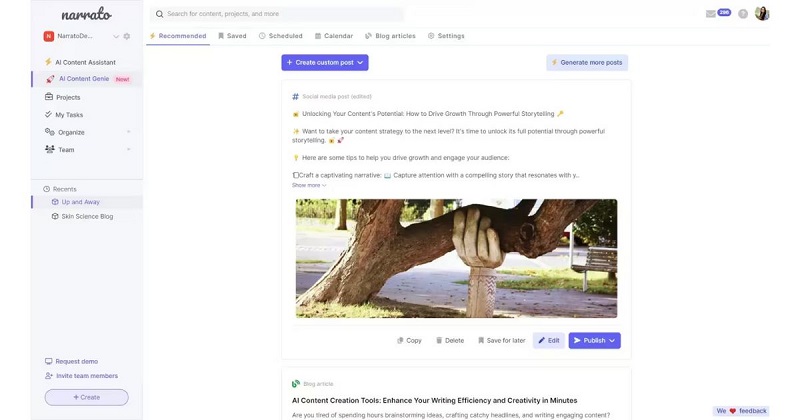
Narrato, although a newcomer to the AI writing tool market, brings expertise in content marketing. Catering to content managers and SEO experts, Narrato is an excellent AI tool for content writing and copywriting.
Features
- Equipped with tools for efficient project management, Narrato will assist you effectively in content marketing.
- The tool integrates a plagiarism checker during the content creation for content authenticity.
- This AI text generator creates content briefs with SEO suggestions in seconds.
- Users can improve content readability, engagement, and grammar with Narrato.
- It allows you to streamline the entire content workflow on one platform.
Pros
- This tool helps you manage teams and collaborate seamlessly with internal and freelance members
- Users can request a demo for free.
Cons
- The AI tool may not consistently meet expectations in generating content outputs.
- The plagiarism checker has a monthly limit of 76,000 words.
Pricing
- Pro Plan: $48/month
- Business Plan: $96/month
- Custom Plan: Contact for details.
Customer Reviews
- G2: 4.2/5 (5 reviews).
- Capterra: 4.9/5 (18 reviews)
Frequently Asked Questions
Is it legal to use AI writing?
Yes, using AI for writing and publishing books is legal. There are no specific laws that prohibit the use of artificial intelligence for these purposes.
Does Turnitin detect ChatGPT and QuillBot?
No. Turnitin doesn’t specifically target AI tools like ChatGPT or QuillBot. Instead, it uses advanced algorithms to check for patterns and similarities in submitted content to ensure academic work’s originality and authenticity. It focuses on identifying plagiarism rather than detecting specific AI writing tools.
The Bottom Line
We have listed the best AI writing tools to address your writing requirements better. Remember that while these options are currently effective, the landscape is dynamic, so follow us to stay tuned for updates.