Key Takeaways
- What is a sitemap? A sitemap acts like a roadmap for search engines, guiding them to all your important pages, even the ones that might be hard to find through internal links alone.
- Keeping your sitemap organized, accurate, and located in the root directory helps search engines crawl and index your site more efficiently.
- While not a ranking factor on its own, a clean, updated sitemap works alongside the Google algorithm to increase your chances of better visibility in search results.
Make your sitemap do more than list links, but a strategic SEO tool. We, ROI Digitally, help optimize it for maximum impact: https://roidigitally.com/
Everything You Need To Know About A Sitemap
What Is A Sitemap?
If you’ve ever asked yourself what is a sitemap, think of it like a blueprint of your website. It shows search engines and users how your site is organized and where to find important content.
While the homepage might be your front door, a sitemap is the full layout of every room.
Sitemaps are especially useful for helping search engines discover and index all your pages. They make it easier to ensure that nothing gets missed, especially if your site is large or updates often.
There are different types of sitemaps, but they all serve the same core purpose: improving how accessible and understandable your site is.
Using more than one type of sitemap can further enhance your site’s discoverability, creating a full picture of your site from both a technical and user-friendly perspective. Here are the most common types, including:
- XML Sitemap: Improves communication with search engines, especially for dynamic or large websites.
- Visual Sitemap: Offers a high-level overview of your site structure, often used in planning or UX design.
- HTML Sitemap: Helps users navigate your site more easily, especially when searching for specific content.
- Video and Image Sitemaps: Make it easier for media-rich content to get indexed and appear in specialized search results.
What Is An XML Sitemap?
An XML sitemap is a structured file that communicates directly with search engine bots like those from Google, Bing, or Yahoo. It lists all the important pages on your website that you want to appear in search results.

Example of ROI Digitally’s XML Sitemap
This type of sitemap uses XML format, which is built specifically for search engines, not humans. The file includes details such as page URLs, when they were last updated, how often they change, and their priority level relative to other pages.
For example, if you run an online store, your XML sitemap can help Google understand which product pages are new or updated and should be crawled first. Without it, search bots might take longer to discover those pages or miss them entirely.
When Do You Need a Sitemap?
If you have a small, simple website with fewer than 500 static pages and strong internal links, you may get by without a sitemap. Search engines can usually navigate and index smaller sites without much help.
However, even for smaller sites, a sitemap adds an extra layer of reliability. It ensures that every page is seen and indexed correctly. Submitting a sitemap is quick and easy, and it helps avoid surprises.
For large or frequently updated websites, a sitemap is crucial. Sites with thousands of pages, dynamic content, or complex structures can easily overwhelm search bots. Without a sitemap, important content may be missed or crawled too slowly.
News sites, eCommerce platforms, and content-heavy blogs benefit greatly from XML sitemaps because they tell search engines exactly what to prioritize.
How to Create a Sitemap for a Website
Once you know what is a sitemap, it’s time to learn how to create a sitemap for a website depends largely on what platform you’re using. Let’s explore the most common scenarios and methods.
1. For WordPress Users
If you’re running a WordPress site, creating a sitemap is straightforward. The most popular method is using the Yoast SEO plugin, which automatically generates and updates your sitemap whenever you add new content.
Here’s how to set it up:
- Install and activate the Yoast SEO plugin
- Navigate to SEO → General → Features in your WordPress dashboard
- Enable the XML sitemap feature
- Your sitemap will be automatically created at yoursite.com/sitemap.xml
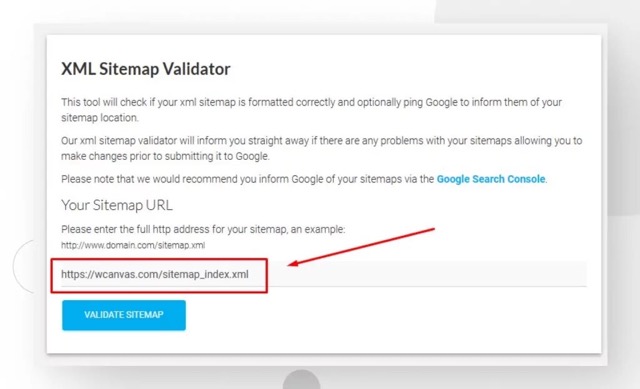
Yoast SEO on WordPress helps to generate a sitemap. Source: White Canvas
The beauty of using Yoast is that it creates a dynamic sitemap. This means every time you publish a new blog post, page, or product, it automatically gets added to your sitemap without any manual work on your part.
Alternative WordPress plugins include Google XML Sitemaps and RankMath, both offering similar functionality with slightly different features.
2. For Users On Non-WordPress Platforms
If you’re not using WordPress, don’t worry. Most modern content management systems like Webflow, Squarespace, and Shopify have built-in sitemap generation features or available plugins.
For custom websites or platforms without automatic sitemap generation, you can use third-party tools like XML-Sitemaps.com. These online generators crawl your website and create a downloadable sitemap.xml file that you can upload to your server.
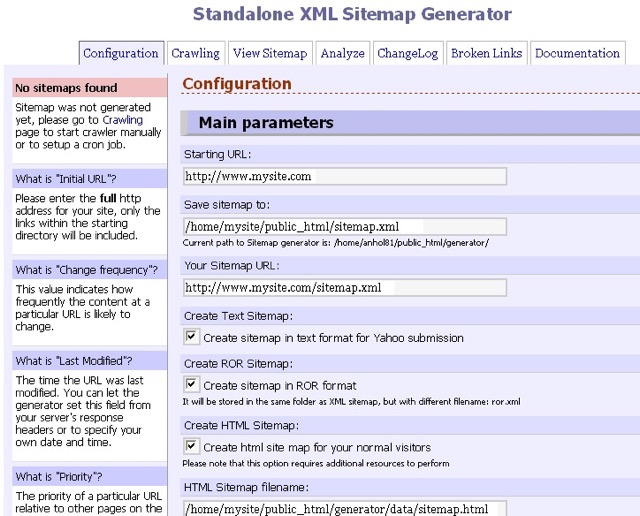
Sitemap created by XML Sitemaps Generator. Source: XML Sitemaps Generator
3. Manual Sitemap Creation
For smaller websites or those wanting complete control, you can create a sitemap manually. This involves writing XML code that lists all your important pages. While this method gives you maximum control, it requires updating the sitemap manually whenever you add new content.
A basic XML sitemap structure looks like this:
<?xml version=”1.0″ encoding=”UTF-8″?>
<urlset xmlns=”http://www.sitemaps.org/schemas/sitemap/0.9″>
<url>
<loc>https://yoursite.com/</loc>
<lastmod>2024-01-15</lastmod>
<priority>1.0</priority>
</url>
<url>
<loc>https://yoursite.com/about/</loc>
<lastmod>2024-01-10</lastmod>
<priority>0.8</priority>
</url>
</urlset>
Verifying Your Sitemap
Once you’ve created your sitemap, it’s crucial to verify it works correctly. Visit yoursite.com/sitemap.xml in your browser. You should see a structured list of all your website pages. If you see an error or blank page, there’s likely an issue with your sitemap generation that needs fixing.
Most well-formatted sitemaps will display in a readable format in your browser, showing each URL along with additional information like last modification dates and priority levels.
How to Submit Sitemap to Google
Creating your sitemap is only half the battle. Learning how to submit sitemap to Google ensures search engines actually use it to crawl and index your site.
Using Google Search Console
The primary method for sitemap submission is through Google Search Console, Google’s free webmaster tool.
Here’s the step-by-step process:
- Set up Google Search Console if you haven’t already by verifying ownership of your website
- Access the Sitemaps section by clicking “Index” then “Sitemaps” in the left sidebar
- Enter your sitemap URL in the “Add a new sitemap” field (usually just “sitemap.xml” if it’s in your root directory)
- Click Submit and wait for Google to process it
After submission, Google will show your sitemap status. A successful submission will display “Success” with the number of discovered URLs. If there are errors, Google will provide specific details about what needs fixing.
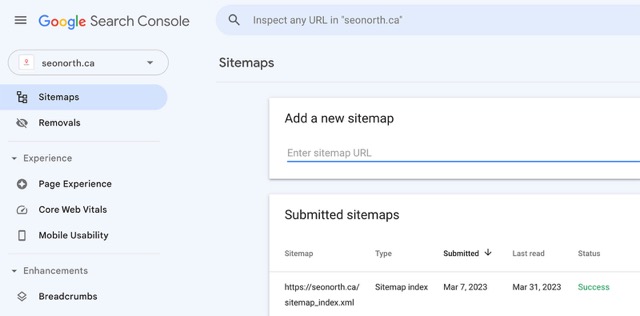
Submit a sitemap through Google Search Console. Source: SEO North
Monitoring Your Submitted Sitemap
Once submitted, regularly check your sitemap’s performance in Google Search Console. The platform shows valuable information including:
- How many URLs were submitted versus how many were indexed
- Any errors preventing indexing
- When Google last crawled your sitemap
This data helps identify potential issues with your website’s indexing and gives insights into how search engines view your content.
Smart Tips for Optimizing Your Sitemap (The Easy Way)
Once you understand what is a sitemap and how to create a sitemap for a website, the next step is to make sure it’s working as well as it should:
Use XML Sitemaps to Highlight Important Links
At its core, a sitemap in XML format is just a list of your site’s URLs. It tells search engines what content you have and where to find it.
But beyond just listing pages, you can also use XML sitemaps to highlight internal links (pages within your site) and external URLs (pages pointing elsewhere).
Why does this matter?
Because when you include clear pathways to your content, search engines better understand your site structure. It helps them know which pages are the most important, and it prevents what are called “orphan pages,” pages that exist but don’t link to anything else and often get ignored by crawlers.
So if you want Google to take your content seriously, make sure your sitemap reflects your actual structure. This helps improve how search engines see your site and, in turn, can improve your rankings.
Just keep in mind: having a sitemap doesn’t guarantee your pages will be indexed. But it increases the chances, and that’s a big deal.
Keep Your Root Directory Clean
The root directory is basically the home base of your website, as it’s where all your website files are stored and where all web requests start. Ideally, your sitemap file (usually called sitemap.xml) should live right here, at the top level of your domain:
Technically, your sitemap could live elsewhere, but placing it outside the root folder can create confusion. Why? Because where the sitemap is stored can affect what content it can “see” and list. For best results, keep it in the root directory where search engines expect to find it.
Also, try not to clutter your root directory with too many other files. A messy structure can slow down your site’s response time and make it harder for both users and bots to navigate.

When you create a sitemap, it’s best to place it in the root directory so search engines can easily find it. Source: Themeisle
Bottom line: a tidy root folder = better site performance and easier crawling.
Make Sure Every Page is Included
One of the most common sitemap mistakes is missing pages. Every important page on your website should be listed in your sitemap.
Even if your internal linking isn’t perfect, your sitemap can act as a safety net, making sure search engines still find and crawl all your content.
This is especially important for:
- New blog posts or landing pages
- Product pages on eCommerce sites
- Pages with weak internal links or no navigation path
If it’s a page you care about, and you want it to rank, it should be in the sitemap. Simple as that.
Regularly review your sitemap to make sure it reflects your most up-to-date content. And don’t forget to update it whenever you add or remove pages. Or you can use SEO Outsourcing Service at ROI Digitally to help you.