Canva is one of the most widely used tools on the internet these days. Among its dozens of users, you can be the one who makes this free design website a source of income. Let’s explore how to make money on Canva using 12 methods, regardless of your expertise or skills.
What Is Canva?
Canva is a versatile online platform that meets the creative needs of more than 125 million users worldwide. It has a user-friendly interface for numerous tasks:
- Design unexpected graphics, videos
- Manage content marketing schedules
- Schedule social media posts
- Create digital products
- And more.
Renowned among online entrepreneurs, freelancers, and side hustlers, Canva is also chosen by remote workers and teams for its asynchronous collaboration powers.
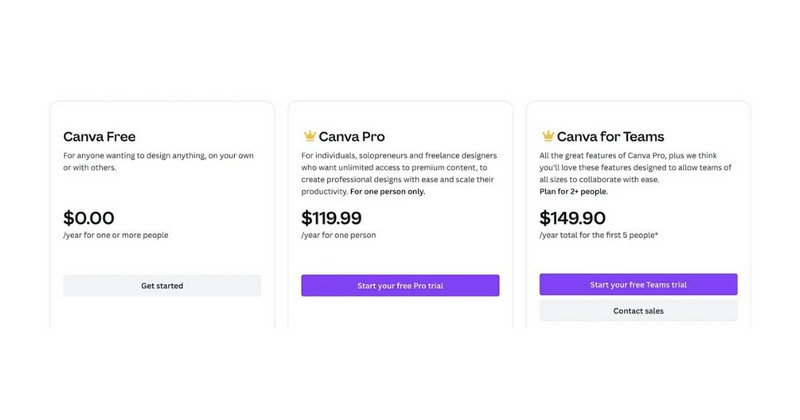
The platform offers 3 plans, making it accessible to users with different needs and budgets:
- Free plan
- Canva Pro: $119.99/year for one person
- Canva for Teams: $149.90/year total for the first 5 people
One preferred method of using Canva to make money is through semi-passive streams. It includes creating and selling e-guides, printables, Canva templates, and blog graphics. While Canva streamlines the creation process, you can also use other platforms like Etsy, Shopify, or Teachable to sell the products.
Even though semi-passive income streams need some setup and time to get going, you can eventually make money on your own. Whether you aim to offer freelance creative services, launch a digital product, or produce content, Canva can be your all-in-one solution. It’s time to use its vast range of features and endless discoveries of Canva hacks to bring your designs to life.
However, it’s crucial to understand that making money with Canva or any similar work is not a quick-fix solution for financial issues. It requires commitment, time investment, and effective marketing strategies. Remember to be patient, persistent, and consistent before earning worthwhile results.
How To Make Money On Canva?
Here are the best ways to help Canva designers make money:
Join The Canva Affiliate Program
Did you know you can earn up to $36 by referring someone to Canva? With the Canva Affiliate program, influencers and creators can make hundreds of dollars monthly by getting their followers to upgrade to Canva Pro.

As mentioned above, Canva is already popular with over 125 million users. As an affiliate, you only have to convince someone to upgrade to Canva Pro and earn a referral fee. Also, Canva tracks each referred user for 30 days, increasing your chances of earning.
Once you sign up as an affiliate, you’ll get a custom referral link to share on your social media, email newsletter, or site. Also, the platform will provide a personal dashboard to track your progress and allow you to withdraw payments easily.
Sell Canva Templates
Now, for those questioning: “Can I sell what I make on Canva?” The answer is yes. A simple way to earn passive income with Canva is by selling Canva templates online. Creating an account and designing templates for different themes help you make up to $100 daily!
There are countless kinds of templates you can create:
- Social media posts
- Presentations
- Client packets
- Newsletters
- eBook covers, etc.
Then, use the Canva creator mode to create eye-catching templates with customization options.
Once you have a few samples ready, sell them individually or in packs on platforms like Etsy, Shopify, Creative Market, and Teachable. We recommend promoting your website designs to expand your income opportunities as you gain traction.
Start A Print-On-Demand Business
If you are not a professional designer who can craft captivating templates, can you really make money with Canva?
Consider this method to make money using Canva – Print on Demand (POD). It is a popular way to make extra money, potentially bringing in thousands of dollars monthly.
Here’s how it works:
- Step 1: Design creative graphics for t-shirts, mugs, tote bags, etc. Don’t worry if you’re not an expert because Canva has multiple templates and graphics to make your designs outstanding and unique.
- Step 2: Once finished, upload them to platforms like Redbubble, Amazon (through Merch by Amazon), or Etsy (through a POD service like Printify).
- Step 3: Set the price for each item, and you will earn a royalty whenever somebody buys one.
The best thing about this method is that you don’t have to deal with any stock—the platforms are responsible for the whole process: production, packaging, shipping, and fulfillment.
But that’s not all: Sell your POD products there directly if you already have a website or online store. It’s a fantastic way to add extra earnings to your hustle!
Design And Sell Printables
Printable products are in high demand these days because of their convenience. Many love being able to download them instantly and print them at home. With the versatility and popularity of printable products, there are plenty of opportunities for Canva designers to make money:
- Calendars
- Art illustrations
- Journals
- Planners
- Budget templates
- Meal planners
- Intake forms
- Checklists, etc.
Pro tip: Find inspiration from pre-made templates on Canva to create your digital products. Experiment with color schemes, fonts, and graphics to create eye-catching printables.
After designing your printables, you can sell them on Etsy or promote them through your brand. Further, you can partner with bloggers or YouTubers by offering custom digital downloads for their viewers and earn a commission on each sale.
Be A Canva Contributor
Becoming a Canva Contributor is a great chance to gain passive income by utilizing your design talents. By joining the Canva Contributor program, you can upload and sell your original graphics, stock photos, stickers, and more on the platform.
Here’s how people are using Canva to make money:
- Step 1: Join as a contributor. Yet, the program may occasionally close to new applicants, so keep an eye out for openings.

- Step 2: Upload your designs, whether one item or a collection. The Canva team will review them promptly and provide feedback within days.
- Step 3: Earn a 35% royalty from the total revenue every time Canva users use your creations in their designs.
Remember: Your artwork must be original and comply with the Canva terms and conditions.
What we love about this program is listing your content on Canva is completely free. Then, you can gain exposure to millions of users without spending extra.
Also, the demand for new templates, designs, photos, and videos on Canva is constant. As a contributor, you can cater to this demand by creating unique and fresh content that sets your work apart.
Design Logos For Other Businesses
How to make money on Canva is not a complex matter if you utilize Canva’s versatile features. Adding a touch of creativity lets you craft eye-catching logos and turn them into profitable sources.
Follow these steps to start your services:
- Step 1: Design and upload logo samples to showcase your skills. These pieces will build the foundation of your portfolio, proofing your abilities to potential customers.
- Step 2: Visit freelance graphic design websites (Upwork or 99Designs) to contact businesses finding logo design services.
- Step 3: Pitch your services and designs to these clients, highlighting your approach and vision.
- Step 4: Secure a few projects and produce impressive results to earn positive ratings and reviews from other clients. These will enhance your credibility and attract more clients in the future.
As you gain experience and build your reputation, pitch your designs to medium and large businesses willing to invest more in high-quality logo designs. You can get higher rates with a solid portfolio and positive feedback, earning $100 or more per logo.
If you lack inspiration, visit the Canva library for reference from thousands of logo templates to spark creativity. Once again, ensure your designs are original and unique to avoid copying others’ work.
Create Low Content Books
Creating low-content books using Canva can be profitable, especially when selling them on Amazon. They are log books, puzzle books, sketchbooks, coloring books, planners, journals, etc. These books allow buyers to fill in the pages themselves.

To start, get an idea and create templates for your low-content books using Canva. Ensure you have visually appealing designs that fulfill your target audience’s preferences. Take your time to test with different themes, layouts, and styles to make your products stand out.
After designing, upload them directly to Amazon’s platform and set your prices. With each sale, you can earn around $1 to $4 per copy, all on autopilot. It’s a straightforward process that allows you to earn passive income from your skills and designs.
More than Amazon, you can explore other online marketplaces or even create your site to sell your low-content books.
Create Social Media Content
For those who want to combine their design and writing skills, creating social media content using Canva is a great approach. The platform’s easy-to-use tools allow you to design engaging posts for various platforms, including Facebook, Instagram, X, etc.

Companies need immersing videos and content to boost their social media marketing. Many are willing to invest in this aspect, with monthly budgets ranging from $300 to $2,000. Understanding this market, you can easily offer your services to local businesses.
For example, contact cafes and hairdressers and create ad posts to promote their products. That’s how many people use Canva to make money.
Start by finding opportunities on Fiverr and Upwork or by networking directly with businesses. When your client base grows, it’s time to expand your services (social media management, post-scheduling, etc). You will build long-term relationships and increase your earnings over time by offering high-quality content and meeting client needs.
Sell Your Design Skills On Freelancing Websites
Another way to quickly earn money with Canva is by offering graphic design services on freelancing platforms. There are countless options: 99Designs, Fiverr, DesignCrowd, and more. These platforms have numerous design opportunities waiting for freelancers to take over.
For instance, Fiverr allows you to earn income from various Canva services:
- eBook covers
- Posters
- Logo design
- Editable social media templates
- Etc.
To start, choose a freelancer platform and set up your profiles. Ensure that you showcase your skills with samples, testimonials, and past projects.
For beginners, it’s wise to apply for as many gigs as possible. After completing several projects with positive reviews, focus on specific niches like social media graphics, logos, or brand kits.
Overall, freelancing can help you become a successful digital agency, allowing you to earn significant annual revenue. So, focus on customer satisfaction and exceed expectations to build long-term partnerships and achieve ongoing success.
Start a Canva Course
If you’re familiar with Canva, how about creating and launching a Teachable, Skillshare, or Udemy course?
Teachable is excellent if you have an existing audience; you’ll earn more by selling directly to them. Should you be starting from scratch, Udemy and Skillshare are better options:
- On Udemy, you’ll receive money every time someone purchases your course, with top instructors making thousands of dollars monthly.
- Skillshare pays monthly royalties based on the watch time of your classes. Many Canva classes on Skillshare already have thousands of students.

Since Canva is versatile, it’s best to initially focus on a specific sub-niche. Here are our recommendations for your course:
- How to create and sell Canva templates
- Ways to make TikTok videos with Canva
- Steps to edit videos for social media platforms using Canva.
You don’t need to be an expert—just a few steps ahead of your students, sharing your best practices and tips to help them.
Publish Canva Tutorials On Youtube
As of Feb 12, 2024, the average annual pay for a U.S. YouTube channel is $68,714. It equals $33.04 per hour, $1,321 weekly, or $5,726 monthly. Starting a YouTube channel where you teach Canva tips and tricks can earn you some serious cash.
You could make a few hundred to even a few thousand bucks monthly once your channel gets popular. Besides money from views, you can also earn by doing sponsored videos with brands, promoting Canva on your channel, or selling things like T-shirts and courses.
To make it big on YouTube, you must plan your videos well:
- Ensure the videos are easy to follow, with engaging visuals and background music to keep viewers interested.
- Catchy titles and eye-catching thumbnails are a must to get attention.
- Share them on social media to get more people watching.
As your subscriber count goes up, so will your earnings!
Design A Website Or E-Commerce Store
More than making posters and logos, do you know you can also build awesome websites using Canva? Canva designers can indeed make some serious money doing it.
You only need to find web design gigs on Upwork, Facebook Groups, and 99Designs. Otherwise, ask around in your professional network or on LinkedIn. Then, visit Canva’s one-page website builder and start designing.
Once your page is ready, add some final touches, install plugins, and hit publish. However, please note that you’ll need Canva Pro to publish websites. So, upgrade now and take your websites to the next level.
Frequently Asked Questions
How much do people earn at Canva?
According to a ZipRecruiter report, people working at Canva in the U.S. make an average hourly pay of $15.78. However, hourly wages can differ significantly, with the lowest reported at $7.21 and the highest at $24.28.
These variations suggest that earning potential at Canva can be influenced by factors such as skill level, location, and experience.
How do I get paid for free on Canva?
There are numerous ways to get paid for free on Canva, as we’ve mentioned above. For example, you can sell your photos, stickers, videos, and graphics online through their platform. Listing your Canva content is free, meaning there are no upfront costs to showcase your work.
The Bottom Line
And that’s all we want to share about how to make money using Canva. With those 12 approaches, you can utilize your skills and knowledge to generate quicker earnings. Remember, all routes require commitment and patience. Enjoy the creative process and explore opportunities with Canva regardless of your chosen approach. Don’t forget to follow us – ROI Digitally for more valuable info and guidelines.