
Key Takeaways
- What is technical SEO? It’s all about improving your website’s backend, including things like site speed, mobile friendliness, and structured data, so Google can understand and rank your content more easily.
- Users expect fast-loading pages, smooth mobile experiences, and safe browsing. Google does too! Optimizing load speed, using HTTPS, and removing dead links are essential items on your technical SEO checklist.
- From scanning broken links to monitoring Google algorithm changes, staying up-to-date is key. Follow the latest technical SEO tips below and always align your website with SEO technical requirements to stay ahead of the game.

What is technical SEO?. Source: LinkedIn
Want help implementing technical SEO the right way?
Visit us at roidigitally.com – we’ll help you build a site that performs better, ranks higher, and converts faster!
What Is Technical SEO?
Technical SEO is all about optimizing a website’s structure and backend to improve its performance on search engines like Google. This includes things like ensuring the website loads quickly, is secure, and has a clear structure so that search engines can easily crawl and index the pages.
For large websites, this often requires teamwork between SEO specialists and web developers to make sure everything is in place.
Key technical SEO elements include improving page load speed, setting up proper internal links, ensuring your site is mobile-friendly, and resolving any issues that could prevent search engines from crawling and indexing your site properly.
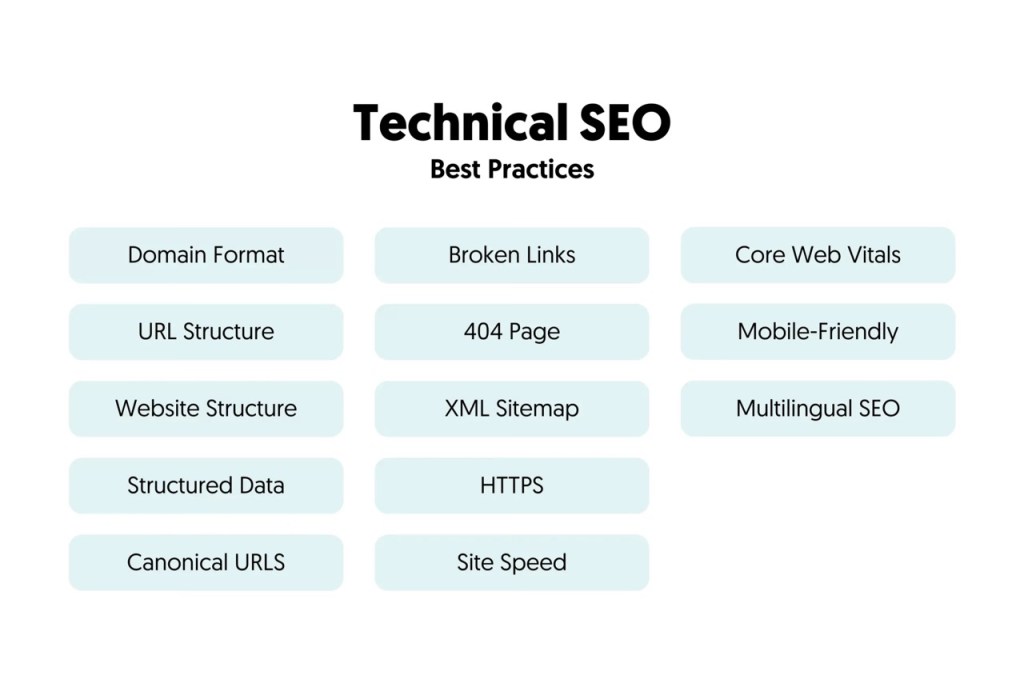
Some key technical SEO factors. Source: Reliablesoft
Technical SEO vs. On-Page SEO vs. Off-Page SEO: What’s the Difference?
Technical SEO focuses on the backend of your website, making sure it runs smoothly and is easy for search engines to crawl and index. This includes fixing things like broken links, improving page speed, and optimizing metadata.
It’s about keeping your website’s technical health in top shape so it ranks better.
For example, making sure your website’s code is clean and all technical requirements are in place is key to SEO website technical requirements.
On-Page SEO is all about what happens on each webpage.
It involves things like keyword research, optimizing content, and fixing on-page elements like titles, meta descriptions, headers, and internal links.
For instance, an on-page SEO expert works on making each page as optimized as possible for the right keywords, but doesn’t get into the technical issues that might affect how pages load or are crawled.
Off-Page SEO is about building external authority for your website. This includes activities such as link building, digital PR, and acquiring high-quality backlinks from other websites.
It focuses on boosting your website’s reputation and authority in the eyes of search engines. Unlike technical or on-page SEO, off-page SEO focuses on external signals that help improve your rankings.
Key Benefits Of A Technically Optimized Website
- Fast Loading
A technically optimized website is not just about making things look good—it’s about making sure everything works efficiently, both for your users and search engines. One of the most important aspects of this is fast loading times, which is crucial for both user experience and search engine rankings.
Why does speed matter?
- User Experience: No one likes waiting around for a website to load. Studies have shown that 53% of mobile visitors will leave a website if it takes longer than three seconds to load. So, if your website is slow, you’ll lose visitors who are frustrated and move on to a faster site.
- Search Engine Rankings: Google prefers websites that load quickly. If your pages are slow, you’ll likely end up ranking lower in search results, making it harder for people to find you. This is because Google considers page speed an important factor in its rankings. Since 2021, page experience (how fast your pages load) has been an official ranking factor, making it even more critical to optimize your site speed.

Google has its own page speed tracking tool – Google PageSpeed. Source: Google for Developers
To improve your website’s speed, you can follow a few simple technical SEO tips.
First, use compressed images to reduce their size, which helps your pages load faster.
Next, try to minimize JavaScript and CSS files wherever possible, as these can slow down your site. You can also leverage browser caching, so returning visitors don’t have to load everything from scratch, which speeds up their experience.
Finally, make sure to review your Core Web Vitals, which are key performance metrics used by Google to measure page experience and impact your rankings.
To ensure your site is fast enough, you can easily test your website speed using various online tools, and many will provide specific technical SEO checklist items to improve your site’s speed.
- Crawability
One of the big benefits of having a technically optimized website is making sure it’s crawlable for search engines.
If you’re wondering what is technical SEO, this is a key part of it, helping search engines easily access and understand your site. Search engines use bots (or “crawlers”) to scan your pages by following links.
A solid internal linking structure tells them which pages are most important. But there’s more you can do behind the scenes.
For example, a robots.txt file lets you guide bots on which pages they should or shouldn’t access.
Be careful, though, as blocking important files like CSS or JavaScript by accident can stop search engines from seeing how your site works, which can hurt your rankings.
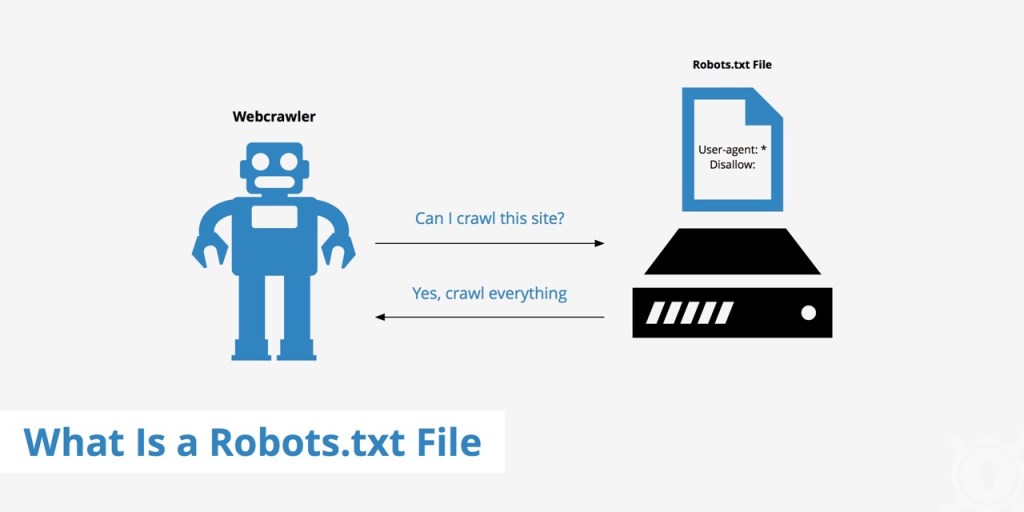
How robots.txt file works. Source: KeyCDN
Another powerful tool is the meta robots tag, which sits in your page’s code. It can tell search engines to either include or exclude a page from search results or even prevent them from following links on that page.
These settings are part of your SEO website technical requirements and should be handled with care. If you’re not sure, it’s a good idea to consult with an expert team like ROI Digitally.
Following this kind of setup is part of a smart technical SEO checklist, and it ensures your site gets crawled properly without blocking important content.
For best results, consider using technical SEO tips, such as checking your internal links, using tools like Yoast SEO, and regularly reviewing your robots.txt settings.
- No 404
A big part of having a technically optimized website is ensuring it doesn’t have too many dead links, which are links that lead to a page that no longer exists and display as 404 error pages. These are frustrating for visitors and can ruin their experience on your site. Imagine clicking on something expecting info, but hitting a dead end instead!
But it’s not just users who get annoyed, search engines don’t like them either!

404 page brings a negative experience to users and search engines. Source: Learn To Code – One Month
Bots crawl every link they find, even the ones that most users won’t see, and if they keep encountering broken links, it can harm your site’s credibility and rankings.
So, part of what is technical SEO is making sure these broken links are cleaned up.
One of the best technical SEO tips is to scan your site for dead links using SEO tools regularly. If you ever delete or move a page, make sure to redirect the old URL to a relevant new one, that way, you keep both visitors and search engines happy.
Adding this step to your technical SEO checklist ensures your site stays tidy, user-friendly, and SEO-ready. Plus, tools like Yoast SEO Premium make it easy to set up redirects, even if you’re not a developer.
- Structured Data
One of the powerful benefits of a technically optimized website is the use of structured data. If you’re asking what is technical SEO, structured data is a big part of the answer.
It helps search engines understand your content more clearly.
This format is defined by Schema.org, and when done right, it helps search engines connect the dots and show your content in a more meaningful way.
Tools like Yoast SEO make this easy by automatically adding structured data for certain types of content, such as FAQs or how-to articles.

Structured sitemap helps search engines understand your site better. Source: Slickplan
Technical SEO Checklist
- Audit Website
A solid technical SEO checklist always starts with a website audit.
And just like with any tune-up, the first step is figuring out what’s working and what needs fixing.
A technical SEO audit reviews the full health of your website.
You can do it yourself or hire an SEO agency like ROI Digitally, but either way, it helps you find issues and prioritize what needs attention.
These audits often include checking for broken or incorrect links, reviewing metadata (such as titles and descriptions), and ensuring that things like image size and alt text are properly optimized.
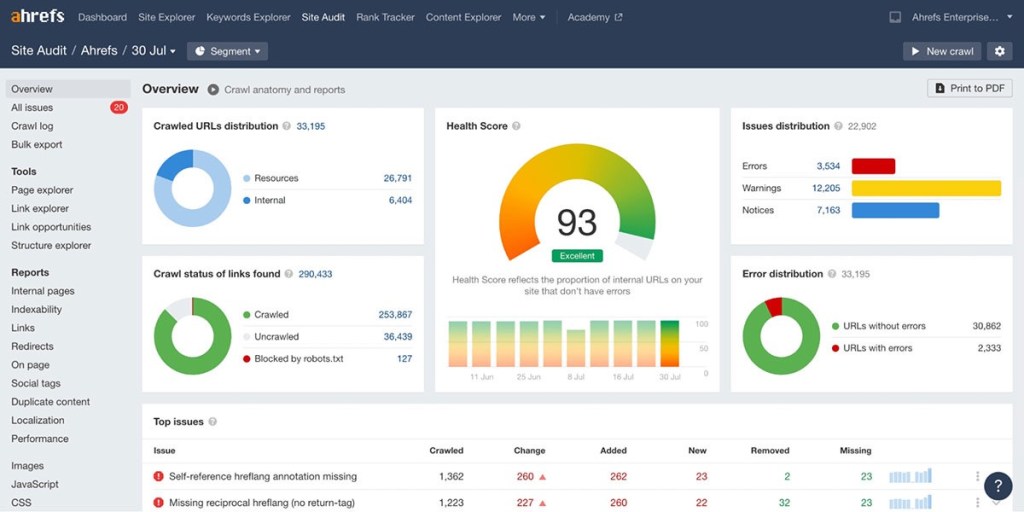
A website audit generated by Ahrefs. Source: DMD Design & Marketing
It’s also important to confirm that your URLs are clean and easy to read, your pages load quickly, and your website is mobile-friendly.
If you’re planning to move your site to a new CMS or make major changes, it’s a good idea to create an SEO website migration checklist to avoid losing traffic in the process.
Regular audits are one of the best technical SEO tips out there. They help you stay on top of SEO website technical requirements, catch problems early, and keep your site performing at its best in search rankings.
- Optimize Loading Speed
One of the most important steps in any technical SEO checklist is optimizing your website’s loading speed.
Why?
Because users today don’t like waiting, if your site takes too long to load, they’ll leave and find a faster one. In fact, the average web page should load in around 2.5 seconds on desktop and 8.6 seconds on mobile.
Anything slower, and you’re likely losing traffic.
Speed is also a big deal for Google. It’s now a key ranking factor, meaning that slow-loading sites can get pushed lower in search results.
Here are some easy technical SEO tips to speed things up:
- Use smaller file types: Choose JPEGs over PNGs for images, and MP4s over MOVs for videos—they load faster.
- Compress large files: HTML, CSS, and JavaScript can be heavy. Compressing them (with free CMS plugins if needed) keeps your site quick without sacrificing quality.
- Remove dead pages: Old or unused pages can slow down your site. If you don’t need them, use a 301 redirect and delete them.
- Use a CDN (Content Delivery Network): A CDN loads your site’s content from the server closest to the user, which greatly reduces loading times.
- Ensure Mobile-Friendliness
These days, more than 50% of all website visits come from people using their phones. That means if your site doesn’t look good or work well on mobile, you’re likely to lose visitors, and Google might even lower your rankings because of it.
To stay competitive and keep users engaged, it’s essential to run a mobile audit on your site. Ask yourself: Is it easy to use on a phone?
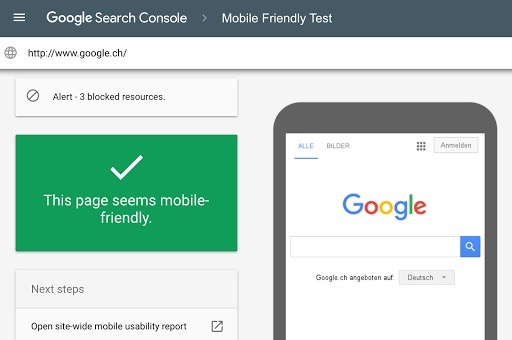
Use Google Search Console (GSC) to analyze your site’s mobile friendliness. Source: Google for Developers
Here are a few tips:
- Make sure your layout adjusts to smaller screens.
- Place buttons and links where thumbs can easily tap them. The bottom left is a smart spot, since users tend to read in an “F” pattern.
- Keep paragraphs short. Big walls of text are overwhelming on small screens.
- If you’re using forms, keep them simple with as few fields as possible.
A smooth mobile experience isn’t just nice to have; it’s essential for both SEO and user satisfaction.
- Improve Core Web Vitals
If you’re diving into what is technical SEO, then Core Web Vitals are something you can’t skip.
These are key metrics that Google uses to measure how well your website performs in terms of loading speed, responsiveness, and visual stability. In short, they reflect how smooth and user-friendly your website feels—and they directly impact your search rankings.
Let’s break it down into the three main metrics and how to improve each:
- LCP (Largest Contentful Paint) measures how quickly the main content on a page loads. Google recommends it happen within 2.5 seconds. To boost this, identify what’s causing the delay—usually big images, heavy fonts, or bulky code. Use web-safe fonts, compress large photos, and minify HTML, CSS, and JavaScript files. This is one of the most effective technical SEO tips to speed things up.
- INP (Interaction to Next Paint) checks how quickly your website responds when someone clicks or taps something. If there’s lag, it affects the user experience. To fix this, load your scripts asynchronously (which means loading multiple things at once instead of one by one) to make your site more responsive.
- CLS (Cumulative Layout Shift) evaluates how stable your site’s layout is during loading. If things jump around (like buttons shifting after the page loads), that’s a bad sign. To improve this, always set size dimensions for images, videos, and ads. Avoid sudden content shifts and skip custom fonts that cause layout delays.
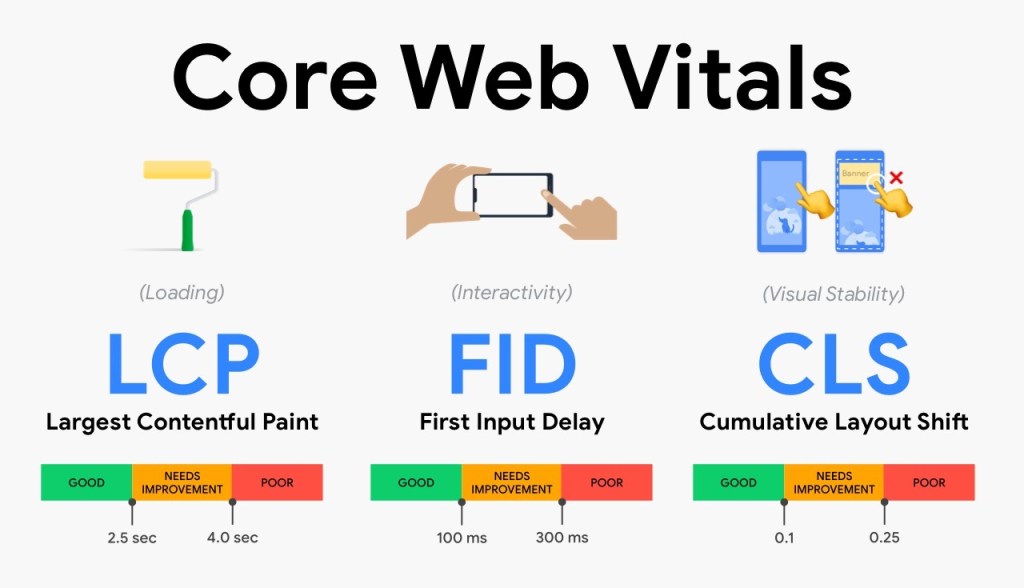
LCP, FID, and CLS are the 3 key web vitals. Source: Akshay Ranganath’s Blogs
To check how your site performs, use Google’s PageSpeed Insights. It’s free and provides specific fixes based on your site’s current performance.
- Keep Track Of Google Updates
One important but often overlooked part of technical SEO is keeping an eye on Google’s algorithm updates. Technical SEO it’s not just about fixing site speed or metadata; it also means staying current with how Google ranks websites.
And that can change a lot. In fact, Google rolls out around 600 updates every year!
These updates come in two types:
- Core updates: These are major changes that affect a wide range of websites and usually happen every few months. They can cause big shifts in rankings.
- Specific updates: These target smaller, more focused aspects of SEO. They happen more frequently and can go unnoticed, but still affect your site.
To stay competitive, it’s essential to monitor these updates and review your site regularly when they occur. Look at how your rankings are performing, check for any dips in traffic, and adapt your site if needed. Following SEO blogs or tools like Google Search Central can help you stay informed.

Jeng Nguyen has nearly 10 years of experience ranging from project management, operations, business development, customer service, content creation, video production, photography, website development, social media marketing, email marketing, advertising, SEO and sales.
Well-known as an ace Digital Marketing expert throughout various industries in Vietnam, Australia and the USA - Jeng is known for the success rate that he achieves whilst finding solutions tailored best for each unique business.
Jeng's mission is to revolutionize customer experience, starting with the journey of Attraction - Interest - Desire – Action. Together with a multi-expertise team at ROI Digitally, Jeng aims to provide businesses unprecedented breakthroughs in Return-on Investment from their customers.