
When building a website, what you put on and how you organize it can make a big difference in its visibility. Before launching your site, review ROI Digitally‘s comprehensive SEO checklist to ensure it’s set up well for search engines and visitors.
Key Takeaways
This checklist covers everything you want to know about SEO, including:
- SEO Basics Checklist
- Keyword Research Checklist
- On-Page SEO Checklist
- Content Checklist
- Technical SEO Checklist
- Link Building Checklist
- Advanced SEO Tips and Tactics
- Case Studies and Examples
So, if you want your site to rank higher on search engines, this checklist is exactly what you need.
1. Site Optimization Checklist
Follow this guideline to optimize your website for search engines before you publish it.
| Instructions | |
| Add a site title | Include a site title under 60 characters with one or more keywords. |
| Add a site description | Add a brief (50-300 characters) description of your site for search results. |
| Add SEO descriptions | Ensure each page has a unique, readable (50-300 characters) SEO description. |
| Check your page and title format | Manage how page titles appear in browser tabs, social shares, and search results. |
| Add social sharing images | Upload images for social media sharing, including one for your site, each page, and each blog post/product/event. |
| Create a custom 404 page | Design a customized 404 error page with links to retain visitors. |
| Connect a custom domain | Build a custom domain to enhance brand identity and improve search visibility. |
| Connect to social media | Link your site to social media profiles for seamless sharing and increased engagement with potential customers. |
| Ensure SSL is enabled | Verify that your SSL settings are configured for security. |
| Check URL slugs | Review and modify URL slugs to ensure they accurately represent page content. |
| Choose your blog post URL format | Opt for a URL format blending the post title for improved readability and SEO optimization. |
| Add your location | Provide location details on your website, particularly if you have a physical business. |
2. SEO Basics Checklist
To be successful with SEO, it’s crucial to cover the basics. Start with the steps below to create a foundation for your SEO strategy. Otherwise, you will hinder your site’s ability to rank effectively.
a. Set Up Google Search Console and Bing Webmaster Tools
Google Search Console (GSC) is a handy tool for monitoring and tracking your site’s performance in search engine result pages (SERPs). Setting up a GSC account and utilizing its features can help you better understand your site’s visibility and address any issues that may arise.

Google Search Console
Similarly, Bing Webmaster Tools is the counterpart for Bing search engine users. While Bing is not as famous as Google, it attracts up to 1.3 billion unique global visitors monthly. This number indicates why you should optimize your site for this platform.

Bing Webmaster Tools
Both GSC and Bing Webmaster Tools offer valuable features such as keyword analysis and SEO audit. They are essential tools for every SEO effort, from beginners to experts. If you haven’t started yet, we recommend setting up accounts for both platforms to enhance your site’s visibility and performance.
b. Set Up Google Analytics
Google Analytics is a practical tool for tracking and analyzing website and app traffic. It provides insights into where your traffic originates, how users interact with your site, and the effectiveness of your marketing efforts.

How Google Analytics works
This website provides numerous helpful features, including:
- Track traffic sources, including Google searches
- Identify top-performing pages on your site
- Monitor traffic trends and changes over time
- See if your traffic is growing and by how much
- Understand user behavior metrics like bounce rate, page views, and time-on-site
Pro tip: For more comprehensive reports, integrate Google Analytics with GSC to access further SEO data directly within your Analytics account.
Follow these phases to set up Google Analytics:
- Step 1: Create an Analytics account
- Step 2: Add properties to your Google Analytics account using the Editor role.
- Step 3: Add a data stream.
- Step 4: Set up data collection for your site.
- Step 5: Complete extra configurations for more helpful data analysis.
c. Install an SEO Plugin
This step is for WordPress users.
The SEO plugins simplify the process of optimizing your site for search engines and conduct technical SEO tasks like setting up robots.txt and XML sitemaps.
We recommend choosing these popular options:
For example, here is how Yoast SEO looks like in WordPress:

Yoast SEO uses green, orange, and red lights to showcase whether your content adheres to SEO best practices. It is where many experts choose to analyze and improve their content’s findability.
Note: If you use a different content management system (CMS), check if it already includes SEO features or if you need to install an SEO plugin.
d. Submit a Sitemap
As we cited in our last blog about Bing SEO, a sitemap is like a roadmap for search engines. It allows them to navigate and understand your website’s structure and content, making it a crucial part of SEO.
Here is what a sitemap looks like: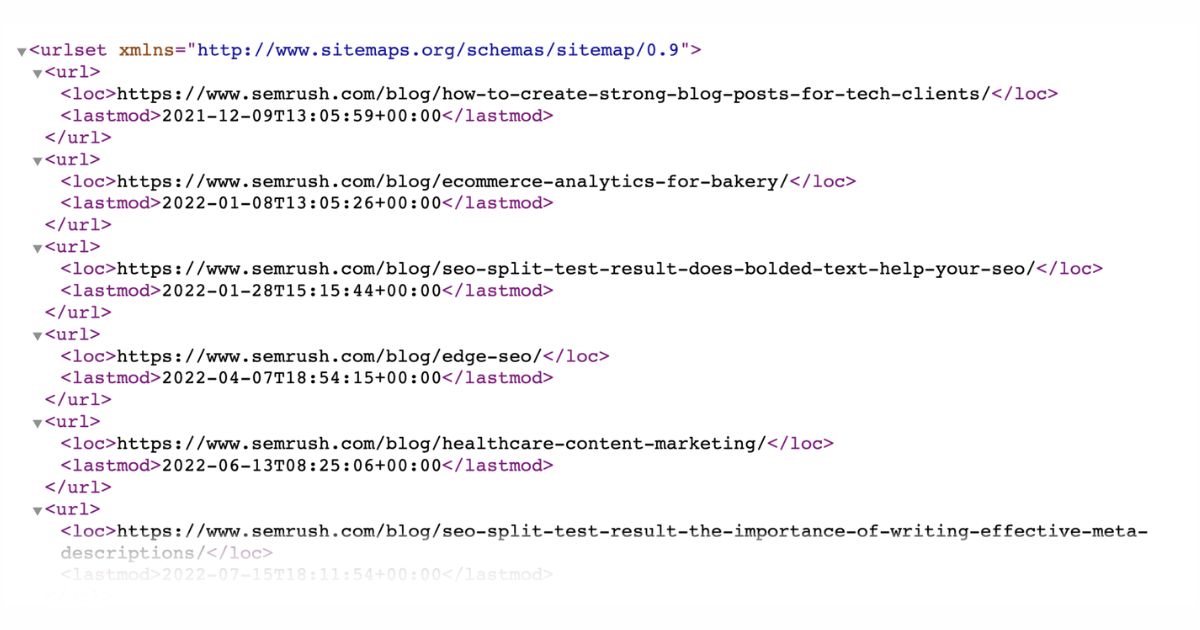
(Source: SEMrush)
If you’re using WordPress, your sitemap is automatically built for you. Otherwise, you can easily create one using one of these sitemap generator tools:
- Yoast SEO
- XML-Sitemaps.com
- XML Sitemap & Google News
- XML Sitemap Generator for Google
- Inspyder Sitemap Creator
- Slickplan Sitemap Builder
Once you have your sitemap, submit it to GSC and Bing Webmaster Tools to ensure search engines efficiently crawl and index your site.
Pro tip: During this process, use SEMrush’s Site Audit tool to detect and fix any issues affecting your sitemap’s performance and overall SEO health.
e. Create a Robots.txt File
The Robots.txt file is another crucial part of SEO. It directs search engines to which pages and files they should or shouldn’t crawl on your website. In short, this file manages how web crawlers access and index your site’s content, impacting its visibility in search results.
Below is an example of a robots.txt:

You can utilize the Robots.txt Generator tool or create one yourself by following this step-by-step guideline:
- Step 1: Create a new file within a text editor or web browser and name it Robots.txt
- Step 2: Add directives to this file
- Step 3: Upload the Robots.txt file to your site
- Step 4: Test your Robots.txt using GSC or SEMrush’s Site Audit tool.
Once finished, you can view your site’s robots.txt file by adding “/robots.txt” to your homepage URL, such as https://roidigitally.com/robots.txt.
f. Review GSC for Manual Actions
Google takes action against a website when this search engine finds some pages don’t follow Google’s rules against spam. These actions usually happen when someone tries to cheat the system to get their site to rank higher in SERPs.
If your site gets a manual action, Google might lower its ranking in search results or not show it at all. But users won’t see any signs that this has happened.
Google will let you know if your site is affected in the Manual Actions report and the Search Console message center. We recommend you regularly check for manual actions in the GSC and fix it. Here’s how:
- Step 1: Scroll down the GSC’s sidebar and find the “Security & Manual Action” section.
- Step 2: Choose “Manual actions” to see if Google has found any issues with your site.

- Step 3: Read the description to see the issues and how to fix them.
- Step 4: Fix all issues on every affected page and ensure Google can access your pages without needing a login, paywall, or being blocked.
- Step 5: After fixing all issues, request a review in the Manual Actions report.
Reconsideration reviews take time, so be patient. Check your mail regularly, and don’t resend your request until you receive a final decision.
g. Ensure Google Can Index Your Site
The final part of the essential SEO checklist is ensuring Google can add your website to its index. Here’s how to confirm your site’s indexability and check how many pages from your website Google has indexed:
Go to Google and search for “site:yourwebsite.com.” You’ll find the number of indexed pages displayed below the search bar. For example:

Use GSC’s URL Inspection tool to check whether a specific page is indexed more accurately. Indexed pages will display “URL is on Google” in the URL Inspection tool, while pages that aren’t indexed will show “URL is not on Google.”

To ensure Google can index your website, request indexing for your homepage or use SEMrush’s Site Audit tool.
h. Verify Your Website With Bing Webmaster Tools
Verifying your site with Bing allows you better to manage its visibility in Bing and Yahoo search results. Depending on whether your site supports code injection, different methods are available for verifying your site with Bing Webmaster Tools:
- DNS auto verification
- XML File authentication
- Meta tag authentication
- Adding CNAME record to DNS
Choose the method aligning with your plan and follow the instructions to complete the verification process.
3. Keyword Research Checklist
Keyword research involves finding potential search queries relevant to your business and customers. This process includes finding, organizing, and prioritizing keywords for your SEO strategy.
Let’s delve into our checklist summarizing the essential tasks involved in effective keyword research:
a. Analyze Competitor Keywords
Analyzing your competitors ‘ keywords is a good starting point for keyword research. You must answer these questions:
- What terms are they targeting to enhance rankings and attract traffic?
- Which ones you haven’t used yet?
- Can you use those terms for your SEO strategy as well?
A practical approach to do this is using SEMrush’s Keyword Gap tool. Follow these steps:
Step 1: Input your domain and competitors’ domains, then click “Compare.”
Step 2: Review the report, focusing on these two labels.
- “Missing” highlights keywords your competitors rank for, but you don’t.
- “Weak” reveals keywords with lower rankings than your competitors.

Keyword Gap tool’s report (Source: SEMrush)
Step 3: Develop a keyword strategy around these terms using these insights. It’s time to regain traffic from your competitors!
b. Find High-Value Keywords
High-value keywords are potential terms that can generate impressions, clicks, sales, and conversions for your business. Typically, they are high in search volume and competition and represent what your business offers. These terms are considered head terms or pillar page keywords.
We suggest using GSC or to do this:
- Step 1: Access the GSC Overview page and choose the “Search results” tab.
- Step 2: Change the date range by clicking the “Date” button.
- Step 3: Sort these by “Clicks” to see which keywords attract the most traffic to your site.
- Step 4: Find high-performing terms and topics for your SEO strategy.
If you want to use SEMrush’s Domain Overview tool along with GSC to find more keyword data for your website, here’s how:
- Step 1: Open the tool and input your domain.
- Step 2: Scroll to the “Top Organic Keywords” section and select “View details.”
- Step 3: Pay attention to keywords with commercial and transactional intent, as they will likely lead to conversions and sales.
c. Find Long Tail Keywords
A long-tail keyword is a highly specific search query with a relatively low search volume. While users search for these terms less frequently, they account for a significant part of overall searches and yield higher conversion rates. Also, long-tail keywords are less competitive and more accessible to reach higher rankings.
Finding long-tail keywords through “Google Suggest” is an effective strategy to expand your keyword research.
Start by entering a keyword into the Google search bar. For example, let’s type “best dryer.” Without hitting enter, you see the suggestions provided by Google below the search bar.

These suggestions, known as “Google Suggest” keywords, are derived directly from user searches on Google.
Since these suggestions are from Google, you can be confident that they reflect actual user search queries. As a result, adding these keywords to your site’s optimization strategy can enhance its performance.
Pro tip: Use Keywordtool.io or Keyword Magic Tool to streamline the process of extracting Google Suggest keywords.
d. Discover Question Keywords
Keep going with our SEO checklist in 2024. Let’s discover question keywords that can significantly enhance your blog posts and articles.
They are queries like:
- How do you make cold-brew coffee?
- What is a technical SEO checklist?
- How do I make a list of keywords?
You can filter the question keywords by SERP features, such as “People also ask.”

Another efficient tool for finding these question-based keywords is Answer The Public. This free tool summarizes questions people commonly search for online, enabling you to address these inquiries effectively through your content.
e. Create a Keyword Map
Once you’ve got your target keywords, keyword mapping is following. This process helps you optimize your website structure and content.
- Step 1: Download the Keyword Mapping Template or create one yourself.
- Step 2: Create keyword clusters using SEMrush’s Keyword Manager tool.

An example of keyword clusters (Source: SEMrush)
- Step 3: Assign pages to your clusters
4. On-Page SEO Checklist
Without a positive on-page experience, your website will face challenges ranking and attracting organic traffic. So, follow this on-page SEO checklist:
a. Include Your Keyword In Your URL
Your URL communicates the purpose of your page to Google. A URL with relevant keywords can enhance your organic click-through rate (CTR). According to Backlinko’s report, URLs containing phrases similar to a keyword have a 45% higher CTR than those lacking a keyword.
For instance, if your target keyword is “SEO checklist,” you can structure your URL as yoursite.com/seo-checklist.
b. Add Your Keyword in H1, H2, and H3 Tags
Include your keyword in H1, H2, or H3 tags.
For example, in this article, we’ve used the term “SEO Checklist” in the heading and other subheaders. This operation can enhance our ranking for that keyword.
This suggestion won’t significantly impact your Google rankings. Yet, in search engine optimization, every little optimization counts.
It’s worth noting the importance of where you place your keyword. Whenever feasible, aim to put your keyword at the beginning of your title tag.
For instance, the main keyword for this post is “what is SEO”:

c. Embed Title Tag Modifiers
Modifiers are terms or phrases that add more detail or specificity to your title tag. They help you rank for long-tail keywords and variations. Including title modifiers is a highly effective method to effortlessly attract more long-tail traffic. Some common title modifiers you can apply include:
- “Top”
- “Best”
- “Guide”
- “Tips”
- “How to”
- “Easy”
- “2024”

Title tag modifiers
Pro tip: If you want to include a year in your title tag, don’t change your URL. Update your anchor text guide annually and adjust the year in the title tag while keeping the URL consistent.
d. Use Your Keyword Once In The First 150 Words
Google gives greater importance to your content’s first 100-150 words. Therefore, ensure to include your keyword at least once within this section.
Take a look at our blog explaining what SEO is; we immediately introduce the term “what is SEO”:

e. Optimize Images
Images play a crucial role in expressing the message of your content. However, search engines like Bing and Google cannot interpret images as humans do. Thus, you must optimize the image alt tags and filenames to help search engines understand your images.
When saving an image, use a descriptive filename that reflects its content. For example, if you have a picture of a lavender garden, you can name it “lavender_garden.jpg.”
Then, when adding the image to your webpage, use a descriptive alt tag that accurately describes the image content. This step allows search engines to understand the image’s context.

A descriptive alt tag (Source: Backlinko)
Optimizing image alt text is crucial as it enhances accessibility for visually impaired users and improves search engine visibility. Further, it could drive more traffic from Google and Google Images.
Pro tip: To ensure all your images have alt text, you can use SEMrush’s Site Audit to find images without alt attributes.
f. Use Synonyms and LSI Keywords
Using synonyms and Latent Semantic Indexing (LSI) keywords is an excellent way to avoid keyword overstuffing while creating engaging content. These terms will diversify your content while still targeting the main keyword.
If you aim to rank for the keyword “what is SEO,” you can use it along with variations such as:
- SEO definition
- Explanation of SEO
- SEO basics
- SEO overview
- SEO concept
There are various ways to discover relevant LSI keywords:
- Google Autocomplete
- Related Searches
- LSIGraph
- Google Keyword Planner
- Google Image Tags
g. Improve Internal Links
Internal links are often overlooked in the SEO checklist but are crucial for search engine optimization. Whenever you publish new content, link it to 2-5 other pages on your web page. Adding internal links from authoritative pages within your site can result in quick wins for your SEO efforts.
Pro tip: Choose keyword-rich anchor text when using internal links to inform search engines about the topic of the linked page.
Use SEMrush Site Audit‘s Internal Linking report to analyze which pages have only one internal link and add more links to those pages.

Site Audit’s Internal Linking report (Source: SEMrush)
h. Fix Keyword Cannibalization Problems
Keyword cannibalization occurs when you optimize multiple pages on your website for the same keyword and user intent. This issue leads to competition between the pages, hindering their ability to rank effectively. As a result, neither page performs optimally in SERPs.
You can use tools to find keyword cannibalization problems quickly. Once you find the issue, here are some common approaches:
- Remove and redirect cannibalized pages
- Canonicalization
- Re-optimize pages
- Merge webpages
i. Find Orphan Pages
An orphan page is a webpage that lacks internal links within the website’s structure. Such pages typically have minimal value as search engines rely on internal linking to identify content, and visitors only access them through direct URLs.
SEMrush’s Site Audit or SiteChecker are some tools that allow you to find orphan pages in seconds. After seeing them, we recommend linking every page on your site to at least one other to ensure optimal visibility and accessibility.
5. Content Checklist
Undeniably, high-quality content is critical in deciding your ranking in SERPs. This section outlines the steps necessary to evaluate and optimize your content systematically.
a. Use “The Skyscraper Technique”
The skyscraper technique in SEO involves finding popular content that other sites link to, creating valuable content, and then persuading those sites to link to your improved version. Your new version can surpass the old one by being:
- More comprehensive
- More current
- Authored by a more reputable expert
- Hosted on a more authoritative site
- Delivered in a more engaging manner
- Unique insights, tools, and visuals
b. Maximize Readability
If your text is hard to understand, all your SEO effort might go to waste. That’s why considering readability is necessary. Improving readability often only requires you to make small changes instead of a complete rewrite to optimize content. Here are seven essential techniques you should use:
- Keep sentences short
- Use shorter paragraphs
- Use headers to break up text
- Avoid complex words when possible
- Use transition words
- Be concise
- Avoid passive voice
Besides, tools are available to make it easier to implement these techniques. For instance, Hemingway is a free online tool that analyzes your content and suggests improvements.

How Hemingway works (Source: GoWP)
c. Use Schema Markup
Schema markup is structured data code that communicates your page’s meaning to search engines, helping them understand how to display it to users. For this step, use Google’s Structured Data Testing tool.
- The Rich Results Test previews how rich results may appear in Google Search.
- The Schema Markup Validator validates all Schema.org-based structured data on web pages without specific Google feature warnings.
This tool will simplify the process of using Schema, making it much easier than manual implementation.
d. Use Multimedia
Images make the content more engaging and enjoyable to read. Moreover, search engines prefer content with pictures and other multimedia. So, if you’re creating content, consider adding multimedia to make it more engaging and boost its online visibility:
- Images
- Charts
- Infographics
- Visual Content
- Videos
- Interactive polls and quizzes
Pro tip: Optimize your multimedia media by choosing the proper format and size. For example, use 1200 x 630 px images in JPG or JPEG format.
6. Technical SEO Checklist
Technical SEO is essential for building a solid foundation and ensuring your website is easily accessible to search engine crawlers. Below are some critical technical best practices to consider.
a. Ensure You Are Using HTTPS
HTTPS is another Google ranking signal. To check if your site is on HTTPS, look at your browser’s URL bar. If you see a padlock icon to the left of the URL, you’re using HTTPS. Otherwise, your connection to the site may not be secure.

You can utilize SEMrush’s Site Audit tool to get a comprehensive report on any potential issues.
b. Check for Your Site’s Duplicate Versions
A crucial part of any SEO checklist is to ensure that only one version of your site is indexed by Google and accessible to visitors. Multiple versions can lead to many crawling, indexing, and security issues.
For instance, these are all different versions of your site, but they should all point to one primary version:
To check this, enter each variant into your browser’s address bar. If you’re automatically redirected to the primary version, everything is fine.
We recommend using WebSite Auditor, a free SEO audit tool.
c. Identify Crawl Errors
A crawl error means Google has trouble viewing a page on your website. When this happens, all your SEO efforts might yield no results.
Common issues include 404 errors, incorrectly canonicalized pages, etc. Avoiding these errors is crucial to maintaining SEO success.
You can quickly identify crawl errors by accessing GSC and opening the “Pages” report. The report has two categories: “Indexed” and “Not indexed.”

GSC’s report (Source: SEMrush)
Crawl errors on your site are under the “Not indexed” category. Take the necessary steps to resolve errors and thoroughly investigate the cause of excluded URLs.
d. Enhance Your Site Speed
A slow-loading site leads to a poor user experience, another ranking factor for Google. Hence, you must ensure your site loads quickly, as users expect faster performance.
Consider using Google’s PageSpeed Insights tool to analyze your page’s performance. All you have to do is input your site’s URL, click “Analyze,” and review the performance score along with the suggested recommendations provided.

(Source: SEMrush)
By solving these issues, you can enhance your site’s performance and provide a better user experience for visitors.
e. Fix Broken Links
A broken link occurs when a hyperlink directs users to a no longer existing page, often due to deletion or relocation without proper redirection. This results in the “404 – Page Not Found” error message.
Broken links can frustrate users, who expect seamless navigation through the website. To maintain a positive UX, check for broken links and fix them promptly using GSC.

(Source: Kinsta)
Click on any link within this report to open a popup, which leads to the 404 error pages. Now, you can promptly identify and correct broken links on those pages, ensuring optimal site functionality and user experience.
f. Ensure Your Site Is Mobile-Friendly
Keep going with our SEO checklist, let’s ensure your site is mobile-friendly. Since 2019, Google has adopted mobile-first indexing for all websites, emphasizing the importance of mobile compatibility.
To evaluate your site’s mobile-friendliness, access Google’s Mobile-Friendly Test tool.
Step 1: Input your page URL and click “Test URL.”
Step 2: Once the test is complete, you’ll receive results offering insights into areas for improvement.
Step 3: Follow the best practices to enhance mobile-friendliness:
- Choose a responsive site theme to ensure compatibility across various devices.
- Optimize your site’s navigation and readability.
- Tailor titles and meta descriptions to suit mobile SERPs.
j. Check Temporary 302 Redirects
302 redirects means a temporary redirection, while 301 redirects signify a permanent move. Although 302 redirects are often substituted for 301s, you must update them to a 301 status if the redirection is intended to be permanent.
Numerous tools, including Redirect Checker, SEMrush’s Site Audit, and RankWatch, can help you locate 302 redirects on your site. Then, replace them with 301 redirects for long-term stability.
7. Link Building & Off-Page SEO Checklist
To achieve SEO success, you must pay attention to off-page SEO alongside on-page optimization. Although off-page SEO is often associated with link building, it includes much more than that.
a. Get Your Competitors’ Backlinks
How can you surpass your competitors in SERPs without understanding their content and backlink profiles? We suggest SEMrush, an effective tool with detailed insights into their off-page SEO potential.

An affordable alternative is Link Explorer from Moz, which has similar functionalities.
By analyzing your competitor’s backlinks, you can explore opportunities to replicate their successful strategies and enhance your SEO efforts.
b. Turn Unlinked Mentions Into Links
An unlinked mention happens when a website mentions you or your business without including a hyperlink to your site. This strategy is effective because the website already knows you. So, there’s a good chance they’ll be open to adding a link.
Use Prowly’s News Alerts to find unlinked mentions quickly. After getting an unlinked mention, politely contact the page owner or author and request a backlink.
c. Explore More Link Building Chances
Getting new link-building opportunities allows you to maintain a high-quality backlink profile, and there are various strategies to do it:
- Use SEO tools
- Become a podcast guest
- Mention Influencers in your blogs
These strategies can significantly streamline exploring new opportunities and provide valuable links to your website.
d. Set Up a Google Business Profile
Having a Google Business Profile is crucial if you own a local business. It helps you connect with customers through Google Search and Maps, ensuring you don’t lose potential visits to competitors.
A Google Business Profile showcases your business accurately and highlights its unique features. Here is what a profile looks like:

Regularly update photos and videos to enhance your brand’s local visibility.
Case Studies and Examples
Now, we will implement the strategies from this SEO checklist. ROI Digitally has used it to help Pearson Cues gain consistent traffic, with an average of 20,000 organic search users.
We strategically applied the checklist’s practices to their most vital pages. To illustrate, consider this specific blog post as an example.

This blog post ranks first in SERPs when you search for the term ”best fiber cue shaft”.
We have followed the checklist mentioned above, which includes:
| SEO Checklist | Implement |
| Find high-value keywords | “best fiber cue shaft” |
| Discover question keywords | Are carbon fiber shafts worth it?Do carbon fiber shafts break easily? |
| Include your keyword in your URL | Done |
| Add keyword in H1, H2, and H3 | Done |
| Embed title tag modifiers | “best” and “2024” |
| Use keyword in the first 150 words | Done |
| Optimize images | Done |
| Use synonyms and LSI keywords | “carbon fiber shaft””Carbon Fiber cue stick””Pool cue shafts” |
And there are more SEO tactics we added to this blog post to enhance its performance and visibility.
The Bottom Line
As you can see, this SEO checklist is worth trying. Before you use it, let us know your thoughts.
Feel free to share your thoughts or questions by leaving a comment below. Finally, follow us for more valuable guidelines to boost your online presence.
Frequently Asked Questions
What is a technical SEO checklist?
- Ensure you are using HTTPS.
- Check for your site’s duplicate versions.
- Identify crawl errors
- Enhance your site speed
- Fix broken links
- Ensure your site Is mobile-friendly
- Check temporary 302 redirects
What are examples of SEO on-page?
Typical on-page SEO practices are optimizing title tags, content, internal links, URLs, and various other ranking factors.
What is the most important factor in SEO?
The most critical factor in SEO is high-quality, relevant content.

Jeng Nguyen has nearly 10 years of experience ranging from project management, operations, business development, customer service, content creation, video production, photography, website development, social media marketing, email marketing, advertising, SEO and sales.
Well-known as an ace Digital Marketing expert throughout various industries in Vietnam, Australia and the USA - Jeng is known for the success rate that he achieves whilst finding solutions tailored best for each unique business.
Jeng's mission is to revolutionize customer experience, starting with the journey of Attraction - Interest - Desire – Action. Together with a multi-expertise team at ROI Digitally, Jeng aims to provide businesses unprecedented breakthroughs in Return-on Investment from their customers.