Midjourney is a generative artificial intelligence (AI)–powered platform that allows users to generate unique artwork such as characters, images, and depictions through short text prompts.
Unlike DALL·E 2 and Stable Diffusion, you can’t download Midjourney on your own laptop or use it online. The only way to access it is through Discord.
Check out ROI Digitally to learn about MidJourney and how to use MidJourney AI art to draw in detail.

What Is Midjourney?
Midjourney is a testing ground for producing artificial intelligence like OpenAI. It is also the name of an artificial intelligence project that has been under trial, improvement, and operation since July 2022. This project is gradually becoming popular and quite famous on the Discord platform in Western and American countries.
Below is the theme of Midjourney:
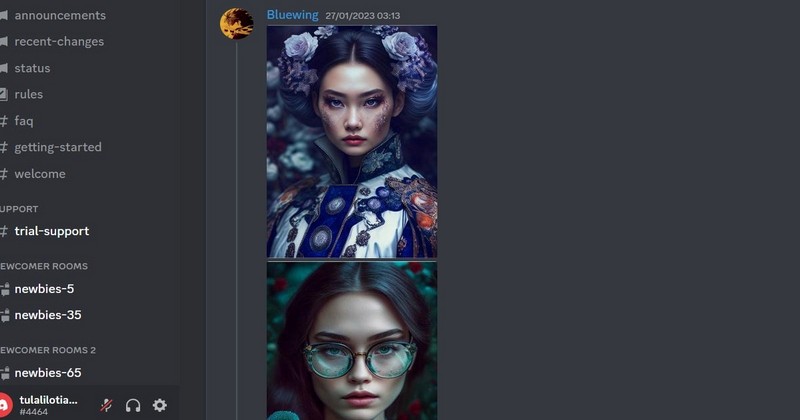
Using Midjourney AI can generate artificial images from the provided information. Artificial intelligence will analyze user information to retrieve data and provide results. The system has a huge database and complex algorithms to assemble keywords-related images into the most complete picture.
The Midjourney AI art database has details and drawings with copyright. Therefore, copyright violations may be considered in some images the technology provides. In that case, developers must agree to take down those works according to DCMA regulations.
How Does Midjourney Work?
Midjourney operates through the sophisticated interplay of two machine learning technologies: large language and diffusion models. When users input prompts, a large language model deciphers the meaning of the words and transforms it into a numerical vector.
This vector is pivotal in guiding the diffusion process, where Midjourney uses a diffusion model to transform random noise into visually appealing art. Diffusion models involve gradually adding random noise to a training data set of images. The model becomes adept at generating entirely new images by learning to reverse this noise over time.
For example, if a user inputs a text prompt such as “Bitcoin mining with bright colors and animated appearance,” Midjourney starts with a field of visual noise. Through latent diffusion, a trained AI model systematically subtracts noise, progressively unveiling an image that embodies the essence of the specified objects and themes in the original prompt.

Language comprehension and diffusion modeling synergy empowers Midjourney to craft captivating and diverse AI-generated artworks based on user input or prompts.
How To Use Midjourney?
Below is the short version of how to use Midjourney:
- Sign up for Discord and accept the invitation to Midjourney’s channel
- Go to the #newbies channel and type /subscribe
- Choose your Midjourney plan
- Use /imagine on Discord to generate images
- Edit and upscale your creation
- Save your image!
Now, let’s look at the finer details of using Midjourney.
Step 1: Sign Up For Discord
Discord is a chat application that works similarly to Slack. However, it was initially intended for gamers to communicate while playing multiplayer online games such as League of Legends and World of Warcraft.
To use Midjourney, you need to have a Discord account first. You can easily sign up for a free account on Discord’s website if you don’t have one. If you successfully login Discord, you’ll see the image below:

Step 2: Sign Up For Midjourney
After creating a Discord account, visit the Midjourney website and click “Join the Beta” to join the Midjourney Discord channel. Accept the invitation, and you’re all set.

The previous free trial plan allowed approximately 25 free images under a CC BY-NC 4.0 Creative Commons non-commercial license. If free trials are available again, you can skip the following step until you’ve used your free images.
To subscribe to a Midjourney plan, navigate to one of the newcomer rooms, such as #newbies-14 or #newbies-44.
Type “/subscribe” in the chatbot, and press enter or return. This is a slash command, and it’s how you interact with Discord bots like Midjourney. By entering this command, you’re indicating that you want to subscribe.
After you click on the link, below are 2 Midjouney plans for you:
- Basic Plan, with $10/month, offers around 200 image generations/month.
- With $120/month, Mega Plan provides roughly 3,600 AI-generated images instantly and unlimited image generations.

Once you’ve completed the signup process, return to Discord to use Midjourney.
Step 3: Generate Your First Image
Midjourney is a platform designed for artists that operate on the Discord app. However, the #newbies channels can be overwhelming due to the many people posting prompts and requests. You can browse different channels to understand what works and what doesn’t.
As a paid user, you can use direct messages to send prompts to the Midjourney Discord. Although, by default, they will still be visible to the public in the member’s gallery.
Now, you can type a text prompt and press Enter or Return. You can type in whatever you want. However, if you need some ideas to get started, here are a few to try:
- A white-collar worker is typing the keyboard
- The boy is playing football with his friend at school
- The Loch Ness monster swimming in the Hudson River near the George Washinton bridge
You can see the example below:

Wait a minute or so, and you’ll have four prompt variations.
Step 4: Edit your images
How To Use Upscaling And Variations
Under every image you generate, you’ll see eight buttons. They arre U1, U2, U3, U4, V1, V2, V3, and V4.
- U buttons upscale selected images, creating larger versions with extra details.
- The latest models can generate 1024 x 1024 px images by default.
- V buttons generate 4 new variations of the chosen image.
- Re-roll button re-runs the prompt and generates 4 new images.

All these buttons let you fine-tune and provide better control of the outputs of Midjourney.
How To Use Pan And Zoom?
When choosing your image using the U buttons with the latest version of Midjourney, you access some additional controls. They are:
- Vary (Strong) and Vary (Subtle) create four image variations
- Zoom Out 2x and Zoom Out 1.5x generate more content based on the original prompt
- Custom Zoom allows you to add a prompt while zooming out
- Four Pan arrows expand your image in the selected direction.
- Make Square converts a panned picture into a square crop.

You can experiment with different options to create larger scenes with your generated images. It’s important to remember that while the Pan commands can produce images larger than 1024 x 1024 pixels, the Zoom commands cannot.
As a result, your zoomed-out images will have a lower resolution than the original.
Save your image
Once satisfied with your result, you can expand the image to full size. Right-click the image, and select the button “Save image.”
Manage Your Midjourney Settings
Midjourney has many different settings. The settings command is a shortcut allowing users to set some default values for some big ones. These include:
- The dropdown selects the version of the Midjourney algorithm, including Niji models for anime-style images.
- RAW, Stylize Low, Med, High, and Very High sets the strength of Midjourney’s default artistic style.
- Turbo mode generates images 4x faster at twice the cost, Fast mode is the default, and Relax mode is free for Pro plan subscribers.
- High and Low Variation Modes control the amount of variation when using V buttons.
- Remix mode allows changing prompts, but it can be complicated.
- Public and Stealth modes set image privacy by default.

5 Effective Midjourney Prompts
Over 15 million other people use Midjourney to create images today. However, you are one of the people still not taking advantage of the power of the prompt. Let’s look at the 5 best Midjourney prompts you can use to elevate your design.
But firstly, you need to understand some symbols to help you describe your design properly:
- The –chaos or –c parameter influences how varied the initial image grids are.
- The –aspect or –ar parameter changes the aspect ratio of the generated image.
- The –quality or –q parameter changes the time spent generating an image.
- The –repeat or –r parameter runs a Job multiple times. Combine –repeat with other. parameters, like –chaos, to increase the pace of your visual exploration.
- The –style parameter replaces the default aesthetic of some Midjourney Model Versions.
- The –tile parameter generates images that can be used as repeating tiles to create seamless patterns for fabrics, wallpapers, and textures.
For example, if you type a prompt with the phrase –ar 1:1, you will receive a square image with equal width and height.
Animals of the Amazon
Are you an animal lover? Do you want to create some wild animals for yourself? Let’s try this prompt on Midjourney:
[Jaguar with green eyes stalking prey]::7 [detailed vegetation and waterfall in Amazon rainforest background, cinematic shoot, ultra-real, morning light]::3 –ar 16:9 –s 400

To generate these Animals of the Amazon in Midjourney, start with the Animal you want, a feature you would like, and an activity. E.g., Red-Bellied Piranha wide mouth hunting OR red Poison-dart-frog dilated pupils stalking prey.
Then, set the weights at the end of the square brackets. The base setting is 7 and 3. If you want more emphasis on the Animal, increase the 7 value; for more focus on the background, increase the 3.
Finally, set your –s value to get a similar art style as these stunning images. You will get the best result, around 400 to 600.
Some good keywords are Stalking, Hunting, Focused, Swimming, Spread Wings, Wide Eyes, Focused, Green Eyes, Showing Off, and Working. Ask ChatGPT for a list of Amazonian Animals to create a whole series!
Calvin Klein Models
Calvin Klein is a famous fashion brand. If you want to generate Calvin Klein models from Midjourney, the prompt below is designed for you:
[A beautiful woman in bra and Calvin Klein jeans]::3.5 [B&W full body size hyper-realistic modeling photoshoot]::6.5 –ar 9:16 –s 400 –v 4
[A young man in a top and Calvin Klein jeans]::3 [B&W full body size hyper-realistic modeling photoshoot]::7 –ar 9:16 –s 200 –c 5

To create a detailed illustration in a Calvin Klein photoshoot style, play around with the model weight, the setting weight, and the –s value (between 0 and 1000).
Try to keep the weights adding up to 10. That way, it’s easier to see what works. –c can be changed too, but 5 seems to work best most of the time.
(Note: Midjourney has blocked using words like bra and underwear in later versions. They can still be used in v4).
Realistic Human Portraits
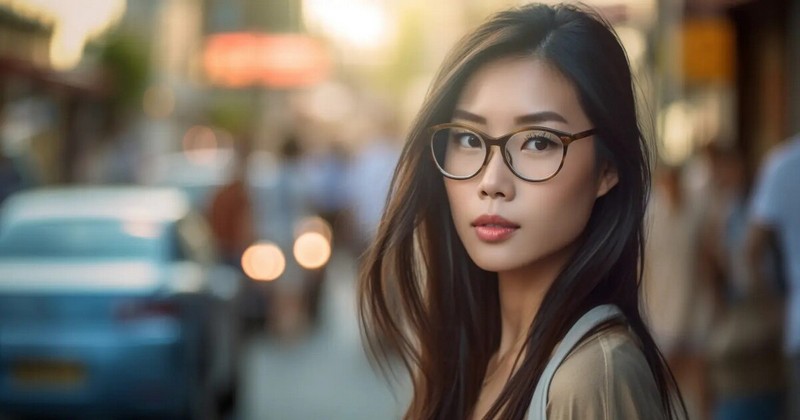
Midjourney can not only generate animals, and models but also human portraits, depending on your needs. You can try the prompt below to create a young man on a New York street
candid portrait of a young man on a New York street, the early 1900s, natural lighting, Nikon D850 35mm and f-stop 1.8, global illumination –ar 2:1
This prompt could warrant an entire article of its own. Here’s a very brief checklist to create high-quality, ultrarealistic human portraits:
- Describe the photo: Include words like candid, portrait, photorealistic, capture, etc.
- Describe the lighting: Natural lighting, afternoon lighting, warm lighting, etc.
- Specify a camera type: If you don’t know, ask ChatGPT or use some options in the Tattoo section.
- Candid: Use the word ‘candid’ in your prompt.
- Cinematic: Use the word ‘Cinematic’ to give your image the classic Cinematic feel.
T-Shirt Designs
If you are working in the Print-On-Demand industry and want to have some idea for your design, let’s try the prompt below:
happy flowers, t-shirt design graphic, cute and happy kawaii style, colorful, clear outline, vector, contour, white background –ar 2:1 –s 1 –v 5.2
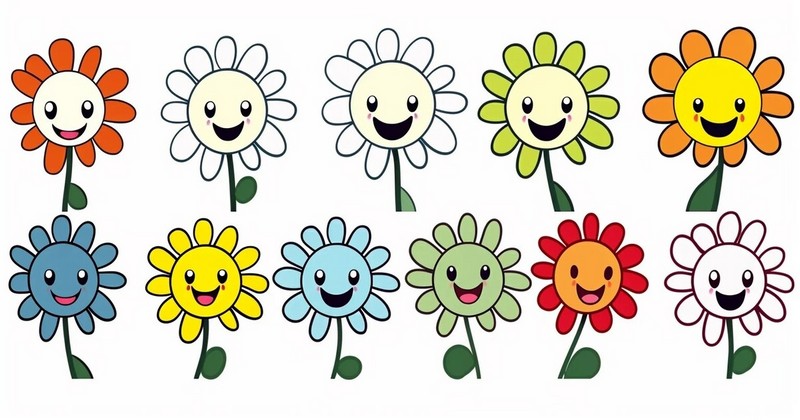
By crafting the right Midjourney prompts, you can produce stunning vector art, retro illustrations, and unique patterns perfect for t-shirts. Experiment with prompts for neon lo-fi aesthetics, kawaii art styles, psychedelic fantasy worlds, and more.
The digital art created in Midjourney opens up limitless possibilities. Compose prompts to create your own digital oil color painting or any desired graphic art style or geometric shapes for tees.
Oil Paintings
The most outstanding feature of Midjourney lies in its ability to create oil paintings. This kind of paint is famous for its complicated process. However, this AI design tool does it with the prompt below:
A serene lakeside scene at sunset with visible brushwork. Impasto texture and chiaroscuro lighting, emulating the style of a classical oil painting –ar 2:1

Oil painting is another popular style of AI art that Midjourney often generates. Oil painting as an art form is known for its rich texture, depth of color, and flexibility in technique.
Characteristics like luminosity and opacity distinguish it from other mediums like watercolor or acrylic. Techniques such as glazing, where thin layers of translucent paint are applied over dry layers, and impasto, which involves applying paint in thick layers, showcase the medium’s unique properties.
The style also allows for intricate brushwork, offering fine details and smooth gradations of tone. The oil painting’s slow drying time allows artists to make adjustments over extended periods, which can result in highly detailed and layered works.
Another notable attribute is chiaroscuro, a technique involving the play of light and shadow to create a sense of volume in two-dimensional works. Overall, oil painting is versatile and offers a range of possibilities for artistic expression.
Frequently Asked Questions
How Do You Use Midjourney Step By Step?
Below are 6 steps to use Midjourney:
- Sign up for Discord and accept the invitation to Midjourney’s channel
- Go to the #newbies channel and type /subscribe
- Choose your Midjourney plan
- Use /imagine on Discord to generate images
- Edit and upscale your creation
- Save your image!
Can You Use Midjourney For Free?
Midjourney is no longer free except for some brief promotional periods. When this tool first launched in July 2022, any user could use it to generate 25 images for free.
How Do I Access Midjourney AI?
After installing and launching Discord, access the Midjourney website and select the “Join the Beta” button. Alternatively, you can follow the Discord invite link to reach the same page directly. You will get an invitation to join the Midjourney Discord channel on the next page. Once you accept the invitation, you can access the Midjourney server.
Can I use Midjourney Without Discord?
No. You can’t use Midjourney without Discord.
This is an artificial intelligence capable of converting text into standout images. The paintings created by this technology are pretty captivating and soft. Many people believe that this Midjourney AI will lay the foundation for future artificial intelligence design industries.
The above is the most detailed information on how to use Midjourney AI for painting. If you want to learn more about this issue, stay tuned to ROI Digitally for future AI articles.

Jeng Nguyen has nearly 10 years of experience ranging from project management, operations, business development, customer service, content creation, video production, photography, website development, social media marketing, email marketing, advertising, SEO and sales.
Well-known as an ace Digital Marketing expert throughout various industries in Vietnam, Australia and the USA - Jeng is known for the success rate that he achieves whilst finding solutions tailored best for each unique business.
Jeng's mission is to revolutionize customer experience, starting with the journey of Attraction - Interest - Desire – Action. Together with a multi-expertise team at ROI Digitally, Jeng aims to provide businesses unprecedented breakthroughs in Return-on Investment from their customers.